




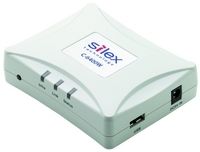
Silex technology C-6400W silex print server for Canon printers

|
137,50 EUR |
|
|
( 163,63 EUR incl. VAT ) ≈ £115.09 | ≈ $151.11 plus delivery charges: 55,00 € |
|
| Made to order · Delivery time approx. 20 workdaysinfo_outline | |
| Lieske Part No.: | 416587 |
|---|---|
| Mfg Part No: | C-6400W |
| UPC/EAN: | 4944406003448 |
| Weight: | 0.2 kg |
Product information for Silex technology C-6400W:
Applications
The C-6400W is suitable for office environments where multiple employees need access to a Canon printer without each requiring an individual connection. It is particularly useful in small to medium-sized enterprises aiming to establish a central printing infrastructure. The wireless connection allows for flexible placement of the printer, independent of proximity to a network connection. The support for scanning and storing extends the functionality of the printer, enabling it to also function as a network scanner.
Functions and Equipment in Detail
The Printserver enables the use of printer functions over a WLAN network. Printers compatible with the C-6400W include inkjet, CAPT laser, and Pixma multifunction models from Canon. Integration is achieved via the printer’s network functions, with the Printserver acting as a bridge between the printer and the network. Support for the Canon print status monitor enables monitored usage, as the printer’s status can be monitored in real time. This is especially helpful for troubleshooting and planning maintenance work.
Technology Explained Simply
The C-6400W operates as a wireless network adapter, connecting to the printer via a serial interface (e.g. USB) and making its functions available over WLAN. Communication occurs via standardised network protocols supported by most operating systems and network environments. The network connection is configured, typically via a web interface or dedicated software.
Compatibility and Accessories
The Printserver is specifically developed for printers of the brand Canon. Compatible models include inkjet-, CAPT laser-, and Pixma multifunction printers.
Installation and Mounting
Installation of the C-6400W involves physically connecting the Printserver to the printer using the interface (e.g. USB). Configuration typically requires entering network parameters such as SSID and password. After successful configuration, the printer is available on the network and can be used by authorised devices.
Operational Advantages
Using the C-6400W reduces the need to connect multiple computers directly to a printer. This reduces network infrastructure complexity and enables centralised printer management. The wireless connection offers placement flexibility, and support for the print status monitor improves transparency in the printing process. The functions network printing, -scanning, and -storing expand the printer’s usability in daily office operations.
| General | |
| Product type | wireless Printserver |
| Manufacturer | silex technology |
| Compatibility | Canon inkjet, CAPT laser and Pixma multifunction printers |
| Functions | Network printing, scanning, storing |
| Support | Original Canon print status monitor |
Questions & answers
What is the delivery time of Silex technology C-6400W silex print server for Canon printers?
The article Silex technology C-6400W silex print server for Canon printers is currently not in stock and must be ordered on a per-order basis.
According to our experience the article is ready for dispatch within 20 working days. The delivery time usually refers to 1 piece. When ordering larger quantities, we can maybe shorten the delivery time. Just send us an inquiry about the desired quantity of Silex technology C-6400W to our sales team for an exact delivery time.
How can I buy the item at a lower price?
We offer you Silex technology C-6400W silex print server for Canon printers always at the best possible price. We can give you a discount of 2% on Silex technology C-6400W silex print server for Canon printers if you choose payment in advance on ordering.
We also offer individual prices for your needs. You can get an offer by using the form Wholesale Inquiry.