



Open Source for Windows
IE-Authenticator: portable Windows authenticator with search and filtering
IE-Authenticator is a free, open-source authenticator for Windows. This WinAuth fork generates TOTP codes according to RFC 6238 and HOTP codes according to RFC 4226, runs without installation, and adds fast filtering for large account lists.
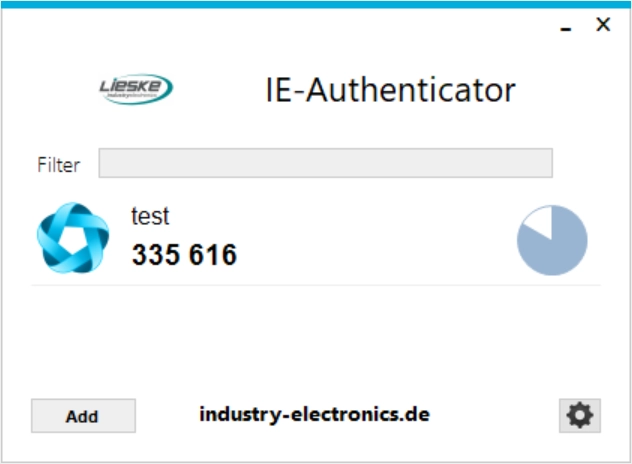
The IE-Authenticator interface with a filter field for quickly finding stored authenticator accounts.
Portable authenticator for administrators, service accounts and teams
IE-Authenticator lets you manage multiple two-factor accounts centrally on a Windows workstation. It is especially useful for IT administrators, service teams and business environments where TOTP codes should not only be stored on a smartphone.
The fork is based on WinAuth 3.6.2 and remains compatible with the proven configuration format. Existing files such as winauth.xml can continue to be used, allowing migration without recreating accounts.
New: filtering for long account lists
When many authenticator entries are stored, the new search saves time: type a name, filter the list in real time and find the required code faster. The familiar WinAuth workflow remains unchanged.
Download: IE-Authenticator for Windows
Download the ZIP file, extract it and start IE-Authenticator.exe. No installation is required. Supported systems include Windows 7, 8.x, 10 and 11; Microsoft .NET Framework 4.5 is required.
Feature overview
Search and filter
Real-time filtering of the authenticator list by name, so codes remain easy to find even with many stored accounts.
Multiple authenticator services
Manages any number of accounts for services compatible with Google Authenticator, Microsoft Authenticator or standardized HOTP/TOTP methods.
Portable use
Runs as a single application without setup. If winauth.xml is stored in the program folder, the software works in portable mode.
Encryption
Private data can be protected with a password. Optionally, access can be bound to a Windows computer or user account via DPAPI.
Code display on demand
Authenticator codes can update automatically or be shown only when needed. This reduces unnecessarily visible security codes.
Hotkeys and scripts
Entries can be assigned hotkeys, for example to display, copy or insert codes into other applications.
Compatible with existing WinAuth files
IE-Authenticator reads and writes the same configuration format as WinAuth 3.x. An existing winauth.xml file can usually be used directly. A backup copy is recommended before every migration or update.
- Back up the existing
winauth.xml. - Extract IE-Authenticator and start it from its own folder.
- Place the configuration file in the program folder when portable mode should be used.
- Store passwords and recovery keys separately and securely.
Use via network drive or file share
The program file and winauth.xml can be stored together in a secured folder. This makes it possible to maintain a shared authenticator set for several workstations. Restrictive file permissions, password protection and avoiding parallel editing of the same file are important.
Privacy and offline operation
Authenticator data remains local on the system. IE-Authenticator works fully offline and generates codes without an internet connection as long as the system time is correct.
If a connection is available, optional time synchronization can be used. No authenticator accounts or secrets are transmitted.
- No transfer of account or authenticator data.
- Local storage of the configuration file.
- Offline use with correctly set system time.
- Suitable for privacy-conscious Windows environments.
Installation and first steps
- Download ZIP
Start the download and save the archive locally. - Extract
Place the folder in a secure location. - Start
RunIE-Authenticator.exe. - Import accounts
Use an existingwinauth.xmlor create new authenticator accounts.
Frequently asked questions about IE-Authenticator
Is IE-Authenticator a fork of WinAuth?
Yes. IE-Authenticator is based on WinAuth 3.6.2 and adds a search and filter function for stored authenticator entries.
Can I continue using my existing winauth.xml?
Yes. The configuration format remains compatible with WinAuth 3.x. A backup copy of the existing file should be created before migration.
Does IE-Authenticator work without internet access?
Yes. Code generation works offline. A correctly set system time is important because TOTP codes are time-based.
Is the software free?
Yes. IE-Authenticator is provided free of charge as open-source software under the GNU General Public License v3.
Which Windows versions are supported?
The download is intended for Windows 7, Windows 8.x, Windows 10 and Windows 11 and requires Microsoft .NET Framework 4.5.
Questions about business integration?
Our team can help with two-factor concepts and IT security solutions.