



RAID Levels ExplainedFrom RAID 0 through RAID 1, 5 and 6 to compound levels — a complete overview Architecture · Properties · Use-case recommendations · Hardware checklist · FAQ |
|
On this page |
What is RAID and what is it used for?
RAID (Redundant Array of Independent Disks) describes the combination of multiple physical storage devices into a single logical volume. Depending on the RAID level chosen, the focus is either on performance, on fault tolerance, or on a combination of both. Management is handled either by a dedicated hardware controller (see RAID controllers) or by the operating system itself (software RAID). For production server environments, a hardware controller with its own cache and BBU/flash backup unit is virtually always the right choice.
RAID configurations are available in many variants — from pure performance optimisation (RAID 0) through full mirroring (RAID 1) to parity-based arrays (RAID 5/6) and combined levels (RAID 10/50). The underlying storage devices can be classic hard disks or, increasingly, SSDs.
Important: A RAID is not a backup. Even a redundant array does not protect against ransomware, accidental deletion or controller failure. For real data security, always pair a RAID with a dedicated backup solution.
Key terms in advance
Before we look at the individual RAID levels, here are the most important technical terms used throughout this article:
| Redundant | A disk can fail without destroying the entire system. Data remains accessible because it is stored in multiple locations or can be reconstructed (via parity). Redundancy is the core property of every productively used RAID level except RAID 0. |
| Hot Swap | A disk can be replaced while the system is running — without a server shutdown and without interrupting data availability. Hot swap requires a suitable drive caddy or a hot-swap-capable drive enclosure as well as a controller that supports it. |
| Hot Spare | A disk that is permanently attached to the system and takes over automatically in the event of a failure. When a disk in the array fails, the hot-spare disk steps in immediately, without manual intervention — the rebuild starts automatically. Especially important for remote sites or 24/7 operations. |
| Array | A group of disks that the RAID controller combines into one logical volume. The operating system then sees only a single, large volume — not the individual physical disks. |
| Striping | Individual data stripes are spread across multiple disks. This allows several disks to read and write in parallel, significantly increasing throughput. Stripe size (the “chunk size”) is typically between 64 kB and 256 kB. |
| Parity | A mathematically calculated checksum across multiple data bits. Together with the user data, parity makes it possible to reconstruct the contents of a failed disk — the basic principle behind RAID 3, 4, 5 and 6. RAID 6 even uses two independent parities and therefore tolerates the simultaneous failure of two disks. |
| Mirroring | Identical data is written to two (or more) disks in parallel. If one disk fails, the other continues to provide all data. This is the classic RAID 1 method and a building block of RAID 10. |
| Rebuild | Restoration of data on a replaced disk after a failure. During a rebuild the array is under load and, depending on the RAID level (especially RAID 5), unprotected. With large disks a rebuild can take hours to days — which is why RAID 6 is recommended for any larger array. |
| Dedicated | Exclusively assigned. A “dedicated parity disk” (as in RAID 3 and 4) is a disk that holds parity information only — in contrast to the distributed parity used by RAID 5/6. |
| Cache | Fast intermediate memory (DRAM) on the RAID controller that buffers read and write operations. In write-back mode the controller acknowledges a write as soon as it is in the cache — a massive boost for production workloads. This requires the cache to be protected (by BBU or flash backup) against power failure. Current enterprise controllers ship with 1 GB to 8 GB of cache. |
| BBU / Flash backup | Battery Backup Unit or flash backup module on the RAID controller. Both protect the write cache contents in the event of a power failure — the BBU by keeping the DRAM powered, the flash module by writing the cache contents into non-volatile memory (supercap-buffered). Without BBU or flash, write-back mode cannot be operated safely — and that removes the biggest performance advantage of a hardware RAID. |
Which RAID levels exist?
Numerous more or less well-known RAID levels exist between 0 and 7. On top of that, there are compound RAID systems such as RAID 10, 30 or 51. Compound levels are always built from the basic RAIDs. The most common are RAID 1, 5 and 6 — the less common ones are 2, 4 and 7.
The most important RAID levels at a glance
| Level | Method | Min. disks | Usable capacity | Failures tolerated | Typical use |
|---|---|---|---|---|---|
| RAID 0 | Striping | 2 | 100 % | none | Scratch volumes, render cache |
| RAID 1 | Mirroring | 2 | 50 % | 1 disk | Boot volumes, small servers |
| RAID 5 | Striping + parity | 3 | (n−1)/n | 1 disk | File servers, database backups |
| RAID 6 | Striping + 2× parity | 4 | (n−2)/n | 2 disks | Large arrays, archives |
| RAID 10 | Mirror + stripe | 4 | 50 % | 1 per mirror | Databases, VM hosts, ERP |
| RAID 50 | RAID 5 + stripe | 6 | high | 1 per set | Mid-range storage |
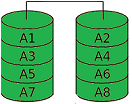
Strictly speaking, RAID 0 is not a real RAID because it provides no redundancy. RAID 0 increases transfer rates by dividing the participating hard disks into contiguous blocks of equal size. These blocks are arranged like a zip fastener into one large virtual disk, so that accesses can be performed in parallel across all of them (striping means “splitting into stripes”, derived from stripe). Throughput gains (in sequential access patterns, but especially under sufficiently high concurrency) come from the fact that the necessary disk operations can be carried out in parallel to a far greater extent. The block size is called the stripe granularity (also known as “chunk size” or “interlace size”). With RAID 0, a chunk size of 128 kB is most commonly chosen. However, if one of the disks fails completely due to a defect, the RAID controller can no longer fully reconstruct the user data without that disk's contents. Partial restoration may be possible — namely for the files that happen to live entirely on the surviving disks — but this typically applies only to small files and only with a large stripe granularity. |
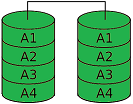
A RAID 1 must consist of at least two hard disks holding exactly the same data (mirroring or duplexing). RAID 1 provides full redundancy of the stored data, while the array capacity is at most equal to the smallest participating disk. If one of the mirrored disks fails, any other can continue to serve all data. This is essential for safety-critical real-time applications. RAID 1 offers high fault tolerance: total data loss requires the failure of all disks. A typical use case is the boot volume in servers. |
RAID 2 — HammingHISTORICAL · NO LONGER IN USE RAID 2 is no longer used and is no longer supported by any manufacturer on the market. Its price/performance ratio is poor compared to RAID 5. The technique used 2 or more disks for data and one or more additional ECC disks. ECC stands for Error Correction Code. Each bit was distributed across all data disks, and an ECC value was generated and stored for it. This made it possible to verify data integrity on every access and correct errors when they occurred. Because the disks were addressed independently, extremely high transfer rates were possible — but only with synchronised disks. The effort required to achieve this is simply not worth it. |
RAID 3 — Byte-Striping with Dedicated Parity DrivePREDECESSOR OF RAID 5 · NO LONGER COMMON 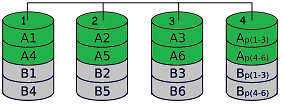
RAID 3 is generally regarded as the predecessor of RAID 5. Striping means that the files to be stored are split across the available hard disks. Redundancy (loosely: the extent to which data is duplicated or reconstructible) is stored on a separate disk. The redundancy is calculated by adding the bits together and computing the sum. This allows the missing bit to be “back-calculated” when a disk fails. To illustrate: take 2 data disks and one disk that stores parity. The bits on the data disks are summed, and the result is either even or odd. That defines the sum bit on the parity disk:
If one of the two data disks fails, the missing value can be back-calculated:
Did it click? The elegant part: the same principle scales to arbitrarily many disks with just a single parity disk (limited only by write speed and capacity):
RAID 3 has since disappeared from the market, largely replaced by RAID 5, which distributes the parity evenly across all disks. The dedicated parity disk was a bottleneck. Before the transition to RAID 5, RAID 3 was partially improved by RAID 4, which standardised I/O operations on larger block sizes for performance reasons. It is also worth noting that a RAID 3 made of just two disks is by definition identical to a RAID 1 of two disks. |
RAID 4BLOCK-LEVEL PARITY · PARITY DISK BOTTLENECK 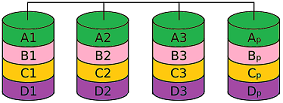
RAID 4 is similar to RAID 3 in that parity information is also calculated and written to a separate disk. The difference is that larger data blocks (stripes, chunks) are used instead of single bytes, which improves overall performance. RAID 5 works the same way. RAID 4 is often described as the “in-between” of 3 and 5. As with RAID 3, however, the parity disk remains the bottleneck despite the chunk-oriented approach. |
RAID 5 — Performance + ParityMOST POPULAR VARIANT MIN. 3 DISKS (N−1)/N USABLE 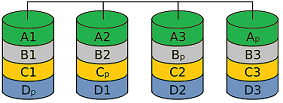
RAID 5 offers both increased read throughput and redundancy at relatively low cost, which makes it the most popular RAID variant. In write-intensive environments with small, non-contiguous changes, RAID 5 is not recommended, because the throughput drops significantly under random write loads due to the two-phase write procedure (a RAID 0+1 configuration would be preferable here). RAID 5 is one of the most cost-efficient ways to store data redundantly across multiple hard disks while still using the available capacity efficiently. Because of the high controller requirements and prices, this advantage typically only kicks in beyond four disks. The user data is distributed across all disks just as in RAID 0. The parity information, however, is not concentrated on one disk as in RAID 4 but distributed as well. Suitable RAID controllers with cache and BBU/flash backup are recommended for production environments. |
RAID 6 / DP — Redundancy via Two Additional DisksTOLERATES 2-DISK FAILURE MIN. 4 DISKS DOUBLE PARITY 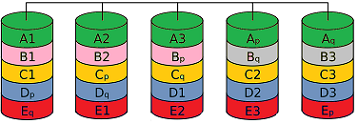
RAID 6 (Advanced Data Guarding) works similarly to RAID 5 but tolerates the failure of up to two disks. Two (rather than one) error-correction values are calculated and distributed across the disks in such a way that data and parities lie block-by-block on different disks. This means a gross capacity of n+2 disks for a net data capacity of n disks, which still represents a cost saving over simple mirroring (RAID 1) even with relatively small net disk counts. The computational overhead of the underlying XOR operations, however, is considerably higher than with RAID 5. RAID 5 calculates a parity bit by adding the data bits in a single row (and resynchronises by adding the row data back). RAID 6 must compute the parity across multiple rows — resynchronisation, especially with two failed disks, requires calculations involving matrices and inverse matrices from linear algebra (coding theory). A RAID 6 array requires at least four disks! |
RAID TPTOLERATES 3-DISK FAILURE PROPRIETARY EASYRAID RAID TP is a proprietary RAID with triple parity from the manufacturer easyRAID. According to the manufacturer, RAID TP tolerates the failure of up to three disks. Data blocks and parities are written in parallel to the individual physical disks. The three parities are placed on different stripes on different disks. The RAID Triple Parity algorithm uses a special code with a Hamming distance of at least 4. This requires a minimum of four disks. The capacity is calculated as the number of disks minus three. |
RAID 7EXPENSIVE · RARELY USED Same as RAID 5, but the RAID controller runs a real-time operating system and faster data buses are used, which leads to significantly higher transfer rates. RAID 7 is rarely deployed because it is very expensive. |
RAIDnmFREELY CONFIGURABLE FAULT TOLERANCE RAIDn extends the principle of generating multiple parity values from RAID 6. This can be used to absorb an arbitrarily large number of disk failures. Such arrays are referred to as RAID nm, RAID (n,m) or RAID n+m. The factor n describes the total number of disks used and the factor m the number of disks that may fail. |
JBOD — Just a Bunch Of DisksNOT A RAID · NO REDUNDANCY “JBOD” stands for Just a Bunch Of Disks. The term is used in contrast to RAID systems to indicate that disks are operated individually rather than as a unified array. Many hardware RAID controllers can present the connected disks individually to the operating system; the controller's RAID functions are disabled and it operates as a simple disk controller. A JBOD can also — independently of the controller — refer to any group of disks attached to the computer. With the help of volume management software, such a JBOD can be aggregated into a software RAID. In some RAID tools, such as the VIA RAID-TOOL, the term JBOD is sometimes (incorrectly) used synonymously with NRAID. |
Compound RAID Levels
Although the RAID levels 0, 1 and 5 listed above are the most popular, it is also possible to combine different RAID systems into so-called compound RAIDs. This produces names such as RAID 10, RAID 30 or RAID 50. There are more than 20 different combinations. Compound levels are commonly used in mid-range and enterprise storage servers as well as in SAN and NAS systems.
RAID 10 or RAID 0+1FAST WRITES MIN. 4 DISKS 50 % USABLE This RAID level is a combination of RAID 1 (mirroring) and RAID 0 (striping) and combines the benefits of both — security and sequential performance. It is sometimes also called RAID 0+1. It usually consists of 4 disks, since RAID 10 is built from two pairs of mirrored arrays that are then combined into a RAID 0 array. RAID 10 is particularly suitable for large files that need to be stored redundantly; because no parity has to be calculated, write operations are very fast — ideal for databases and VM hosts on rack-mount servers equipped with NVMe / M.2 SSDs or SAS SSDs. |
RAID MatrixFLEXIBLE · MIXED OPERATION INTEL PROPRIETARY This Intel-developed technology is a low-cost and flexible RAID solution. Matrix RAID allows different RAID types to be mixed on a single set of drives. Part of the drives can be configured as RAID 1 (full mirroring) while the performance-sensitive part runs as RAID 0. In practice this means: the operating system partition including critical data is protected by a RAID 1, while performance-hungry applications run on a separate RAID 0 partition at maximum speed. |
RAID 50DATA SECURITY + PERFORMANCE MIN. 6 DISKS Developed by AMI, RAID 50 is recommended when data security, fast access times and high transfer rates are required at the same time. RAID 50 can be implemented with a minimum of 6 disks. Typical use cases are storage servers and larger direct-attached storage solutions. |
Which RAID level fits which use case?
The right RAID level depends on the workload. The following recommendation matrix summarises typical B2B scenarios:
| Use case | Recommendation | Reason |
|---|---|---|
| Database server (OLTP) | RAID 10 | High IOPS, fast writes, short rebuild time |
| Virtualisation / VM datastores | RAID 10 | Random write profile, low latency |
| Mid-size file server | RAID 5 / 6 | High usable capacity, sequential workloads |
| Backup repository | RAID 6 / 60 | Double parity beats rebuild risk |
| Server boot volume | RAID 1 | Simple, robust, fast disk swap |
| Video editing / render cache | RAID 0 (with backup!) | Maximum throughput, regenerable data |
| Large SAN / NAS arrays > 12 disks | RAID 60 | Enterprise standard, best failure domain |
Hardware selection — what belongs together?
A reliable RAID array does not come from individual components but from a coordinated chain:
|
RAID controller Hardware controller with sufficient SAS/SATA ports, at least 1 GB of cache and BBU/flash backup. For NVMe setups, tri-mode controllers are increasingly used. |
Identical drives Hard disks or SSDs with the same model and same firmware. Avoid identical batches if possible (statistical correlation in failure rates). |
|
Hot-swap mechanics Drive caddies or a suitable drive enclosure — the only way to swap a defective disk without a server shutdown. |
Hot-spare or cold-spare Keep a replacement disk on hand — especially for enterprise disks, lead times of several weeks are common. |
|
Clean power supply UPS and cache protection on the controller — cache loss during a write operation can leave a RAID 5/6 in an inconsistent state. |
|
Frequently asked questions about RAID levels
Is RAID a backup replacement?
No. RAID increases availability against hardware failure, but does not protect against logical errors, ransomware or accidental deletion. A full backup strategy (ideally following the 3-2-1 rule) is always required in addition.
Can I mix HDDs and SSDs in a RAID?
Technically yes, sensible no. The slowest disk dictates the performance, and the wear profile differs. In production, always use uniform drives — either all HDDs or all SSDs.
What is the point of a BBU or flash backup unit on the controller?
It protects the write cache of the RAID controller in the event of a power failure. Without BBU/flash, manufacturers usually recommend write-through instead of write-back — with a significant performance penalty. Practically mandatory for production servers.
RAID 5 or RAID 6 — when does RAID 6 become mandatory?
Rule of thumb: from eight disks or from 6 TB disk size on, always RAID 6. The reason: the probability of an unrecoverable read error (URE) during a rebuild grows exponentially with data volume.
Can an existing RAID level be changed later?
Many current controllers support online capacity expansion (OCE) and online RAID-level migration (ORLM) — for example from RAID 1 to RAID 5 or from RAID 5 to RAID 6. These operations run under production load but can take hours to days. Always perform a full backup before any migration.
Important: A RAID increases availability against hardware failure but is not a backup. Logical errors, ransomware or accidental deletion are mirrored across the array. For real data security, always pair the array with a dedicated backup solution following the 3-2-1 rule.
Consulting on RAID configuration and storage hardwarePlanning a new server, a storage extension or upgrading an existing array? Our team supports you in selecting the right RAID controllers, hard disks, SSDs and matching drive caddies — for standard servers as well as for SAN and NAS systems. Phone: +49 (0)7666 / 88499-0 · E-mail: sales@industry-electronics.com |
Related shop categories
|
Controllers & RAID
RAID controllers Controllers (all) |
Hard Disks & SSD
Hard disks SSD SATA · SSD SAS SSD PCIe · SSD M.2 |
Servers & Storage
Servers ·
Rack-mount servers Storage servers Storage NAS · Storage SAN |
|
Enclosures & Caddies
Drive caddies Drive enclosures |
Data protection Backup solutions |
Storage in general
Storage media Direct attached storage |
|
Further reading RAID Systems — hardware architectures and selection
A conceptual introduction to RAID systems — history, benefits, PC-based vs. platform-independent disk arrays, selection criteria for controllers and external storage subsystems. Backup Strategies — why RAID is not a backup
A RAID increases availability against hardware failure, but is not protection against ransomware, accidental deletion or logical errors. Our Backup Strategies series covers risks, RTO/RPO, the 3-2-1 rule and concrete methods, media and software. |
Last updated: April 2026 · Lieske Elektronik · industry-electronics.com