
Startech.com CPNT (SV431TDVIUA)
Accessories > Cable / Adapter > KVM Kits
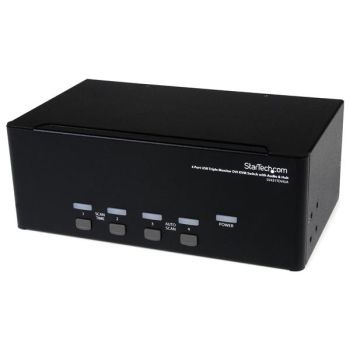
Startech.com CPNT (SV431TDVIUA)
| Lieske Part No. | 816653 |
|---|---|
| Mfg Part No | SV431TDVIUA |
| EAN-Code | 0065030847476 |
| Manufacturer | Startech.com |
| Here only | 246,71 EUR
293,58 EUR incl. VAT
|
Further information for Startech.com CPNT (SV431TDVIUA)
| Design | |
| Product colour | Black |
| Housing material | Steel |
| Certification | CE, FCC, UL |
| Rack mounting | |
| LED indicators | |
| Hot keys | |
| Display | |
| Built-in display | |
| Logistics data | |
| Harmonized System (HS) code | 85176200 |
| Operational conditions | |
| Operating temperature (T-T) | 0 - 40 °C |
| Storage temperature (T-T) | -10 - 60 °C |
| Operating relative humidity (H-H) | 0 - 80% |
| Other features | |
| Audio support | |
| IP control | |
| Packaging content | |
| Manual | |
| AC adapter included | |
| Rubber feet | |
| Packaging data | |
| Package width | 272 mm |
| Package depth | 297 mm |
| Package height | 108 mm |
| Package weight | 2.2 kg |
| Performance | |
| Maximum resolution | 1920 x 1200 pixels |
| Maximum digital resolution | 1920 x 1200 pixels |
| Scan interval | 3,8,15,30 s |
| Number of users | 1 user(s) |
| HDCP | |
| Daisy chain | |
| Ports & interfaces | |
| Number of computers controlled | 4 |
| Keyboard port type | USB |
| Mouse port type | USB |
| Video port type | DVI-I |
| Console ports | 3.5mm headphone, 3.5mm mic, USB A |
| Console USB ports quantity | 4 |
| Headphone outputs | 4 |
| Number of microphone inputs | 4 |
| Audio connections | |
| DC-in jack | |
| Power | |
| Input voltage | 110-240 V |
| Input current | 0.8 A |
| Output voltage | 12 V |
| Output current | 1.5 A |
| Power plug type | Type M |
| Compatible power plug types | EU, UK, US |
| External power adapter | |
| Sustainability | |
| Compliance certificates | RoHS |
| Weight & dimensions | |
| Width | 219 mm |
| Depth | 137 mm |
| Height | 81 mm |
| Weight | 1.5 kg |

This is an offer of:
79279 Vörstetten
https://industry-electronics.com
Tel. 07666/88499-0
Fax. 07666/88499-111
Diesen Artikel finden Sie unter:
industry-electronics.com/artikel/816653

Lieske Elektronik e.K.
Reutener Str. 1079279 Vörstetten
https://industry-electronics.com
Tel. 07666/88499-0
Fax. 07666/88499-111
Diesen Artikel finden Sie unter:
industry-electronics.com/artikel/816653