
Startech.com CDP2DVI USB-C to DVI Adapter
Networks > Wireless Networking > USB WiFi
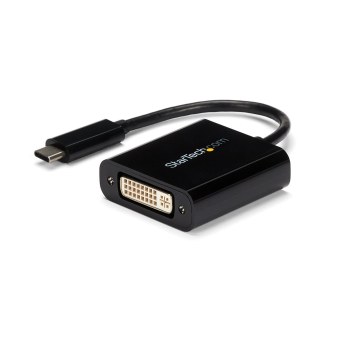
Startech.com CDP2DVI USB-C to DVI Adapter
| Lieske Part No. | 149811 |
|---|---|
| Mfg Part No | CDP2DVI |
| EAN-Code | 0065030863322 |
| Manufacturer | Startech.com |
| Here only | 13,95 EUR
16,60 EUR incl. VAT
|
Further information for Startech.com CDP2DVI USB-C to DVI Adapter
| Design | |
| Product colour | Black |
| Integrated USB cable | |
| Logistics data | |
| Products per master (outer) case | 200 pc(s) |
| Master (outer) case width | 326 mm |
| Master (outer) case length | 506 mm |
| Master (outer) case height | 210 mm |
| Harmonized System (HS) code | 84733020 |
| Operational conditions | |
| Operating temperature (T-T) | 0 - 70 °C |
| Storage temperature (T-T) | -10 - 80 °C |
| Operating relative humidity (H-H) | 5 - 95% |
| Packaging data | |
| Package width | 122 mm |
| Package depth | 103 mm |
| Package height | 24 mm |
| Package weight | 34 g |
| Performance | |
| USB connector type | USB Type-C |
| USB connector gender | Male |
| USB connector form factor | Straight |
| USB version | 3.2 Gen 2 (3.1 Gen 2) |
| Number of displays supported | 1 |
| DVI connector type | DVI-I |
| Maximum resolution | 1920 x 1200 pixels |
| Supported graphics resolutions | 1024 x 768 (XGA), 1280 x 720 (HD 720), 1920 x 1080 (HD 1080), 1920 x 1200 (WUXGA) |
| Supported video modes | 720p, 1080p |
| Chipset | Parade - PS171, NXP - PTN5100 |
| Certification | CE, FCC, REACH |
| DVI output | |
| HDMI output | |
| DisplayPort output | |
| Technical details | |
| Compliance certificates | RoHS |
| Weight & dimensions | |
| Width | 43 mm |
| Depth | 187 mm |
| Height | 15 mm |
| Weight | 29 g |
| USB cable length | 0.014 m |
Applications
This adapter is particularly suitable for mobile work environments where a BYOD (Bring Your Own Device) concept is applied. For example, it can be used in the office to connect a personal USB-C device to a provided DVI monitor. It is also suitable for presentations in conference rooms, as it quickly establishes a connection without additional devices. Traveling users benefit from its compact design, which allows the adapter to be conveniently carried in a laptop bag or backpack.
Features and Specifications in Detail
The adapter features a USB Type-C plug (24-pin) as input and a DVI-I female connector (29-pin) as output. The DVI-I interface supports digital signals, with the adapter supporting only Single-Link DVI. The maximum resolution is 1920 x 1200 pixels, with common resolutions such as 1024 x 768 (XGA), 1280 x 720 (HD 720p), 1920 x 1080 (HD 1080p), and 1920 x 1200 (WUXGA) also supported. Image quality is ensured by utilizing the integrated video functions of the USB Type-C connector. The adapter is designed for driving a single display.
Technology Explained Simply
The adapter operates using DisplayPort Alt Mode, a protocol that enables video signals to be transmitted over USB Type-C connections. This requires the connected device to support this mode. The integrated USB cable connection (length 14 mm) ensures a direct connection between the device and the adapter. The chipset consists of a Parade-PS171 and an NXP-PTN5100, responsible for signal conversion. The USB standard corresponds to version 3.2 Gen 2 (also known as 3.1 Gen 2), enabling high data transfer rates. No audio is transmitted over the DVI output.
Compatibility and Accessories
The adapter is compatible with USB Type-C devices that support DisplayPort over USB-C (DP Alt Mode), as well as with Thunderbolt 3 connectors. It is not compatible with the Apple Cinema Display. When used with older Dual-Link DVI monitors (prior to 2014), limited resolution support may occur. Compatibility with operating systems such as Windows and Mac is confirmed by the manufacturer.
Installation and Mounting
Installation is done by simply plugging the USB Type-C plug into the device and the DVI-I plug into the monitor or projector. The USB Type-C connector is reversible, so insertion direction does not matter. No additional drivers or software installation is required, as signal transmission occurs via DisplayPort Alt Mode.
Operational Advantages
The adapter is characterized by its low height (15 mm), narrow width (43 mm), and low weight (29 g), making it highly portable. The integrated cable connection ensures a stable connection without additional cables. Support for resolutions up to 1920 x 1200 pixels ensures clear and detailed image reproduction. The 3-year warranty and lifetime free technical support from StarTech.com provide additional operational security.
Product Color and Design
The adapter has a black housing that visually harmonizes well with devices such as the ChromeBook Pixel or other modern laptops. The shape is slim and flat, minimizing space requirements.
Operating Conditions
The adapter can be operated at temperatures from 0 to 70 °C and relative humidity from 5 to 95 % (non-condensing). Storage is possible at temperatures from -10 to 80 °C.
Certifications
The adapter meets CE, FCC, REACH, and RoHS certifications, confirming compliance with European and American safety and environmental standards.

This is an offer of:
79279 Vörstetten
https://industry-electronics.com
Tel. 07666/88499-0
Fax. 07666/88499-111
Diesen Artikel finden Sie unter:
industry-electronics.com/artikel/149811

Lieske Elektronik e.K.
Reutener Str. 1079279 Vörstetten
https://industry-electronics.com
Tel. 07666/88499-0
Fax. 07666/88499-111
Diesen Artikel finden Sie unter:
industry-electronics.com/artikel/149811