
TP-Link TL-WR802N IP Router 300 MBit
Networks > Router > IP router
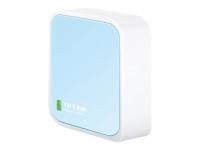
TP-Link TL-WR802N IP Router 300 MBit
| Lieske Part No. | 256311 |
|---|---|
| Mfg Part No | TL-WR802N |
| EAN-Code | 6935364071714 |
| Manufacturer | TP-Link |
| Here only | 25,17 EUR
29,95 EUR incl. VAT
|
Further information for TP-Link TL-WR802N IP Router 300 MBit
| Antenna | |
| Antenna design | Internal |
| Antennas quantity | 2 |
| Receive power | 270M: -65dBm@10% PER , 130M: -70dBm@10% PER , 108M: -82dBm@10% PER , 54M: -73dBm@10% PER , 11M: -82dBm@8% PER , 6M: -86dBm@10% PER , 1M: -90dBm@8% PER |
| Transmit power | CE: , <20dBm(2.4GHz) , FCC: , <30dBm |
| Certificates | |
| Compliance certificates | Federal Communications Commission (FCC) |
| Design | |
| Product colour | Blue, White |
| LED indicators | Activity, LAN, Power, WLAN |
| Product type | Portable router |
| On/off switch | |
| Features | |
| Processor cores | 1 |
| Built-in processor | |
| Logistics data | |
| Harmonized System (HS) code | 85176990 |
| Management features | |
| Web-based management | |
| Quality of Service (QoS) support | |
| Reset button | |
| Network | |
| Ethernet LAN interface type | Fast Ethernet |
| Ethernet LAN data rates | 10,100 Mbit/s |
| Cabling technology | 10/100Base-T(X) |
| Networking standards | IEEE 802.11b, IEEE 802.11g, IEEE 802.11n |
| Number of guest networks (2.4 GHz) | 1 |
| Ethernet LAN | |
| Port forwarding | |
| Port triggering | |
| Dynamic DNS (DDNS) | |
| VPN Passthrough | |
| Operational conditions | |
| Operating temperature (T-T) | 0 - 40 °C |
| Storage temperature (T-T) | -40 - 70 °C |
| Operating relative humidity (H-H) | 10 - 90% |
| Storage relative humidity (H-H) | 5 - 90% |
| Packaging content | |
| Cables included | LAN (RJ-45), USB |
| AC adapter included | |
| Quick installation guide | |
| Packaging data | |
| Package width | 110 mm |
| Package depth | 109 mm |
| Package height | 73.5 mm |
| Package weight | 240 g |
| Ports & interfaces | |
| Ethernet LAN (RJ-45) ports | 1 |
| USB port | |
| Memory card slot(s) | |
| DC-in jack | |
| Power | |
| Power source type | USB |
| Output voltage | 5 V |
| Output current | 1 A |
| Protocols | |
| Supported network protocols | IPv4, IPv6 |
| DHCP client | |
| DHCP server | |
| Universal Plug and Play (UPnP) | |
| Security | |
| Security algorithms | WEP, WPA, WPA-Enterprise, WPA2, WPA2-Enterprise |
| Firewall security | SPI |
| Firewall | |
| Stateful Packet Inspection (SPI) | |
| DoS attack prevention | |
| Filtering | |
| MAC address filtering | |
| IP address filtering | |
| DMZ support | |
| Sustainability | |
| Sustainability compliance | |
| System requirements | |
| Windows operating systems supported | Windows 2000, Windows 7 Enterprise, Windows 7 Enterprise x64, Windows 7 Home Basic, Windows 7 Home Basic x64, Windows 7 Home Premium, Windows 7 Home Premium x64, Windows 7 Professional, Windows 7 Professional x64, Windows 7 Starter, Windows 7 Starter x64, Windows 7 Ultimate, Windows 7 Ultimate x64, Windows 8, Windows 8 Enterprise, Windows 8 Enterprise x64, Windows 8 Pro, Windows 8 Pro x64, Windows 8 x64, Windows 8.1, Windows 8.1 Enterprise, Windows 8.1 Enterprise x64, Windows 8.1 Pro, Windows 8. |
| Mac operating systems supported | macOS |
| Linux operating systems supported | |
| WAN connection | |
| WAN connection type | RJ-45 |
| Ethernet WAN | |
| DSL WAN | |
| SIM card slot | |
| 3G/4G USB modem compatibility | |
| Weight & dimensions | |
| Width | 57 mm |
| Depth | 57 mm |
| Height | 18 mm |
| Wireless LAN features | |
| Wi-Fi band | Single-band (2.4 GHz) |
| Top Wi-Fi standard | Wi-Fi 4 (802.11n) |
| WLAN data transfer rate (max) | 300 Mbit/s |
| Wi-Fi standards | 802.11b, 802.11g, Wi-Fi 4 (802.11n) |
The TL-WR802N is designed for use with tablets, smart phones, handheld game consoles and other portable electronic wireless devices. The devices, which can be powered by an external power adapter or USB connection to a computer, can conveniently connect to the Internet and share the connection around an average sized room at 300Mbps. The device's tiny size makes it ideal for use on the road and is powerful enough to satisfy almost any basic wireless application requirement.
Portable and Compact - Ideal for Home and Travel Use The TL-WR802N is the perfect travel companion for anyone who needs fast, easy Internet access on the go. Portable and compact design easily fits into a pocket or the palm of your hand. Simply plug a hotel room's ethernet cable into the port provided and enter a default password to instantly create a wireless hotspot in the room. Flexible Power Supply - Easy to Take on the Road TL-WR802N can be powered by an external power adapter or via a USB connection to a computer. When traveling, users can plug the TL-WR802N into computer's USB port and share Wi-Fi connection with family and friends. Multiple Operation Modes TL-WR802N supports Router (default), Repeater, Client, AP and WISP modes to enable various wireless applications to give users a more dynamic and comprehensive wireless networking experience.
WPA / WPA2 Encryptions WPA/WPA2 encryption standards ensure your wireless connection is safe from intruders.

This is an offer of:
79279 Vörstetten
https://industry-electronics.com
Tel. 07666/88499-0
Fax. 07666/88499-111
Diesen Artikel finden Sie unter:
industry-electronics.com/artikel/256311

Lieske Elektronik e.K.
Reutener Str. 1079279 Vörstetten
https://industry-electronics.com
Tel. 07666/88499-0
Fax. 07666/88499-111
Diesen Artikel finden Sie unter:
industry-electronics.com/artikel/256311