
TP-Link WRLS (ER706W-4G(EU))
Networks > Router > VPN Routers
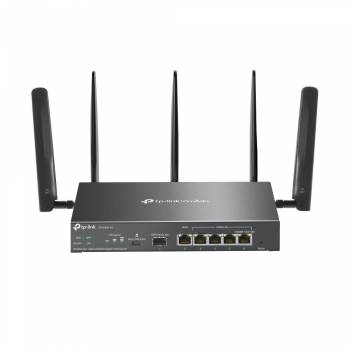
TP-Link WRLS (ER706W-4G(EU))
| Lieske Part No. | 1163739 |
|---|---|
| Mfg Part No | ER706W-4G(EU) |
| EAN-Code | 4895252500714 |
| Manufacturer | TP-Link |
| Here only | 264,83 EUR
315,15 EUR incl. VAT
|
Further information for TP-Link WRLS (ER706W-4G(EU))
| Antenna | |
| Antenna design | External |
| Antennas quantity | 5 |
| Design | |
| Product colour | Black |
| LED indicators | LAN, LTE, Status, System, WAN |
| Product type | Desktop/pole router |
| Features | |
| Internal memory | 512 MB |
| Internal memory type | DDR4 |
| Flash memory | 128 MB |
| Management features | |
| Bandwidth control | |
| Reset button | |
| MU-MIMO technology | |
| MIMO | |
| Mobile network | |
| Mobile network generation | 4G |
| 3G standards | HSDPA, HSUPA, WCDMA |
| 4G standard | LTE-TDD & LTE-FDD |
| 4G bands supported | 800,850,900,1800,2100,2300,2500,2600 MHz |
| SIM card type | NanoSIM |
| Network | |
| Ethernet LAN interface type | Gigabit Ethernet |
| Ethernet LAN | |
| Dynamic DNS (DDNS) | |
| VPN Passthrough | |
| Operational conditions | |
| Operating temperature (T-T) | 0 - 40 °C |
| Storage temperature (T-T) | -40 - 70 °C |
| Operating relative humidity (H-H) | 10 - 90% |
| Storage relative humidity (H-H) | 5 - 90% |
| Ports & interfaces | |
| Ethernet LAN (RJ-45) ports | 5 |
| USB port | |
| Power | |
| Power source type | AC |
| Protocols | |
| DHCP server | |
| Security | |
| NAT functionality | • One-to-One NAT • Multi-Net NAT • Virtual Server • Port Triggering† • NAT-DMZ • FTP/H.323/SIP/IPSec/PPTP ALG • UPnP |
| Access Control List (ACL) | |
| URL filtering | |
| Network address translation (NAT) | |
| WAN connection | |
| Ethernet WAN | |
| DSL WAN | |
| SIM card slot | |
| 3G/4G USB modem compatibility | |
| Weight & dimensions | |
| Width | 226 mm |
| Depth | 131 mm |
| Height | 35 mm |
| Wireless LAN features | |
| Wi-Fi band | Dual-band (2.4 GHz / 5 GHz) |
| Top Wi-Fi standard | Wi-Fi 6 (802.11ax) |
| WLAN data transfer rate (max) | 2402 Mbit/s |
Highlights
- Supports 4G+ Cat6: Insert a Nano SIM card to enjoy speeds of up to 300 Mbps
- AX3000 Dual-Band WiFi 6: Supports 2402 Mbps in 5 GHz band and 574 Mbps in 2.4 GHz band
- Equipped with 1x Gigabit SFP WAN/LAN port, 1x Gigabit RJ45 WAN port, 4x Gigabit RJ45 WAN/LAN port and 1 Nano SIM card slot
- 5 High Performance Detachable Antennas: Extend and concentrate the Wi-Fi signals
- Central Management: Cloud access and the Omada app for easy management
- Omada Mesh: Connects seamlessly to EAPs that support mesh technology
- Highly Secure VPN: Supports IPSec / SSL / WireGuard / OpenVPN / PPTP / L2TP VPN
- Stationary router
- ear category (ElektroG): relevant, Category 6: small IT and telecommunications devices, small IT and telecommunications devices B2C
- Application area: Indoor
- Modem type: LTE
- WEEE: 85565951
- Total number of copper ports: 5
- Total number of fiber optic ports: 1
- Connections highlights: 1x Nano SIM slot (4G+ Cat6)
- DHCP server
- VPN
- UTM functionality: VPN support, translation of network addresses (NAT)
- wall-mountable
- Power supply unit: integrated
- WLAN
- WLAN standard: IEEE 802.11a - WiFi 2, IEEE 802.11b - WiFi 1, IEEE 802.11g - WiFi 3, IEEE 802.11n - WiFi 4, IEEE 802.11ac - WiFi 5, IEEE 802.11ax - WiFi 6
- Mobile standards: 4G - LTE Advanced (LTE-A from CAT 6), 3G - UMTS
- UMTS band: B1 (2100), B3 (1800 DCS), B5 (850), B7 (2600), B8 (900 GSM), B20 (800 DD), B38 (TD 2600), B40 (TD 2300)
- LTE band: B1 (2100), B3 (1800 +), B7 (2600), B8 (900), B20 (800 DD), B28 (700 APT), B32 (1500 L-band), B38 (TD 2600), B40 (TD 2300), B41 (TD 2500)
- Security standard: WPA, WPA2, WPA3
- WLAN frequency band: dual band
- Bandwidth: 10/100/1000 MBit/s > Basic features
- Color: Black
- Height: 35 mm
- Length/Depth: 131 mm
- Width: 226 mm
- icecat Import: 2024/01/11
- TP-Link ER706W-4G AX3000 Gigabit VPN Router
- Power supply
- Quick start guide
Product Type
Specifications
Shipping
Connections
Functions
Power supply
Data transmission
Scope of delivery

This is an offer of:
79279 Vörstetten
https://industry-electronics.com
Tel. 07666/88499-0
Fax. 07666/88499-111
Diesen Artikel finden Sie unter:
industry-electronics.com/artikel/1163739

Lieske Elektronik e.K.
Reutener Str. 1079279 Vörstetten
https://industry-electronics.com
Tel. 07666/88499-0
Fax. 07666/88499-111
Diesen Artikel finden Sie unter:
industry-electronics.com/artikel/1163739