
Startech.com USB3LINK USB Cable 3.0
Networks > Fiber and Components
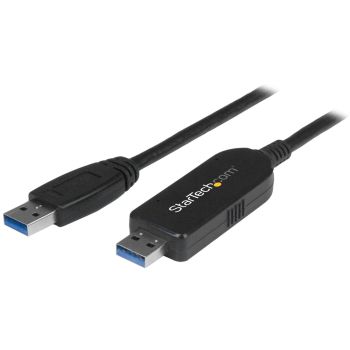
Startech.com USB3LINK USB Cable 3.0
| Lieske Part No. | 997092 |
|---|---|
| Mfg Part No | USB3LINK |
| EAN-Code | 0065030858229 |
| Manufacturer | Startech.com |
| Here only | 43,11 EUR
51,30 EUR incl. VAT
|
Further information for Startech.com USB3LINK USB Cable 3.0
| Certificates | |
| Compliance certificates | RoHS |
| Certification | CE, FCC |
| Features | |
| USB version | USB 3.2 Gen 1 (3.1 Gen 1) |
| Connector 1 | USB A |
| Connector 2 | USB A |
| Connector gender | Male/Male |
| Connector 1 gender | Male |
| Connector 2 gender | Male |
| Connector 1 form factor | Straight |
| Connector 2 form factor | Straight |
| Cable jacket material | Plastic |
| Maximum data transfer rate | 5000 Mbit/s |
| Product colour | Black |
| Windows operating systems supported | Windows 10 Education, Windows 10 Education x64, Windows 10 Enterprise, Windows 10 Enterprise x64, Windows 10 Home, Windows 10 Home x64, Windows 10 Pro, Windows 10 Pro x64, Windows 7 Enterprise, Windows 7 Enterprise x64, Windows 7 Home Basic, Windows 7 Home Basic x64, Windows 7 Home Premium, Windows 7 Home Premium x64, Windows 7 Professional, Windows 7 Professional x64, Windows 7 Starter, Windows 7 Starter x64, Windows 7 Ultimate, Windows 7 Ultimate x64, Windows 8, Windows 8 Enterprise, Windows 8 |
| Mac operating systems supported | Mac OS X 10.10 Yosemite, Mac OS X 10.11 El Capitan, Mac OS X 10.7 Lion, Mac OS X 10.8 Mountain Lion, Mac OS X 10.9 Mavericks |
| Plug and Play | |
| Logistics data | |
| Products per master (outer) case | 60 pc(s) |
| Master (outer) case width | 286 mm |
| Master (outer) case length | 486 mm |
| Master (outer) case height | 352 mm |
| Harmonized System (HS) code | 84733080 |
| Other features | |
| LED indicators | Activity, Link |
| Packaging content | |
| Quantity per pack | 1 pc(s) |
| Manual | |
| Packaging data | |
| Package width | 133 mm |
| Package depth | 162 mm |
| Package height | 33 mm |
| Package weight | 128 g |
| Weight & dimensions | |
| Cable length | 1.8 m |
| Weight | 72 g |
| Dimensions (WxDxH) | 24 x 1800 x 11.5 mm |
Data transfer over USB 3.2 Gen 1
The cable supports the USB 3.2 Gen 1 (also known as USB 3.1 Gen 1) specification and achieves a maximum data transfer rate of 5 Gbit/s. This speed allows for fast transfer of large data volumes, such as videos, images, or document collections, without the process taking an excessive amount of time. The connection is Plug & Play, meaning no additional driver installations are required when using supported operating systems.
Compatibility with operating systems
The USB3LINK cable is designed for a variety of operating systems. Under Windows, versions from Windows XP SP2 (32-bit and 64-bit) up to Windows 8.1 (32-bit and 64-bit) are supported. For Mac systems, compatibility includes operating systems from Mac OS X 10.7 Lion to Mac OS X 10.11 El Capitan. Software solutions such as Windows Easy Transfer and PC-Linq enable data exchange between different combinations of Windows and Mac computers. Windows Easy Transfer, for example, supports migration from Windows XP to Windows 7 or 8, while PC-Linq also enables data transfer between Mac and Windows.
Functions and equipment in detail
The cable is equipped with LED indicators that display the connection status. These indicators signal activity and link, providing the user with visual feedback on the connection status. The integrated software PC-Linq allows for file transfer between computers while simultaneously enabling control over file directories on both sides. The installation of PC-Linq is performed via an application stored on a removable data carrier, which is automatically recognized as soon as the cable is connected.
Technology explained simply
The connection is established via a direct USB cable, enabling data transfer between two computers without requiring a network or external storage media. The USB 3.2 Gen 1 technology ensures a high transfer rate, suitable for the fast exchange of large files. The Plug & Play function means the system automatically recognizes the cable and installs the necessary drivers, provided the supported operating systems are used. The LED indicators serve as visual feedback, indicating whether a connection has been established and whether data is being transferred.
Installation and mounting
Installation is performed by connecting the cable to the USB ports of the involved computers. When using Windows Easy Transfer, the software is automatically launched as soon as the cable is connected. When using PC-Linq, the application must be installed from the removable data carrier generated by the cable. Installation is carried out via an InstallShield wizard that guides through the necessary steps. After installation, PC-Linq can be opened on both computers to perform file transfer.
Advantages in operation
The cable offers a simple and fast method to transfer data between computers without requiring additional hardware or network setups. Support for multiple operating systems and the integrated software solution PC-Linq extend functionality and enable flexible use. The Plug & Play function and LED indicators simplify operation and ensure transparent usage. The maximum data transfer rate of 5 Gbit/s guarantees efficient transfer, even with large file volumes.
The product is delivered with an instruction manual describing the installation and use of the software. The manual is available in German and provides step-by-step instructions for setting up and using the cable. Certifications CE and FCC, along with compliance with RoHS, ensure adherence to relevant safety and environmental standards.

This is an offer of:
79279 Vörstetten
https://industry-electronics.com
Tel. 07666/88499-0
Fax. 07666/88499-111
Diesen Artikel finden Sie unter:
industry-electronics.com/artikel/997092

Lieske Elektronik e.K.
Reutener Str. 1079279 Vörstetten
https://industry-electronics.com
Tel. 07666/88499-0
Fax. 07666/88499-111
Diesen Artikel finden Sie unter:
industry-electronics.com/artikel/997092