
Softing WX_FX_INSP_KIT fiber optic microscope for inspection
Measurement > Network Analyzers
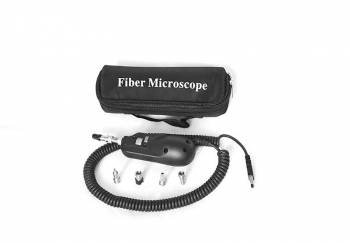
Softing WX_FX_INSP_KIT fiber optic microscope for inspection
| Lieske Part No. | 1494976 |
|---|---|
| Mfg Part No | WX_FX_INSP_KIT,226539 |
| EAN-Code | 0046382252903 |
| Manufacturer | Softing IT Networks |
| Here only | 1.416,36 EUR
1.685,47 EUR incl. VAT
|
Further information for Softing WX_FX_INSP_KIT fiber optic microscope for inspection
| General | |
| Product type | Fiber optic microscope |
| Connection type | USB |
| Compatible devices | WireXpert-FA, WireXpert-MP, FiberXpert 5000, LinkXpert M3, NetXpert XG2 |
| Test probes | FC, SC, LC, U12M, U25M |
| Purpose | Inspection of connector end faces of fibre optic cables |
Applications
The microscope is primarily used in the field of network infrastructure, where fibre optic cables are employed in data centres, industrial networks, or building cabling. It is suitable for technicians who install, maintain, or certify fibre optic cables, particularly in environments requiring high transmission quality and reliability. Inspection is performed directly before connection or after installation to ensure that the connector end faces are clean and intact.
Functions and Equipment in Detail
The device connects via a USB interface to compatible Softing network testers, including WireXpert models (including WireXpert-FA, MP and C8), FiberXpert 5000, LinkXpert M3, and NetXpert XG2. The connection is made via a standard USB interface, allowing inspection to be carried out directly within the context of network diagnostics. The microscope is equipped with various inspection tips suitable for the most common connector types: FC, SC, LC, U12M, and U25M. These tips enable adaptable inspection of different connector types commonly encountered in practice.
Technology Explained Simply
The fibre optic microscope generates an enlarged view of the connector end face on the display of the connected network tester. The magnification allows for detailed assessment of surface quality, making even small defects visible. Inspection is performed without additional lighting equipment, as the microscope integrates the necessary light source. The inspection tips are specially shaped to securely and precisely position the respective connector types, ensuring reproducible and reliable inspection.
Compatibility and Accessories
The WX_FX_INSP_KIT is designed for use with multiple Softing network testers, including WireXpert-FA, WireXpert-MP, FiberXpert 5000, LinkXpert M3, and NetXpert XG2. When used with WireXpert-FA, an additional fibre optic module or microscope module (part number #228188) is required to enable the connection. The accessory is not intended for use with other manufacturers or devices. Compatible devices that can be combined with the microscope include, among others, the WireXpert MP C8, WireXpert MP C6A, LinkXpert M3, and NetXpert XG2. Combining the microscope with these devices enables integrated inspection and diagnostics, streamlining workflows.
Mounting and Installation
Installation is performed by simply connecting the microscope to the USB port of the network tester. The inspection tips are selected according to the connector type and attached to the microscope. Inspection is carried out directly on the connector, with positioning supported by the specially shaped tips. No additional tools or mounting aids are required. The device is used directly in the field, without additional preparation or calibration steps.
Advantages in Operation
Integrating the microscope into the workflow of network technicians reduces error rates during fibre optic cable installation. Visual inspection allows for quick identification of defects, preventing costly rework or downtime. Compatibility with various Softing devices ensures a uniform working environment, enhancing the efficiency and quality of network infrastructure. The inspection tips for common connector types ensure universal applicability without requiring additional adapters.

This is an offer of:
79279 Vörstetten
https://industry-electronics.com
Tel. 07666/88499-0
Fax. 07666/88499-111
Diesen Artikel finden Sie unter:
industry-electronics.com/artikel/1494976

Lieske Elektronik e.K.
Reutener Str. 1079279 Vörstetten
https://industry-electronics.com
Tel. 07666/88499-0
Fax. 07666/88499-111
Diesen Artikel finden Sie unter:
industry-electronics.com/artikel/1494976