
Inline 65020
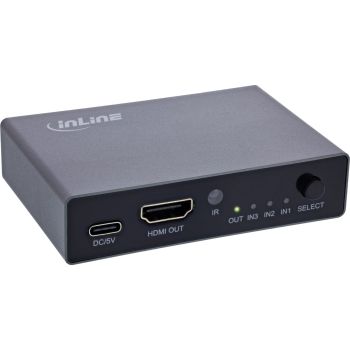
Inline 65020
| Lieske Part No. | 22195925 |
|---|---|
| Mfg Part No | 65020 |
| EAN-Code | 4043718340583 |
| Manufacturer | Inline |
| Here only | 28,69 EUR
34,14 EUR incl. VAT
|
Further information for Inline 65020
| Features | |
| Product colour | Black |
| Maximum refresh rate | 144 Hz |
| Maximum operating distance | 2 m |
| Supported video modes | 480i, 480p, 576i, 576p, 720p, 1080i, 1080p, 1440p, 2160p, 4320p |
| HD type | 8K Ultra HD |
| Colour depth | 36 bit |
| Audio decoders | DSD, DTS, DTS-HD, Dolby AC3, Dolby TrueHD |
| HDCP version | 2.3 |
| HDCP | |
| LED indicators | |
| Logistics data | |
| Country of origin | Taiwan |
| Operational conditions | |
| Operating temperature (T-T) | -15 - 55 °C |
| Operating relative humidity (H-H) | 5 - 90% |
| Packaging content | |
| Cables included | USB Type-C |
| Remote control included | |
| Manual | |
| Packaging data | |
| Package width | 100 mm |
| Package depth | 145 mm |
| Package height | 48 mm |
| Package weight | 157 g |
| Package volume | 700 cm³ |
| Ports & interfaces | |
| Video port type | HDMI |
| HDMI ports quantity | 4 |
| HDMI version | 2.1 |
| HDMI in | 3 |
| Number of HDMI outputs | 1 |
| Power | |
| AC adapter input voltage | 5 V |
| AC adapter input current | 1 A |
| Technical data | |
| Interface | HDMI |
| Number of inputs | 3 |
| Length packaging | 0.145m |
| Article height | 2.00cm |
| Article type | Switch |
| Net weight | 0.089kg |
| Packaging volume | 0.0007m³ |
| Article width | 5.50cm |
| Weight | 0.157kg |
| Width packaging | 0.100m |
| Article length | 8.20cm |
| Height packaging | 0.048m |
| Technical details | |
| Compliance certificates | CE, TÜV mark |
| Weight & dimensions | |
| Width | 55 mm |
| Depth | 82 mm |
| Height | 20 mm |
| Weight | 89 g |
| Dimensions (WxDxH) | 55 x 82 x 20 mm |
Automatic or manual switching – by remote or button
Wide audio compatibility – supports DTS-HD, Dolby TrueHD & more
HDMI 2.1 & HDCP 2.3 – optimized for modern TV and AV systems
Plug & Play – easy installation without drivers
The InLine 3-port HDMI switch allows you to connect up to three HDMI devices to just a single HDMI port on your TV or monitor. Whether it's a games console, Blu-ray player or computer, the switch makes switching between devices easy and convenient.
Thanks to HDMI 2.1 support, you can enjoy 8K resolution at 60 Hz or 144 Hz in 4K – perfect for gaming, streaming and home theater experiences. The compact design fits perfectly into any entertainment setup, while the automatic switching function ensures that the active source is always recognized. Alternatively, switching can also be controlled manually via IR remote control.
In addition to the excellent image quality, the switch offers broad audio compatibility, including Dolby TrueHD, DTS-HD and LPCM 7.1. The device is backward compatible and also supports lower resolutions. Thanks to plug and play, no additional software is required – just plug it in and get started!
Technical data:
Resolution: up to 8K @ 60 Hz (7680x4320 px), 4K @ 144 Hz (3840x2160 px), 480i/480p, 576i/576p, 720p, 1080i/1080p, 1440p, 2160p (4K), 4320p (8K)
HDMI/HDCP version: HDMI 2.1, HDCP 2.3
Supports video in color format at: 24 bits, 30 bits, 36 bits
Max. transmission rate: 48 Gb/s
Supports audio: DTS HD/Dolby* TrueHD/LPCM7.1 / DTS / Dolby*-AC3 / DSD HD (HBR)
Input current: 5V/1A
Distance between the input and output cables: Maximum output cable length: 2m AWG24 HDMI standard cable
Operating temperature: -15 to +55°C
Operating humidity: 5% to 90% RH
Dimensions: 83 x 56.5 x 20 mm
Contents:
1x HDMI switch
1x USB-C cable (1m)
1x IR remote control
1x user manual (DE/EN)
*To operate the HDMI switcher, make sure that the source devices and display devices are connected correctly. To ensure that the corresponding interfaces function optimally, use the supplied USB-C power cable. First turn on the switcher and then the source and display devices.

This is an offer of:
79279 Vörstetten
https://industry-electronics.com
Tel. 07666/88499-0
Fax. 07666/88499-111
Diesen Artikel finden Sie unter:
industry-electronics.com/artikel/22195925

Lieske Elektronik e.K.
Reutener Str. 1079279 Vörstetten
https://industry-electronics.com
Tel. 07666/88499-0
Fax. 07666/88499-111
Diesen Artikel finden Sie unter:
industry-electronics.com/artikel/22195925