
Fujitsu FPCPR401BP Docking Station USB-C Thunderbolt 4
Computer Hardware > Notebook Accessories > Dockingstation
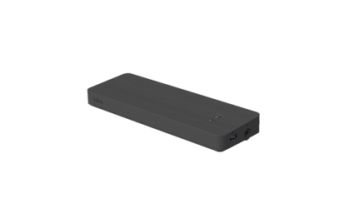
Fujitsu FPCPR401BP Docking Station USB-C Thunderbolt 4
| Lieske Part No. | 2012539 |
|---|---|
| Mfg Part No | FPCPR401BP |
| EAN-Code | 4063872854948 |
| Manufacturer | Fujitsu |
| Here only | 79,96 EUR
95,15 EUR incl. VAT
|
Further information for Fujitsu FPCPR401BP Docking Station USB-C Thunderbolt 4
| Logistics data | |
| Harmonized System (HS) code | 84733020 |
| Network | |
| Ethernet LAN (RJ-45) ports | 1 |
| Ethernet LAN data rates | 10,100,1000 Mbit/s |
| Ethernet LAN | |
| Packaging content | |
| Cables included | AC |
| Packaging data | |
| Quantity per pack | 1 pc(s) |
| Performance | |
| Product colour | Black |
| Card reader integrated | |
| Ports & interfaces | |
| Connectivity technology | Wired |
| Host interface | Thunderbolt 4 |
| USB 3.2 Gen 2 (3.1 Gen 2) Type-A ports quantity | 2 |
| USB 3.2 Gen 2 (3.1 Gen 2) Type-C ports quantity | 1 |
| DisplayPorts quantity | 2 |
| Thunderbolt 4 ports quantity | 2 |
| DC-in jack | |
| Power | |
| Power source type | AC |
| Power supply | 170 W |
| Weight & dimensions | |
| Width | 239 mm |
| Depth | 80 mm |
| Height | 26 mm |
| Weight | 440 g |
Applications
The docking station is designed for professional users requiring a stable and fast connection for multiple devices. It is particularly suitable for workstations where a notebook remains connected for extended periods, such as in offices, call centers, or technical service environments. Support for Thunderbolt 4 enables high data transfer rates and simultaneous power delivery, simplifying use with modern laptops. The integrated Ethernet-LAN function with data rates of 10, 100, or 1000 Mbit/s ensures a reliable network connection, which is essential for office applications.
Functions and Equipment in Detail
The FPCPR401BP offers a total of six external connections: two USB 3.2 Gen 2 (3.1 Gen 2) Type-A ports, one USB 3.2 Gen 2 (3.1 Gen 2) Type-C port, two DisplayPort connections, and two Thunderbolt 4 ports. This variety of interfaces allows simultaneous connection of monitors, storage devices, printers, network cables, and other USB devices. The two DisplayPort connections support connection to two external screens, which is useful for multi-monitor setups. The integrated DC power connector enables power delivery to the connected notebook via the docking station, eliminating the need for the laptop’s original charger.
Technology Explained Simply
The Thunderbolt 4 technology offers a maximum data transfer rate of up to 40 Gbit/s and supports simultaneous power delivery over the same cable. This reduces the number of required cables and simplifies the work environment. The USB 3.2 Gen 2 connections (also known as USB 3.1 Gen 2) enable data transfer rates up to 10 Gbit/s, sufficient for connecting external hard drives, SSDs, or other fast storage devices. The Ethernet-LAN function with 10/100/1000 Mbit/s ensures a stable network connection, which is especially important for critical applications such as file transfers or video conferencing. The docking station is powered via an AC power supply unit with 170 W, sufficient to power the connected notebook and multiple connected devices simultaneously.
Compatibility and Accessories
The docking station is designed for notebooks equipped with a Thunderbolt 4 port. Connection is made via a cable-based system, with the included AC cable providing power to the docking station. Compatibility is therefore limited to all devices supporting the Thunderbolt 4 interface.
Installation and Mounting
Installation is performed by simply connecting the notebook to the docking station via the Thunderbolt 4 port. Power is supplied via the included AC cable. External device connections (USB, DisplayPort, Ethernet) are directly accessible on the device and require no additional configuration. The docking station is designed for desktop use and does not require special mounting or fixation.
Operational Advantages
The FPCPR401BP reduces the number of required cables and enables a quick, cable-free work environment once the notebook is connected. Simultaneous power delivery and data transfer via Thunderbolt 4 simplifies usage. The integrated Ethernet function ensures a stable network connection, essential for office applications. The combination of multiple USB and DisplayPort connections allows simultaneous use of multiple peripheral devices, increasing productivity. The compact design and low weight also make the docking station suitable for mobile use scenarios.

This is an offer of:
79279 Vörstetten
https://industry-electronics.com
Tel. 07666/88499-0
Fax. 07666/88499-111
Diesen Artikel finden Sie unter:
industry-electronics.com/artikel/2012539

Lieske Elektronik e.K.
Reutener Str. 1079279 Vörstetten
https://industry-electronics.com
Tel. 07666/88499-0
Fax. 07666/88499-111
Diesen Artikel finden Sie unter:
industry-electronics.com/artikel/2012539