
Eltako FJ62NP-230V Radio Actuator Blind/Shutter
Installation > Home Automation > Bus systems - radio
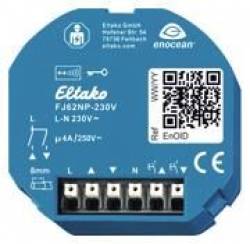
Eltako FJ62NP-230V Radio Actuator Blind/Shutter
| Lieske Part No. | 1779075 |
|---|---|
| Mfg Part No | 30200535 |
| EAN-Code | 4010312319390 |
| Manufacturer | Eltako |
| Here only | 66,77 EUR
79,46 EUR incl. VAT
|
Further information for Eltako FJ62NP-230V Radio Actuator Blind/Shutter
Radio blind and roller shutter actuator 1+1 normally open 4A/250V AC, not potential-free, for a shading element motor 230V AC. Standby loss only 0.6 watts. For built-in installation. 49x51mm, 20mm deep. The connection terminals are plug-in terminals for conductor cross-sections from 0.2mm² to 2.5mm². Up to 32 radio universal buttons, radio direction buttons and radio central control buttons can be taught in using the convenient tap technology. Contact switching at zero crossing. Bidirectional radio can be activated. Supply, switching and control voltage locally 230V. If the supply voltage fails, it is switched off in a defined manner. In addition to the radio control input via an internal antenna, this radio actuator can also be controlled locally with a conventional control button that may be mounted in front of it. Either separate local control inputs for up and down as direction buttons, or these two inputs are bridged and controlled with a single button as a universal button. The direction is then changed by interrupting the control. A glow lamp current is not permitted. A radio button with the function up, stop, down, stop can be taught in as a universal button like the local button, or a radio button such as a roller shutter double button can be taught in as a direction button with press up to up and press down to down. A short tap stops the movement immediately. Central control buttons with static priority can also be taught in. The static priority is only active as long as the radio button is pressed. With a control signal, e.g. from an FSM61 radio transmitter module with switches taught in as a central control button, the up or down switch position and the priority are specifically activated. With priority because these control signals cannot be overridden by other control signals until the central command is canceled again by the end of the control signal. A tap-turn function can be activated: Universal buttons, direction buttons and the local button initially act statically and thus allow blinds to be turned. Only after activation for >1 second does it switch to dynamic. When controlled via the Professional Smart Home Controller, travel commands for up and down can be started with the exact travel time. Since the actuator reports back exactly the travel time after each activity, even when travel is triggered by a button, the position of the shading is always displayed correctly in the Professional Smart Home Controller. When the top and bottom end positions are reached, the position is automatically synchronized. If a radio window contact is taught in, lock-out protection is set up when the window or door is open, which prevents central down, timer down and controller down commands.

This is an offer of:
79279 Vörstetten
https://industry-electronics.com
Tel. 07666/88499-0
Fax. 07666/88499-111
Diesen Artikel finden Sie unter:
industry-electronics.com/artikel/1779075

Lieske Elektronik e.K.
Reutener Str. 1079279 Vörstetten
https://industry-electronics.com
Tel. 07666/88499-0
Fax. 07666/88499-111
Diesen Artikel finden Sie unter:
industry-electronics.com/artikel/1779075