
APC FS-WI-1001-U HyperPod Window Panel 2 ft
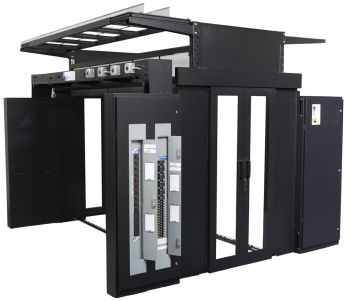
APC FS-WI-1001-U HyperPod Window Panel 2 ft
| Lieske Part No. | 362683 |
|---|---|
| Mfg Part No | FS-WI-1001-U |
| EAN-Code | 0731304334439 |
| Manufacturer | APC |
| Here only | 94,99 EUR
113,04 EUR incl. VAT
|
Further information for APC FS-WI-1001-U HyperPod Window Panel 2 ft
| Features | |
| Compatibility | APC HyperPod |
| Logistics data | |
| Harmonized System (HS) code | 85389099 |
| Packaging data | |
| Package width | 298 mm |
| Package depth | 625 mm |
| Package height | 42 mm |
| Package weight | 2.5 kg |
| Weight & dimensions | |
| Width | 270 mm |
| Depth | 600 mm |
| Height | 15 mm |
| Weight | 2.4 kg |
Window Panel
The two window panels are designed as fixed-mount elements to be inserted into designated openings in the HyperPod module. They serve as mechanical covers that simultaneously allow controlled airflow. Dimensions are 600 mm in depth, 270 mm in width, and 15 mm in height, ensuring a precise fit in designated mounting areas. The total weight of the product is 2.4 kg, indicating a robust yet manageable construction.
Applications
The window panel is primarily used in data centers and server rooms where the APC HyperPod system is installed for airflow management and thermal control. It optimizes cooling through targeted airflow, improving the efficiency of climate control systems. The application is in enclosed pod structures designed to separate cold and hot air, maximizing cooling performance and minimizing energy loss.
Functions and Features in Detail
The surface is smooth, allowing for easy cleaning. Installation is achieved through mechanical fastening at designated mounting points on the HyperPod module. The unit is not designed for electrical functionality but serves purely mechanical purposes for airflow and covering.
Technology Explained Simply
The function of the window panel is based on airflow principles in enclosed pod systems. By installing the window panels, airflow in server rooms is directed precisely, making server cooling more efficient. Openings in the panel allow controlled air intake, while the remaining surface acts as a cover to prevent uncontrolled air currents. This contributes to reduced energy costs and improved operational reliability.
Compatibility and Accessories
The window panel is specifically developed for the APC HyperPod system and is compatible with corresponding modules. It is used in combination with other HyperPod components such as pod containment systems to ensure enclosed airflow.
Installation and Mounting
Installation follows the instructions in the installation manual for the NetShelter™ Pod Containment System. The window panels are inserted into designated openings in the HyperPod module and mechanically secured. No special tools are required, although the use of standard tools such as a screwdriver is recommended. Installation takes place in a closed pod system, with detailed mounting instructions provided in the manufacturer’s manual.
Operational Advantages
Using the window panel improves airflow in the server room, increasing cooling performance and energy efficiency. The mechanical cover prevents uncontrolled air currents, enhancing the thermal stability of servers. The robust construction ensures long service life and easy maintenance.

This is an offer of:
79279 Vörstetten
https://industry-electronics.com
Tel. 07666/88499-0
Fax. 07666/88499-111
Diesen Artikel finden Sie unter:
industry-electronics.com/artikel/362683

Lieske Elektronik e.K.
Reutener Str. 1079279 Vörstetten
https://industry-electronics.com
Tel. 07666/88499-0
Fax. 07666/88499-111
Diesen Artikel finden Sie unter:
industry-electronics.com/artikel/362683