
Samsung LS49F950UAUXEN Monitor 49" 32:9 curved
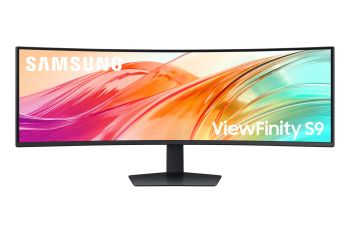
Samsung LS49F950UAUXEN Monitor 49" 32:9 curved
| Lieske Part No. | 631212 |
|---|---|
| Mfg Part No | LS49F950UAUXEN |
| EAN-Code | 8806097614005 |
| Manufacturer | Samsung |
| Here only | 661,79 EUR
787,53 EUR incl. VAT
|
Further information for Samsung LS49F950UAUXEN Monitor 49" 32:9 curved
| Design | |
| Market positioning | Business |
| Product colour | Black |
| Feet colour | Black |
| Display | |
| Display diagonal | 124.5 cm (49") |
| Display resolution | 5120 x 1440 pixels |
| HD type | Dual QHD |
| Native aspect ratio | 32:9 |
| Display technology | LCD |
| Panel type | VA |
| Display brightness (typical) | 350 cd/m² |
| Display brightness (min) | 280 cd/m² |
| Response time | 5 ms |
| Response time measurement type | GTG (Gray to Gray) |
| Screen shape | Curved |
| Screen curvature rating | 1000R |
| Contrast ratio (typical) | 3000:1 |
| Dynamic contrast ratio marketing name | Mega Infinity DCR |
| Maximum refresh rate | 120 Hz |
| Viewing angle, horizontal | 178° |
| Viewing angle, vertical | 178° |
| Display number of colours | 1.07 billion colours |
| Viewable size, horizontal | 119.2 cm |
| Viewable size, vertical | 33.5 cm |
| Display diagonal (metric) | 123 cm |
| High Dynamic Range (HDR) technology | DisplayHDR 400 |
| sRGB coverage (typical) | 115% |
| DCI-P3 coverage | 92% |
| Touchscreen | |
| High Dynamic Range (HDR) supported | |
| Ergonomics | |
| Panel mounting interface | 100 x 100 mm |
| Adjustable height (max) | 12 cm |
| Swivel angle range | -15 - 15° |
| Tilt angle range | -2 - 11° |
| VESA mounting | |
| Height adjustment | |
| Swivelling | |
| Tilt adjustment | |
| Picture-in-Picture | |
| Multimedia | |
| Number of speakers | 2 |
| RMS rated power | 10 W |
| Built-in speaker(s) | |
| Built-in camera | |
| Network | |
| Ethernet LAN | |
| Operational conditions | |
| Operating temperature (T-T) | 10 - 40 °C |
| Operating relative humidity (H-H) | 10 - 80% |
| Other features | |
| Picture-by-Picture (PbP) | |
| Samsung Eye Saver Mode | |
| Image size | |
| Factory tunning | |
| Adaptive picture | |
| Off Timer Plus | |
| Auto source switch+ | |
| Packaging content | |
| Cables included | HDMI, Power, USB Type-A to USB Type-B, USB Type-A to USB Type-C |
| Power cable length | 1.5 m |
| Stand included | |
| Packaging data | |
| Stand type | HAS stand |
| Package width | 1265 mm |
| Package depth | 481 mm |
| Package height | 343 mm |
| Package weight | 20.6 kg |
| Performance | |
| NVIDIA G-SYNC | |
| AMD FreeSync | |
| Flicker-free technology | |
| Ports & interfaces | |
| USB hub version | 3.2 Gen 1 (3.1 Gen 1) |
| Number of USB Type-B upstream ports quantity | 1 |
| Number of USB Type-C upstream ports quantity | 1 |
| USB Type-A downstream ports quantity | 3 |
| USB Power Delivery up to | 90 W |
| HDMI ports quantity | 2 |
| HDMI version | 2.0 |
| DisplayPorts quantity | 1 |
| DisplayPort out version | 1.4 |
| HDCP version | 1.4/2.2 |
| Built-in USB hub | |
| USB Power Delivery (USB PD) | |
| HDMI | |
| Headphone out | |
| Built-in KVM switch | |
| HDCP | |
| Power | |
| Energy efficiency class (SDR) | G |
| Energy efficiency class (HDR) | G |
| Energy consumption (SDR) per 1000 hours | 45 kWh |
| Energy consumption (HDR) per 1000 hours | 92 kWh |
| Power consumption (typical) | 45 W |
| Power consumption (standby) | 0.5 W |
| AC input voltage | 100 - 240 V |
| AC input frequency | 50/60 Hz |
| Power supply type | Internal |
| Energy efficiency scale | A to G |
| Sustainability | |
| Sustainability certificates | EPEAT Gold, TCO |
| Weight & dimensions | |
| Width (with stand) | 1147.6 mm |
| Depth (with stand) | 420.5 mm |
| Height (with stand) | 568.4 mm |
| Weight (with stand) | 15.6 kg |
| Width (without stand) | 1147.6 mm |
| Depth (without stand) | 293.8 mm |
| Height (without stand) | 363.5 mm |
| Weight (without stand) | 10.6 kg |
Integrierter KVM-Schalter
Dank des integrierten KVM-Schalters kannst du zwei an deinem Monitor angeschlossene Geräte mit nur einer Tastatur und Maus steuern.
Wenig Belastung für deine Augen
TÜV-zertifiziert für „Intelligent Eye Care“
Bei langen Arbeitstagen und nächtlichen Projekten passt der ViewFinity S9 Helligkeit und Farbtemperatur automatisch an deine Umgebung an. Der Monitor ist TÜV-zertifiziert für „Intelligent Eye Care“ und reduziert im „Eye Saver“-Modus Bildschirmflimmern und blaues Licht.
Auf einem Bildschirm produktiv arbeiten
Picture-by-Picture
Schöpfe das volle Potenzial deines Bildschirms aus und erlebe Multitasking auf eine moderne Art und Weise. Picture-by-Picture teilt den Bildschirm in zwei Hälften. Du siehst hier also das vollständige Bild beider Quellen, und das sogar in der Qualität der Ursprungsquelle. Somit kannst du deiner Arbeit nahtlos auf deinen Geräten nachgehen.
Nahtloses Multitasking inklusive Nebenbildschirm
Picture-in-Picture
Picture-in-Picture macht einen zweiten Monitor überflüssig. Diese Funktion legt ein zweites Bild in einer frei wählbaren Ecke deines Bildschirms über das normale PC-Bild.
Rufe Dokumente, Chat-Fenster, Entertainment oder andere Inhalte auf, ohne den Blick vom Hauptbildschirm abzuwenden. So kannst du dich aufs Wesentliche konzentrieren und dazu wichtige Updates verfolgen.

This is an offer of:
79279 Vörstetten
https://industry-electronics.com
Tel. 07666/88499-0
Fax. 07666/88499-111
Diesen Artikel finden Sie unter:
industry-electronics.com/artikel/631212

Lieske Elektronik e.K.
Reutener Str. 1079279 Vörstetten
https://industry-electronics.com
Tel. 07666/88499-0
Fax. 07666/88499-111
Diesen Artikel finden Sie unter:
industry-electronics.com/artikel/631212