
Ricoh AE011086
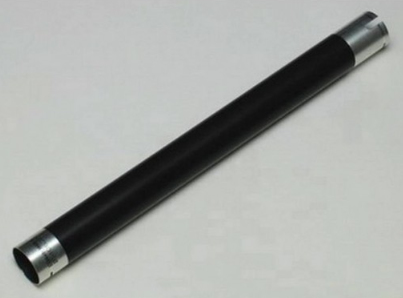
Ricoh AE011086
| Lieske Part No. | 262479 |
|---|---|
| Mfg Part No | AE011086 |
| EAN-Code | 5704327796008 |
| Manufacturer | Ricoh |
| Here only | 27,88 EUR
33,18 EUR incl. VAT
|
Further information for Ricoh AE011086
| Features | |
| Type | Roller |
| Brand compatibility | Ricoh |
| Compatibility | 3310, 4410, 4420, 1013, 120, 1515, MP161, MP171, MP201 |
| Product colour | Black |
Applications
The roller is intended for a range of Ricoh printers and multifunction devices, including the models 3310, 4410, 4420, 1013, 120, 1515, MP161, MP171, and MP201. These devices are used in office environments, small to medium-sized enterprises, and service companies, where reliable and continuous printing performance is required. The roller is used in the fuser area, where it supports paper feeding and ensures that the toner image is evenly fixed onto the paper during heating.
Functions and Features in Detail
The roller is a mechanical component integrated into the fuser module. It performs the function of paper guidance and tensioning to ensure clean and error-free print results. The black colour of the roller is typical for such components, as it supports heat dissipation and mechanical durability. The exact shape and size are tailored to the respective device models to ensure precise fit and functionality.
Technology Explained Simply
A roller in the fuser module is a central component of the fixing phase in laser printing. After the printing process is completed, the paper with the toner image is passed through the fuser, where it is fixed by heat and pressure. The roller ensures that the paper is evenly drawn through the fuser module, preventing distortions, creases, or uneven fixing. The compatibility with the specified models ensures that the roller meets the specific requirements for tension, diameter, and material behaviour.
Compatibility and Accessories
The roller is compatible with Ricoh models 3310, 4410, 4420, 1013, 120, 1515, MP161, MP171, and MP201. These devices belong to Ricoh’s product line designed for office and production environments. Compatibility is tailored to the respective fuser modules, with mechanical fit and thermal durability being critical factors.
Installation and Mounting
The installation of the roller takes place in the fuser module of the respective device. Mounting requires opening the fuser module, removing the old roller, and inserting the new one. The exact procedure is described in the respective service manual for the devices. It is important that the roller is correctly positioned and secured to ensure even paper feeding. Installation should be carried out by qualified personnel or authorised technicians to avoid damage to the device.
Operational Advantages
A properly functioning roller ensures consistent paper feeding in the fuser module, leading to improved print quality. Errors such as paper jams, uneven fixing, or image distortion can be avoided. Using an original Ricoh replacement part ensures the reliability and longevity of the component, positively influencing operational safety and maintenance intervals. The black colour of the roller is a standard feature that supports thermal and mechanical durability.

This is an offer of:
79279 Vörstetten
https://industry-electronics.com
Tel. 07666/88499-0
Fax. 07666/88499-111
Diesen Artikel finden Sie unter:
industry-electronics.com/artikel/262479

Lieske Elektronik e.K.
Reutener Str. 1079279 Vörstetten
https://industry-electronics.com
Tel. 07666/88499-0
Fax. 07666/88499-111
Diesen Artikel finden Sie unter:
industry-electronics.com/artikel/262479