
Ricoh AD027018 drum charge roller for Aficio 1015
Printers/Scanners > Parts
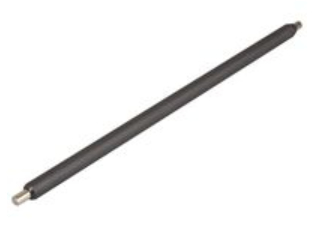
Ricoh AD027018 drum charge roller for Aficio 1015
| Lieske Part No. | 193281 |
|---|---|
| Mfg Part No | AD027018 |
| EAN-Code | 5711045149832 |
| Manufacturer | Ricoh |
| Here only | 29,75 EUR
35,40 EUR incl. VAT
|
Further information for Ricoh AD027018 drum charge roller for Aficio 1015
| Features | |
| Type | Roller |
| Device compatibility | Multifunctional |
| Brand compatibility | Ricoh |
| Compatibility | Aficio MP 3010, Aficio MP 3010P, Aficio MP 3010SP, Aficio MP 3010SPF, Aficio MP 3010SPFI, Aficio MP 3010SPI, Aficio MP 3350, Aficio MP 3350B, Aficio MP 3350SP, Aficio MP 3350SPF, Aficio MP 3351SP, Aficio MP 3352, Aficio MP 3352SP, MP2501SP, MP2553, MP3053, MP3353 |
| Product colour | Black |
| Logistics data | |
| Harmonized System (HS) code | 84439990 |
Applications
The roller is intended for a wide range of Ricoh multifunction devices, including models such as the Aficio MP 3010, MP 3010P, MP 3010SP, MP 3010SPF, MP 3010SPFI, MP 3010SPI, MP 3350, MP 3350B, MP 3350SP, MP 3350SPF, MP 3351SP, MP 3352, MP 3352SP, MP2501SP, MP2553, MP3053, and MP3353. These devices are commonly used in office environments, small businesses, and administrative settings where reliable and continuous printing performance is required. Compatibility with these models ensures direct interchangeability without modifications or additional tools.
Functions and Features in Detail
The roller is a mechanical component mounted in the printing unit. It consists of an elastic, conductive material that transfers an even electrical charge to the drum. This charge is necessary to fix the toner onto the drum before it is transferred to the paper. A defective or worn roller can lead to uneven print results, streaks, or missing print areas. Using the original Ricoh roller AD027018 ensures optimal fit and performance, meeting the manufacturer’s standards.
Technology Explained Simply
In the printing process, the drum is first electrically charged. The roller performs this task by continuously and evenly transferring a charge to the drum surface. This charge is then selectively neutralized by the toner, creating the image on the drum. A properly functioning roller ensures the charge is evenly distributed across the entire drum, which is crucial for clear and sharp print quality. The material of the roller is designed to provide the required electrical conductivity and mechanical stability to meet daily operational demands.
Compatibility and Accessories
The roller is specifically designed for the mentioned Ricoh multifunction devices. It is not a universal replacement part but fits precisely into the printing units of these models. Compatibility is confirmed by the manufacturer, ensuring direct interchangeability without additional adjustments or tools. No additional accessories are specifically recommended or required for this roller. Installation follows the maintenance instructions provided for the respective devices.
Installation and Mounting
The roller is mounted during maintenance or repair of the printing unit. The exact steps are described in the service manuals for the respective devices. Typically, the printing unit is removed, the defective roller is taken out, and replaced with the new one. Installation does not require special tools, as the components are designed with mechanical guidance and fit to ensure secure placement. Correct installation is essential to ensure proper function and long service life of the roller.
Operational Advantages
Using the original Ricoh roller AD027018 ensures that print quality and device reliability remain at a high level. The component is developed for the specific requirements of the mentioned devices, guaranteeing optimal fit and performance. This minimizes the likelihood of printing errors and extends the lifespan of the printing unit. Adhering to the manufacturer’s maintenance recommendations contributes to the overall stability and efficiency of the device.

This is an offer of:
79279 Vörstetten
https://industry-electronics.com
Tel. 07666/88499-0
Fax. 07666/88499-111
Diesen Artikel finden Sie unter:
industry-electronics.com/artikel/193281

Lieske Elektronik e.K.
Reutener Str. 1079279 Vörstetten
https://industry-electronics.com
Tel. 07666/88499-0
Fax. 07666/88499-111
Diesen Artikel finden Sie unter:
industry-electronics.com/artikel/193281