
Photon PH_01 Robot Education from 4 years
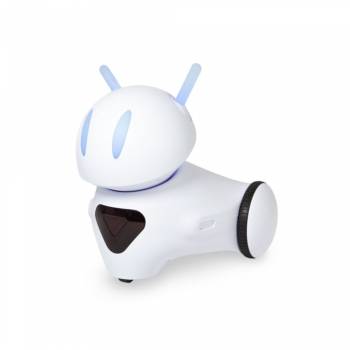
Photon PH_01 Robot Education from 4 years
| Lieske Part No. | 1928830 |
|---|---|
| Mfg Part No | PH_01 |
| EAN-Code | 5907222648025 |
| Manufacturer | Photon |
| Here only | 222,87 EUR
265,22 EUR incl. VAT
|
Further information for Photon PH_01 Robot Education from 4 years
The ultimate teaching tool! The Photon robot supports teachers in their daily work at school. It's easy to use thanks to its intuitive mobile and desktop apps. The robot awakens students' innate curiosity and appeals to their emotions, allowing them to delve deeper into each lesson. The robot can also be used at every grade level. Teachers can use specially prepared lessons to introduce students to the basics of programming. Contents of the complete package 1x Photon robot 1x Digital database with lesson plans and additional teaching materials 1x Photon Edu app 1x microUSB cable Instructions Advantages of the complete package The interdisciplinary Photon Robot was designed for both younger and older students. Teachers can either use specially prepared lesson plans or create their own to teach each subject. In addition, the robot can be used at any level of education, from kindergarten to 12th grade. Teach about planets and the solar system by taking the robot on a walk in space; take it to a meadow to learn about plants and bees; take it into the city to talk about road safety. The robot can be used to introduce colors, animals or geometric figures or even to explain the concept of sustainable energy. Skills to be learned Natural sciences
From basic information about plants and animals to learning about the entire natural ecosystem, various chemical reactions or even the solar system. The robot can be used in lessons in all science subjects to introduce new topics and explain new phenomena. Language lessons
Photon is an excellent tool for teaching native and foreign languages. With the help of story mats and illustrations, children can improve their storytelling skills by recounting the robot's adventures. Art
Using a 3D printer can make teaching more fun. Print out accessories that will make the activities more interesting and give the robot a new use. A great example would be the permanent marker holder, which allows children to program the robot's movements and make their own drawings. Children can also design masks, costumes and accessories for the robots to wear. Then they can dress the robots in costumes and have them take on certain roles, such as: B. reenact a scene from a story or dance to a previously discussed style of music. Bodily development
Use the Photon robot as a guide to perform various motor activities and promote children's physical development. The children can imitate the robot's movements and dances. You can also lead him to a specific area on the mat that represents a physical or everyday activity (e.g. tying shoelaces, fastening buttons) and then perform it. How do you work with the complete package? The robot can move around its axis with an accuracy of 5 degrees, making it a great tool for introducing concepts of measuring angles and geometric figures. Students can also determine the robot's movements with an accuracy of 0.5 inches. In addition, you can draw any geometric figure with an attachable permanent marker handle. This opens up many opportunities to conduct experimental activities to measure or convert units. Photon is also great for conducting games to consolidate mathematical operations and memorize numbers. With the help of the robot, students can assign the result of an operation or decide whether the result is correct or not. Programming the Photon Robot Programming simplified
The Photon EDU app contains unique programming methods that help students gradually discover the world of programming can. Each subsequent interface builds on the previously acquired skills and introduces new, more advanced capabilities.
Programming Basics
By purchasing the basic version of the robot, teachers receive a complete toolkit to support them and their students in programming lessons. We have developed an innovative approach that helps students discover the secrets of programming in a fun way. Thousands of teachers around the world have observed that working with Photon increases student enthusiasm and engagement.
Our Development Stages of ProgrammingStep 1: Photon Draw
Set the robot's route by drawing it with your finger. Ideal for learning the basic skills of the robot. Step 2: Photon Badge
Program the robot using instructive symbols. Introduces the logical planning of the robot's route. Step 3: Photon Blocks
Program the robot by stacking blocks with symbols known from the previous interfaces. Learns how to create more complex programs. Step 4: Photon Code
Arrange text code sequences in the form of blocks familiar from the previous interface.
From basic information about plants and animals to learning about the entire natural ecosystem, various chemical reactions or even the solar system. The robot can be used in lessons in all science subjects to introduce new topics and explain new phenomena. Language lessons
Photon is an excellent tool for teaching native and foreign languages. With the help of story mats and illustrations, children can improve their storytelling skills by recounting the robot's adventures. Art
Using a 3D printer can make teaching more fun. Print out accessories that will make the activities more interesting and give the robot a new use. A great example would be the permanent marker holder, which allows children to program the robot's movements and make their own drawings. Children can also design masks, costumes and accessories for the robots to wear. Then they can dress the robots in costumes and have them take on certain roles, such as: B. reenact a scene from a story or dance to a previously discussed style of music. Bodily development
Use the Photon robot as a guide to perform various motor activities and promote children's physical development. The children can imitate the robot's movements and dances. You can also lead him to a specific area on the mat that represents a physical or everyday activity (e.g. tying shoelaces, fastening buttons) and then perform it. How do you work with the complete package? The robot can move around its axis with an accuracy of 5 degrees, making it a great tool for introducing concepts of measuring angles and geometric figures. Students can also determine the robot's movements with an accuracy of 0.5 inches. In addition, you can draw any geometric figure with an attachable permanent marker handle. This opens up many opportunities to conduct experimental activities to measure or convert units. Photon is also great for conducting games to consolidate mathematical operations and memorize numbers. With the help of the robot, students can assign the result of an operation or decide whether the result is correct or not. Programming the Photon Robot Programming simplified
The Photon EDU app contains unique programming methods that help students gradually discover the world of programming can. Each subsequent interface builds on the previously acquired skills and introduces new, more advanced capabilities.
Programming Basics
By purchasing the basic version of the robot, teachers receive a complete toolkit to support them and their students in programming lessons. We have developed an innovative approach that helps students discover the secrets of programming in a fun way. Thousands of teachers around the world have observed that working with Photon increases student enthusiasm and engagement.
Our Development Stages of ProgrammingStep 1: Photon Draw
Set the robot's route by drawing it with your finger. Ideal for learning the basic skills of the robot. Step 2: Photon Badge
Program the robot using instructive symbols. Introduces the logical planning of the robot's route. Step 3: Photon Blocks
Program the robot by stacking blocks with symbols known from the previous interfaces. Learns how to create more complex programs. Step 4: Photon Code
Arrange text code sequences in the form of blocks familiar from the previous interface.

This is an offer of:
79279 Vörstetten
https://industry-electronics.com
Tel. 07666/88499-0
Fax. 07666/88499-111
Diesen Artikel finden Sie unter:
industry-electronics.com/artikel/1928830

Lieske Elektronik e.K.
Reutener Str. 1079279 Vörstetten
https://industry-electronics.com
Tel. 07666/88499-0
Fax. 07666/88499-111
Diesen Artikel finden Sie unter:
industry-electronics.com/artikel/1928830