
NetAlly WIREVIEW 2-6 Network Tester
Measurement > Network Analyzers
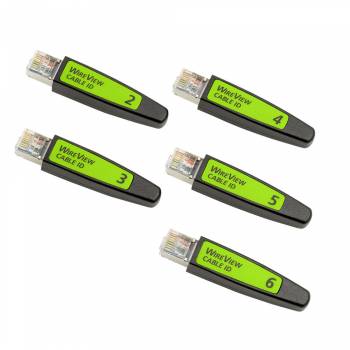
NetAlly WIREVIEW 2-6 Network Tester
| Lieske Part No. | 805725 |
|---|---|
| Mfg Part No | WIREVIEW 2-6 |
| EAN-Code | 0754082026815 |
| Manufacturer | NetAlly |
| Here only | 348,34 EUR
414,52 EUR incl. VAT
|
Further information for NetAlly WIREVIEW 2-6 Network Tester
| General | |
| Manufacturer | NetAlly |
| Product type | WireView Cable ID Set |
| Number of cable IDs | 5 |
| Included IDs | #2 to #6 |
| Application | Copper/Ethernet cabling |
| Main function | Cable identification and Wiremap support |
| Connection | RJ-45 |
| Wiremap | Yes, with compatible NetAlly tester |
| Fault diagnosis | Dependent on the main tester used |
| Supplement to | WIREVIEW 1 |
| Application range | Installation, commissioning, maintenance and troubleshooting |
Applications
The WIREVIEW 2-6 set is primarily used in the installation and maintenance of structured Ethernet cabling. It is ideal for network technicians, installers, and system integrators who need to quickly and securely identify multiple cable runs during rollouts, moves, adds & changes, commissioning, or troubleshooting operations. Cable identification is achieved by connecting the remote adapters at the far end of the line to a compatible NetAlly main tester. This allows the technician to clearly trace the connection between the patch panel port and the respective network outlet at the other end. The application is especially advantageous in office and building cabling, where a large number of cables are installed and clear documentation is required.
Functions and Equipment in Detail
The WireView Cable IDs are compact remote adapters connected to the end of an Ethernet line. They feature an RJ-45 connector that is directly plugged into the network outlet or patch panel. The unique numbering of the IDs (#2 to #6) allows multiple lines to be marked simultaneously. A compatible NetAlly tester recognizes the respective ID and displays it on the screen, enabling immediate assignment of the cable run to a specific port or outlet. The IDs also support Wiremap tests, which check the wiring of individual wire pairs. Common errors such as Open (open circuit), Short (short circuit), Crossed Pairs (crossed wire pairs), or Split Pairs (split wire pairs) can be detected. The fault diagnosis depends on the functionality of the main tester used.
Technology Explained Simply
The WireView technology is based on signal transmission over the network cable. The main tester sends a specific signal, which is received and retransmitted by the respective remote ID. The ID transmits its unique number, which is recognized and displayed by the tester. This enables precise assignment of the cable run without requiring physical presence at both ends of the line. The remote adapters are passive and require no external power supply, as they receive the signal through the cable. Use is exclusively in combination with compatible NetAlly network testers that support the WireView function.
Compatibility and Accessories
The WIREVIEW 2-6 set is designed as a supplement to the WIREVIEW 1-Set. Combined with the WIREVIEW 1-Set (containing ID #1), a total of six different remote IDs are available, enabling identification of up to six cable runs. Compatibility is limited to NetAlly network testers that support the WireView function. The IDs are not intended for use with other manufacturers or devices. Use is exclusively in copper/Ethernet cabling, with the RJ-45 connector being standardized. Functions such as Wiremap testing and fault diagnosis depend on the capabilities of the main tester.
Installation and Mounting
Mounting the WireView Cable IDs is simple and quick. The remote adapters are directly plugged into the network outlet or patch panel at the remote end of the Ethernet cable to be tested. No additional mounting or cabling is required. The IDs are compact and suitable for mobile use, making them ideal for temporary or mobile applications. Installation requires no tools and no special preparation. Cable run assignment is performed via the main tester, which recognizes the ID and displays it on the screen.
Operational Advantages
Using the WIREVIEW 2-6 set significantly reduces the time required for identifying and assigning cable runs. Especially in larger installations with multiple parallel lines, the unique numbering enables fast and error-free documentation. Combining with Wiremap tests increases the reliability of cabling verification, as both the identity and correct wiring of the line are checked. The passive operation of the remote adapters requires no additional power supply, making deployment flexible and uncomplicated. Cable identification is performed without a physical connection to the main tester, making the workflow more efficient.
Note: Batteries are not included in the delivery scope.

This is an offer of:
79279 Vörstetten
https://industry-electronics.com
Tel. 07666/88499-0
Fax. 07666/88499-111
Diesen Artikel finden Sie unter:
industry-electronics.com/artikel/805725

Lieske Elektronik e.K.
Reutener Str. 1079279 Vörstetten
https://industry-electronics.com
Tel. 07666/88499-0
Fax. 07666/88499-111
Diesen Artikel finden Sie unter:
industry-electronics.com/artikel/805725