
Microsoft EP2-20112 Tablet PC Surface Pro11 16GB
Mobile Computing > Tablet PC
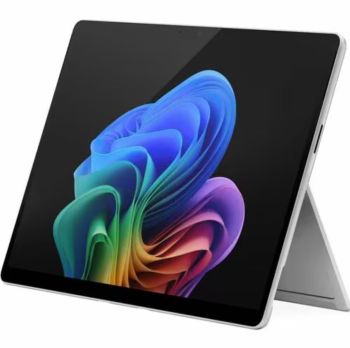
Microsoft EP2-20112 Tablet PC Surface Pro11 16GB
| Lieske Part No. | 225395 |
|---|---|
| Mfg Part No | EP2-20112 |
| EAN-Code | 0196388444892 |
| Manufacturer | Microsoft |
| Here only | 1.653,90 EUR
1.968,14 EUR incl. VAT
|
Further information for Microsoft EP2-20112 Tablet PC Surface Pro11 16GB
| General | |
| Operating system | Microsoft Windows 11 Pro 64bit |
| Processor | Intel Core Ultra 5 (Series 2) 236V |
| Clock frequency | 4,7 GHz |
| Number of cores | 8 |
| NPU | Intel Ai Boost with 40 TOPs |
| Main memory | 16 GB |
| Memory type | LPDDR5x |
| Graphics | Intel Arc Graphics |
| Storage space | 256 GB |
| Storage format | M.2 PCIe 4.0 x4 (2230) |
| Display size | 13 " |
| Display resolution | 2880x1920 |
| Display type | Multi-Touch, Matt |
| Frame rate | 120 Hz |
| Brightness | 600 cd/m² |
| Connections | 2x Thunderbolt 4.0 |
| Camera on the front | 1440p Quad-HD |
| Rear camera | 10 Megapixel |
| WLAN | Wi-Fi 7 |
| Bluetooth | 5.4 |
| NFC | Integrated |
Applications
The Surface Pro 11 is suitable for mobile work environments where flexibility and performance are required simultaneously. It is used in companies that rely on AI-powered applications such as live captioning, speech translation, or the use of Microsoft 365 Copilot. The combination of touch and stylus input, as well as voice control, makes it particularly suitable for teams switching between different work modes, such as presentations, document editing, and digital sketching. The device is also suitable for use in warehouses or on the move, as it features an adjustable kickstand and can be extended with an optional keyboard.
Features and Equipment in Detail
The display has a size of 13 inches (33.02 cm) with a resolution of 2880 x 1920 pixels, corresponding to a pixel density of approximately 266 ppi. It is a multi-touch display with a matte coating, ensuring high readability even in daylight. The refresh rate is 120 Hz, providing smooth motion, and the brightness is 600 cd/m², ensuring good visibility in bright environments. The integrated front camera offers a resolution of 1440p Quad-HD, while the rear camera has 10 megapixels. The camera features support video conferencing and the creation of high-quality images.
Technology Explained Simply
The Intel Core Ultra 5 (Series 2) 236V processor is designed for high efficiency and performance. It enables the simultaneous use of multiple applications, even across two external monitors, and supports local AI workloads. The graphics component is based on Intel Arc Graphics, which is sufficiently powerful for modern applications and multimedia tasks. The memory is 16 GB LPDDR5x and is not expandable, ensuring stable and fast system performance. Storage is provided by a 256 GB SSD in M.2 PCIe 4.0 x4 (2230) format, ensuring fast loading and access times. Connectivity technologies include Wi-Fi 7 (WLAN 802.11a/b/g/n/ac/ax/be) and Bluetooth 5.4, enabling fast and stable network connections. An integrated NFC reader supports passwordless authentication via NFC-enabled badge systems.
Compatibility and Accessories
The Surface Pro 11 is compatible with accessories such as the Surface Slim Pen and optional keyboard, which enhance productivity in the office or on the go. The use of Copilot+ PC features requires the use of Microsoft 365 Copilot and other AI-powered applications specifically developed for this platform. Support for touch, stylus, and voice input enables flexible use depending on the work environment. The connections include two Thunderbolt 4.0 ports, which can be used for both data transfer and power supply.
Mounting and Installation
The device is delivered as a fully configured system. Installation is performed via the integrated Windows 11 Pro 64bit operating system environment. The use of accessories such as keyboard or stylus requires no additional installation, as the devices are recognized via integrated interfaces (Bluetooth, USB-C). Configuration of AI functions is done via the Microsoft 365 platform and requires appropriate licensing.
Advantages in Operation
The combination of mobile flexibility and high performance makes the Surface Pro 11 a powerful tool for mobile teams. The use of AI features such as live captioning or Cocreator in Paint enables more efficient collaboration. Security features, ranging from the chip to the cloud, including Secured-Core-PC status and Microsoft Trusted Security, provide high protection for corporate data. The integrated NFC authentication simplifies secure access to systems and applications without entering passwords.

This is an offer of:
79279 Vörstetten
https://industry-electronics.com
Tel. 07666/88499-0
Fax. 07666/88499-111
Diesen Artikel finden Sie unter:
industry-electronics.com/artikel/225395

Lieske Elektronik e.K.
Reutener Str. 1079279 Vörstetten
https://industry-electronics.com
Tel. 07666/88499-0
Fax. 07666/88499-111
Diesen Artikel finden Sie unter:
industry-electronics.com/artikel/225395