
Microsoft 8WY-00002 Slim Pen 2 pen black
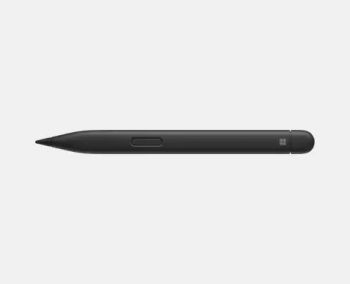
Microsoft 8WY-00002 Slim Pen 2 pen black
| Lieske Part No. | 225969 |
|---|---|
| Mfg Part No | 8WY-00002 |
| EAN-Code | 0889842779141 |
| Manufacturer | Microsoft |
| Here only | 75,40 EUR
89,73 EUR incl. VAT
|
Further information for Microsoft 8WY-00002 Slim Pen 2 pen black
| General | |
| Current supply | Accu |
| Battery runtime | up to 15 Hours |
| Suitable for | Surface Pro, Surface Duo, Surface Go, Surface Hub, Surface Laptop, Surface Studio, Surface Book |
| Colour | matt black |
Applications
The pen is compatible with a wide range of Surface models, including Surface Pro, Surface Duo, Surface Go, Surface Hub, Surface Laptop, Surface Studio, and Surface Book. This compatibility makes it a universal accessory for users who switch between different devices or wish to use a consistent input device across multiple devices. Application areas range from creative tasks such as digital drawing and sketching to productive tasks such as text composition or presentation design.
Functions and Equipment in Detail
The Surface Slim Pen 2 is an active input pen powered by an integrated battery. The battery life lasts up to 15 hours, enabling continuous use over an extended period without frequent recharging. The battery life is sufficient for daily use in office and mobile work environments. The pen features a tap function activated by pressing the tip, serving as a context menu or click function. This function enhances efficiency when operating software applications.
Technology Explained Simply
As an active pen, the Surface Slim Pen 2 operates using capacitive technology, enabling precise detection of touch on the display. The sensitivity is designed to allow fine lines and detailed drawings. Power is supplied by an internal battery, which can be charged via the Surface device as soon as the pen is connected to it.
Compatibility and Accessories
The pen is compatible with the mentioned Surface models that support pen functionality.
Installation and Mounting
Installation of the pen requires no additional software or physical mounting. The pen is simply placed on the display, and the connection is established automatically. Recognition is achieved via the capacitive technology of the display. Manual configuration or installation is not required. Charging is performed via the Surface device once the pen is connected.
Advantages in Operation
The pen offers high precision in interacting with the display, which is particularly beneficial for creative or text-based tasks. The long battery life of up to 15 hours reduces the need for frequent recharging. The ergonomic design ensures comfortable handling, and the tap function increases efficiency during use. Compatibility with a wide range of Surface models makes it a universally applicable accessory.

This is an offer of:
79279 Vörstetten
https://industry-electronics.com
Tel. 07666/88499-0
Fax. 07666/88499-111
Diesen Artikel finden Sie unter:
industry-electronics.com/artikel/225969

Lieske Elektronik e.K.
Reutener Str. 1079279 Vörstetten
https://industry-electronics.com
Tel. 07666/88499-0
Fax. 07666/88499-111
Diesen Artikel finden Sie unter:
industry-electronics.com/artikel/225969