
Manhattan 341158 PS2-USB Adapter Female to Male
Accessories > Cable / Adapter > PS2
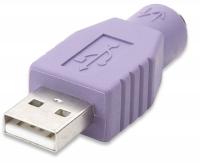
Manhattan 341158 PS2-USB Adapter Female to Male
| Lieske Part No. | 838002 |
|---|---|
| Mfg Part No | 341158 |
| EAN-Code | |
| Manufacturer | Manhattan |
| Here only | 0,46 EUR
0,55 EUR incl. VAT
|
Further information for Manhattan 341158 PS2-USB Adapter Female to Male
| Performance | |
| Product colour | Lilac |
| Ports & interfaces | |
| Connector 1 | 1x USB M |
| Connector 2 | 1x PS/2 F |
| Connector 1 gender | Male |
| Connector 2 gender | Female |
Applications
The adapter is suitable for environments where PS/2 peripherals are still in use, for example in office installations, industrial workstations, or with older computer systems that lack PS/2 ports. It serves as a transitional solution to continue using existing keyboards or mice without replacement.
Features and equipment in detail
The adapter provides the physical connection between the two interfaces without any active signal conversion or electronic control. It is a passive adapter that does not offer additional functions such as power supply or data processing. Compatibility is limited to PS/2 devices equipped with a standard PS/2 plug.
Technology explained simply
The adapter operates without electronic components that convert or process signals. It serves only as a mechanical transition, with electrical signals transmitted directly between the connectors. As a passive adapter, no external power supply is required. The connection is made via standard interfaces: USB Type A plug (male) and PS/2 socket (female). The purple colour serves visual distinction and is not a technical feature.
Compatibility and accessories
The adapter is designed for PS/2 keyboards and mice equipped with a standard PS/2 plug. The connection is made to a USB port, which must be available on a computer, notebook, or other USB-capable device. For broader compatibility, article 364966 is recommended, described as a universal solution.
Installation and mounting
Installation is performed by simply inserting the USB plug into an available USB port and then connecting the PS/2 device (keyboard or mouse) into the PS/2 socket of the adapter. No additional steps, such as driver installation or configuration, are required. The connection is automatically recognised as soon as the device is plugged in.
Advantages in operation
The adapter enables the reuse of PS/2 peripherals on USB-capable systems, which is beneficial during workstation modernisation or when using older devices. The simple handling and direct connection without additional software or configuration simplify use. The purple colour supports quick identification in cable clutter. As a passive adapter, no power supply is required, and there are no additional components that need maintenance or replacement.

This is an offer of:
79279 Vörstetten
https://industry-electronics.com
Tel. 07666/88499-0
Fax. 07666/88499-111
Diesen Artikel finden Sie unter:
industry-electronics.com/artikel/838002

Lieske Elektronik e.K.
Reutener Str. 1079279 Vörstetten
https://industry-electronics.com
Tel. 07666/88499-0
Fax. 07666/88499-111
Diesen Artikel finden Sie unter:
industry-electronics.com/artikel/838002