
Lenovo 4X90S91831 USB-C Ethernet Adapter
Accessories > Cable / Adapter > USB
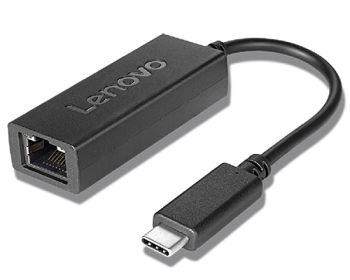
Lenovo 4X90S91831 USB-C Ethernet Adapter
| Lieske Part No. | 1491710 |
|---|---|
| Mfg Part No | 4X90S91831 |
| EAN-Code | 0193124150345 |
| Manufacturer | Lenovo |
| Here only | 20,61 EUR
24,53 EUR incl. VAT
|
Further information for Lenovo 4X90S91831 USB-C Ethernet Adapter
| Design | |
| Product colour | Black |
| Internal | |
| Logistics data | |
| Harmonized System (HS) code | 85176990 |
| Ports & interfaces | |
| Connectivity technology | Wired |
| Host interface | USB Type-C |
| Interface | Ethernet |
| Ethernet LAN (RJ-45) ports | 1 |
| Weight & dimensions | |
| Weight | 44 g |
Applications
The adapter is designed for use in office environments, home offices, and IT administration tasks. It is especially suitable for tasks requiring a stable and fast network connection, such as system imaging or transferring large data volumes. Its compact design and plug-and-play functionality facilitate use while traveling or in mobile work environments.
Functions and Equipment in Detail
The device features a single Ethernet LAN port (RJ-45) and is designed as external accessory, not integrated into the end device. The transmission technology is wired, requiring a direct physical connection to the network. The USB Type-C host interface enables connection to modern devices supporting this port. The adapter is black, allowing seamless integration into work environments.
Technology Explained Simply
The adapter acts as a bridge between the USB-C port of the end device and the Ethernet network. Data transfer and power supply (if required) are handled via the USB-C cable. The RJ-45 interface allows connection to a network cable (Cat 5e, Cat 6 or higher), which is connected to a switch, router, or network socket.
Compatibility and Accessories
The adapter is intended for ThinkPad models such as the X1 Carbon (7th generation), E15, as well as ThinkBook 13, 14, 15, and ThinkCentre M75. Compatibility with other USB-C-enabled devices is also available, provided the operating systems support the required drivers.
Installation and Mounting
Installation is done by simply plugging the USB-C end into the corresponding port on the device and connecting the RJ-45 connector to a network cable. Most operating systems automatically detect the adapter and install the necessary drivers without additional user input.
Advantages in Operation
The adapter provides a reliable and stable network connection independent of WLAN signals. This is particularly beneficial in environments with high network load or when transferring large data volumes. The compact design and low weight of 44 g enable easy portability and use on the go. The plug-and-play functionality reduces setup time and simplifies the user experience.

This is an offer of:
79279 Vörstetten
https://industry-electronics.com
Tel. 07666/88499-0
Fax. 07666/88499-111
Diesen Artikel finden Sie unter:
industry-electronics.com/artikel/1491710

Lieske Elektronik e.K.
Reutener Str. 1079279 Vörstetten
https://industry-electronics.com
Tel. 07666/88499-0
Fax. 07666/88499-111
Diesen Artikel finden Sie unter:
industry-electronics.com/artikel/1491710