
Lenovo 13AY004FGE CMU All-in-One
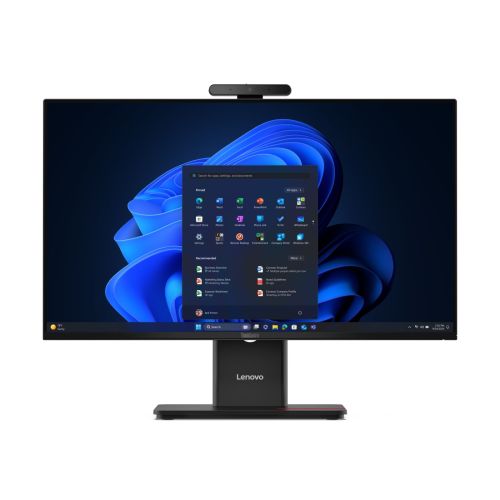
Lenovo 13AY004FGE CMU All-in-One
| Lieske Part No. | 157726 |
|---|---|
| Mfg Part No | 13AY004FGE |
| EAN-Code | 0828132231815 |
| Manufacturer | Lenovo |
| Here only | 1.115,83 EUR
1.327,84 EUR incl. VAT
|
Further information for Lenovo 13AY004FGE CMU All-in-One
| Audio | |
| Number of loudspeakers | 2 |
| RMS power | 4 W |
| Built-in speakers | |
| Built-in microphone | |
| Camera | |
| Total megapixels | 5 MP |
| Type of privacy | Privacy shield |
| Integrated camera | |
| Privacy camera | |
| Connections and interfaces | |
| Number of Ethernet LAN ports (RJ-45) | 1 |
| USB 3.2 Gen 1 (3.1 Gen 1) number of Type A connectors | 2 |
| USB 3.2 Gen 2 (3.1 Gen 2) number of Type A connectors | 3 |
| USB 3.2 Gen 2 (3.1 Gen 2) number of Type C connectors | 1 |
| Number of HDMI connectors | 1 |
| Number of DisplayPort connectors | 1 |
| Combined headphone/microphone connector | |
| Design | |
| Product colour | Black |
| Slot type cable lock | Kensington |
| Cable lock slot | |
| Display | |
| Screen diagonal | 60,5 cm (23.8") |
| Display resolution | 1920 x 1080 pixels |
| HD type | Full HD |
| Native aspect ratio | 16:9 |
| Brightness | 250 cd/m² |
| Panel type | IPS |
| RGB colour space | sRGB |
| Colour scale | 99% |
| Touchscreen | |
| Glare-free screen | |
| Energy | |
| Power supply rating | 90 W |
| Functions | |
| Product type | All-in-One PC |
| Motherboard chipset | Intel Q870 |
| Trusted Platform Module (TPM) version | 2.0 |
| Trusted Platform Module (TPM) | |
| Graphics | |
| Separate graphics card model | Not available |
| Integrated graphics card model | Intel Graphics |
| Separate graphics adapter | |
| Integrated graphics adapter | |
| Memory | |
| Memory capacity | 16 GB |
| Internal memory type | DDR5-SDRAM |
| Maximum RAM memory | 64 GB |
| Memory card slots | 2 |
| RAM type | SO-DIMM |
| Memory clock frequency | 5600 MHz |
| Memory layout | 1 x 16 GB |
| Memory form factor | DIMM/SO-DIMM |
| Memory medium | |
| Total memory capacity | 512 GB |
| Storage media | SSD |
| Total SSD capacity | 512 GB |
| Number of installed SSDs | 1 |
| SSD storage capacity | 512 GB |
| SSD interface | PCI Express 4.0 |
| SSD form factor | M.2 |
| NVMe | |
| Optical drive - type | |
| Network | |
| Top WLAN standard | Wi-Fi 7 (802.11be) |
| WLAN standards | Wi-Fi 7 (802.11be) |
| Antenna type | 2x2 |
| Ethernet LAN data transfer rates | 100,1000 Mbit/s |
| Bluetooth version | 5.4 |
| WLAN | |
| Ethernet/LAN | |
| Bluetooth | |
| Processor | |
| Processor manufacturer | Intel |
| Processor family | Intel Core Ultra 5 |
| Processor | 225T |
| Number of processor cores | 10 |
| Scope of delivery | |
| Mouse connectivity | cable-bound |
| Keyboard connectivity | cable-bound |
| Keyboard language | German |
| Mouse included | |
| Keyboard included | |
| Software | |
| Operating system language | German |
| Installed operating system | Windows 11 Pro |
| Weight and dimensions | |
| Device width (including stand) | 539,6 mm |
| Device depth (including stand) | 213,1 mm |
| Device height (including stand) | 437 mm |
| Weight (including stand) | 7,12 kg |
Applications
The ThinkCentre M70a Gen 6 is suitable for general office applications such as word processing, spreadsheet calculations, presentations and web browser use. The integrated camera with 5 megapixels and a privacy shutter provides the option for video conferencing, with privacy protected by the mechanical shutter. Integrated speakers with an RMS power of 4 W and a built-in microphone enable basic audio functionality without additional peripherals. The device is intended for indoor use and does not offer special protection against dust or moisture.
Functions and equipment in detail
The system is equipped with an Intel Core Ultra 5 225T processor featuring 10 cores, providing efficient performance for multiple simultaneous tasks. The memory consists of 16 GB DDR5-SDRAM with a clock speed of 5600 MHz, configured as 1 x 16 GB. Maximum memory capacity is 64 GB, with two memory card slots available. The memory is in SO-DIMM form factor. The storage medium is a 512 GB SSD in M.2 form factor with PCI Express 4.0 interface and NVMe support, ensuring fast boot and access times. No optical drive is included.
Technology explained simply
The integrated graphics are based on Intel graphics technology, sufficient for everyday office and multimedia use. Network functions include Wi-Fi 7 (802.11be) with 2x2 antennas, enabling stable and fast wireless connectivity. Ethernet is supported via an RJ-45 port with data rates of 100 and 1000 Mbit/s. Bluetooth 5.4 allows connection to compatible devices such as headphones or keyboards. The connections include two USB 3.2 Gen 1 (3.1 Gen 1) Type A, three USB 3.2 Gen 2 (3.1 Gen 2) Type A, one USB 3.2 Gen 2 (3.1 Gen 2) Type C, one HDMI port, one DisplayPort port, and a combined headphone/microphone jack.
Compatibility and accessories
The device is pre-configured with Windows 11 Pro and supports the use of Microsoft Office applications and other software solutions. The motherboard chipset is Intel Q870, and the system includes a Trusted Platform Module (TPM) version 2.0, providing additional security features for data encryption and authentication. The operating system language is German. The delivery includes a wired keyboard in German language and a wired mouse.
Mounting and installation
The device is delivered in a compact, black-painted housing with an integrated stand. Dimensions are 539.6 mm (width), 213.1 mm (depth), and 437 mm (height), with a weight of 7.12 kg. A Kensington slot is included to secure the device against theft. Installation involves connecting to power and network, and connecting peripheral devices. The operating system installation is already completed.
Advantages in operation
The ThinkCentre M70a Gen 6 offers a compact and efficient workstation with good performance for office applications. The combination of modern hardware, integrated audio and video functions, and extensive connectivity options makes the device a versatile solution. Integrated security via TPM 2.0 and wired peripherals ensure stable and secure operation. The device is designed for use in offices and workstations where a clear separation between hardware and workspace is desired.

This is an offer of:
79279 Vörstetten
https://industry-electronics.com
Tel. 07666/88499-0
Fax. 07666/88499-111
Diesen Artikel finden Sie unter:
industry-electronics.com/artikel/157726

Lieske Elektronik e.K.
Reutener Str. 1079279 Vörstetten
https://industry-electronics.com
Tel. 07666/88499-0
Fax. 07666/88499-111
Diesen Artikel finden Sie unter:
industry-electronics.com/artikel/157726