
Kyocera 1505J40UN0 SSD hard drive 32 GB
Printers/Scanners > Printer Accessories > Memory
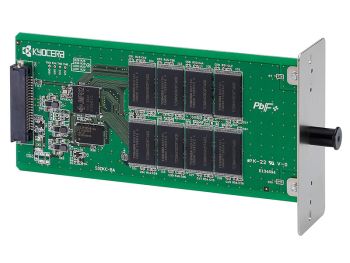
Kyocera 1505J40UN0 SSD hard drive 32 GB
| Lieske Part No. | 124130 |
|---|---|
| Mfg Part No | 1505J40UN0 |
| EAN-Code | 0632983026533 |
| Manufacturer | Kyocera |
| Here only | 200,26 EUR
238,31 EUR incl. VAT
|
Further information for Kyocera 1505J40UN0 SSD hard drive 32 GB
| Features | |
| SSD capacity | 32 GB |
| Logistics data | |
| Harmonized System (HS) code | 84717070 |
| Other features | |
| Product colour | Black, Green |
| Compatible products | Kyocera FS-2100D, FS-2100DN, FS-4100DN, FS-4200DN, FS-4300DN |
| Internal | |
Applications
The SSD module is used in office and production environments where high print speed and the ability to process multiple print jobs in parallel are required. By storing print data on the SSD, the printer can quickly and simultaneously output multiple copies of a document, which is particularly advantageous when using the electronic sorting function. Additionally, the module enables the use of document box functions, allowing documents to be stored and printed later on demand.
Functions and Equipment in Detail
The device features an SSD storage capacity of 32 GB, sufficient to store and process multiple print jobs simultaneously. The integrated design ensures a direct connection to the printer system, eliminating the need for additional connections or external devices. The product colour is available in black and green, with the colour having no impact on functionality but serving only for visual differentiation.
Technology Explained Simply
The SSD (Solid State Drive) is a non-volatile storage device that, unlike conventional hard drives, has no moving parts. This results in higher reliability, lower heat generation, and faster access times. Storing print data on the SSD allows the printer to rasterize the data in advance (convert it into pixels) and keep it ready in memory. This enables the printer to retrieve data directly from memory when outputting multiple copies of a document, without reloading from the source each time, thereby increasing print speed.
Compatibility and Accessories
The SSD module is exclusively intended for the specified Kyocera printer models: FS-2100D, FS-2100DN, FS-4100DN, FS-4200DN, and FS-4300DN. It is not suitable for other devices or brands. Compatibility is confirmed by the manufacturer’s specifications.
Installation and Mounting
The module is installed, meaning it is physically integrated into the printer. Installation is performed by inserting the module into the designated slot inside the printer. No additional tools or components are required.
Operational Advantages
Using the SSD in the printer increases print speed for multiple copies, as data is already prepared in memory. The electronic sorting function can be used more efficiently, as print jobs are stored in memory and do not need to be reloaded. Additionally, the document box function enables storing documents for later printing, optimizing workflows in office environments. The SSD is robust and maintenance-free, as it contains no moving parts.

This is an offer of:
79279 Vörstetten
https://industry-electronics.com
Tel. 07666/88499-0
Fax. 07666/88499-111
Diesen Artikel finden Sie unter:
industry-electronics.com/artikel/124130

Lieske Elektronik e.K.
Reutener Str. 1079279 Vörstetten
https://industry-electronics.com
Tel. 07666/88499-0
Fax. 07666/88499-111
Diesen Artikel finden Sie unter:
industry-electronics.com/artikel/124130