
Inline 33390C
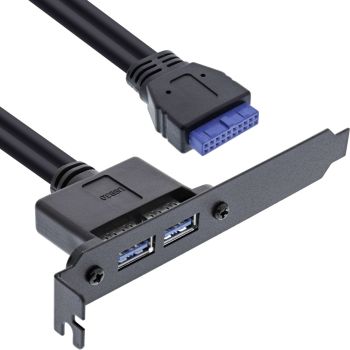
Inline 33390C
| Lieske Part No. | 22194703 |
|---|---|
| Mfg Part No | 33390C |
| EAN-Code | 4043718188031 |
| Manufacturer | Inline |
| Here only | 15,68 EUR
18,66 EUR incl. VAT
|
Further information for Inline 33390C
| Features | |
| Connector 1 gender | Female |
| Connector 2 gender | Female |
| Other features | |
| Cable length | 0.5 m |
| Dimensions (WxDxH) | 120 x 585 x 22 mm |
| Packaging data | |
| Quantity per pack | 1 pc(s) |
| Package width | 122 mm |
| Package depth | 220 mm |
| Package height | 35 mm |
| Package weight | 107 g |
| Package volume | 700 cm³ |
| Technical data | |
| Width packaging | 0.122m |
| Cable length | 0.50m |
| USB specification | USB 3.2 Gen.1 |
| Article height | 2.20cm |
| Connections internal | 19pin. Motherboard connector |
| Transmission rate | 5Gb/s |
| Length packaging | 0.220m |
| Type | USB 3.2 |
| Article width | 12.00cm |
| Packaging volume | 0.0007m³ |
| Article length | 58.50cm |
| Connections external | 2x USB-A socket |
| Height packaging | 0.035m |
| Net weight | 0.082kg |
| PU | 1Pieces |
| Weight | 0.107kg |
| Low Profile | |
| Weight & dimensions | |
| Width | 120 mm |
| Depth | 585 mm |
| Height | 22 mm |
| Weight | 82 g |
Quick expansion without modifications: Insert into a free slot and connect to the 19-pin motherboard header.
Clean cable management: Cable length approx. 0.5 m for flexible routing inside the case.
Reliable connectivity: Direct connection to the motherboard for stable USB connections.
The slot bracket routes the internal USB 3.2 Gen.1 motherboard connector to the outside and provides two USB-A ports on the rear of the case. This allows you to use additional USB ports when front ports are occupied or more ports are needed. Setup is straightforward: Insert the slot bracket and connect the 19-pin motherboard header.
In professional IT environments and in on-site deployments, it complements existing systems with minimal effort and improves the accessibility of USB ports. It also simplifies temporary device connections in service deployments and in companies and public institutions, providing a tidy access point at the rear of the case.
External connection: 2x USB-A ports
Internal connection: 19-pin motherboard header
Standard: USB 3.2 Gen.1
Length: approx. 0.5 m

This is an offer of:
79279 Vörstetten
https://industry-electronics.com
Tel. 07666/88499-0
Fax. 07666/88499-111
Diesen Artikel finden Sie unter:
industry-electronics.com/artikel/22194703

Lieske Elektronik e.K.
Reutener Str. 1079279 Vörstetten
https://industry-electronics.com
Tel. 07666/88499-0
Fax. 07666/88499-111
Diesen Artikel finden Sie unter:
industry-electronics.com/artikel/22194703