
Inline 17168P
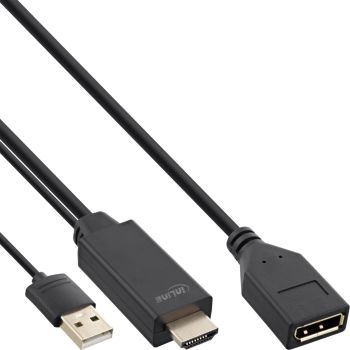
Inline 17168P
| Lieske Part No. | 22193525 |
|---|---|
| Mfg Part No | 17168P |
| EAN-Code | 4043718292660 |
| Manufacturer | Inline |
| Here only | 23,10 EUR
27,49 EUR incl. VAT
|
Further information for Inline 17168P
| Features | |
| Connector 1 form factor | Straight |
| Connector 2 form factor | Straight |
| Connector contacts plating | Gold |
| Power source | USB |
| Cable length | 0.3 m |
| Connector 1 | HDMI Type A (Standard) |
| Connector 2 | DisplayPort |
| Connector 1 gender | Male |
| Connector 2 gender | Female |
| Maximum resolution | 3840 x 2160 pixels |
| Supported graphics resolutions | 3840 x 2160 |
| Maximum refresh rate | 30 Hz |
| Product colour | Black |
| Other features | |
| Dimensions (WxDxH) | 21 x 300 x 14 mm |
| Packaging data | |
| Package width | 100 mm |
| Package depth | 100 mm |
| Package height | 13 mm |
| Package weight | 52 g |
| Package volume | 200 cm³ |
| Technical data | |
| Side A | HDMI A male + USB A male |
| Signal | Video |
| Length packaging | 0.100m |
| Side B | DisplayPort female |
| Width packaging | 0.100m |
| Outer diameter | 5.0mm |
| Article length | 30.00cm |
| Height packaging | 0.013m |
| Weight | 0.052kg |
| Maximum display resolution | 3840x2160 @60Hz |
| Length | 0.30m |
| Article width | 2.10cm |
| Packaging volume | 0.0002m³ |
| Article height | 1.40cm |
| Net weight | 0.045kg |
| Colour | Black |
| Gold plated contacts | |
| Active cable | |
| UL | |
| Weight & dimensions | |
| Weight | 45 g |
| Width | 21 mm |
| Depth | 300 mm |
| Height | 14 mm |
Active signal conversion with USB power: Conversion is electronic; you supply power via 5 V/500 mA over USB on the HDMI side.
Clear display up to UHD: Use resolutions up to 3840x2160 @ 30 Hz for sharp images.
Reliable contact: Gold-plated contacts support a stable connection.
With this converter cable, you connect a DisplayPort monitor to an HDMI source. The HDMI signal is actively converted to DisplayPort; additional power is supplied via the integrated USB A plug (5 V/500 mA) on the HDMI side. This allows the use of resolutions up to UHD 3840x2160 @ 30 Hz.
In professional IT environments, for on-site installations and service deployments, you bridge interfaces without fully replacing devices. In existing infrastructures of companies and public institutions, you integrate monitors quickly and neatly at workstations and in meeting rooms.
Connector: HDMI A plug to DisplayPort socket
Power supply: USB A plug, 5 V/500 mA (on HDMI side)
Resolution: up to 3840x2160 @ 30 Hz (UHD)
Type: Active HDMI-to-DisplayPort converter
Length: 0.3 m
Color: black
Contacts: gold-plated

This is an offer of:
79279 Vörstetten
https://industry-electronics.com
Tel. 07666/88499-0
Fax. 07666/88499-111
Diesen Artikel finden Sie unter:
industry-electronics.com/artikel/22193525

Lieske Elektronik e.K.
Reutener Str. 1079279 Vörstetten
https://industry-electronics.com
Tel. 07666/88499-0
Fax. 07666/88499-111
Diesen Artikel finden Sie unter:
industry-electronics.com/artikel/22193525