
HP L31859-001
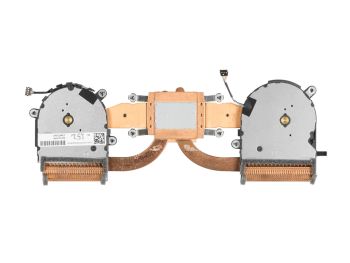
HP L31859-001
| Lieske Part No. | 549794 |
|---|---|
| Mfg Part No | L31859-001 |
| EAN-Code | |
| Manufacturer | HP |
| Here only | 84,56 EUR
100,63 EUR incl. VAT
|
Further information for HP L31859-001
| Features | |
| Type | Heatsink |
| Brand compatibility | HP |
| Compatibility | EliteBook x360 1030 G3 |
| Packaging content | |
| Quantity per pack | 1 pc(s) |
Applications
The heat sink is exclusively intended for use in the HP EliteBook x360 1030 G3. It replaces the original heat sink installed in the device when it is defective, dirty, or impaired by wear. Maintenance or repair of the laptop requires replacing this part in such cases to restore cooling performance and avoid thermal overload.
Functions and Features in Detail
The heat sink is responsible for dissipating heat from hot components and transferring it to the environment via a large surface area. It is designed to match the internal layout of the EliteBook x360 1030 G3, ensuring secure mounting and optimal heat dissipation. The exact shape, material composition, and connection points are designed to be compatible with the internal components of the laptop. The item is delivered in a package containing 1 piece.
Technology Explained Simply
A heat sink typically consists of a metallic body that increases heat dissipation through its surface and often through fins or ribs. In notebooks such as the EliteBook x360 1030 G3, it is usually used in combination with a fan to support airflow. However, this article includes only the heat sink itself, without an integrated fan. Heat is transferred from the CPU/GPU to the heat sink via thermal paste or thermal tape, from where it is dissipated through convection and, if applicable, fan-assisted airflow.
Compatibility and Accessories
The heat sink is compatible with the HP EliteBook x360 1030 G3. It is not intended for other models, even if they have similar designations. Brand compatibility is limited to HP. Installation requires knowledge of the laptop’s internal construction to ensure correct mounting.
Installation and Mounting
Installing the heat sink requires opening the laptop chassis, removing the old heat sink, and mounting the new one. Care must be taken to ensure correct alignment and the use of thermal paste or thermal tape to guarantee optimal heat transfer. Installation should be carried out by qualified personnel or experienced technicians to avoid damaging the device.
Advantages in Operation
A functional heat sink ensures that the laptop does not overheat under heavy load. This extends the lifespan of internal components and prevents performance throttling or system crashes. Using an original replacement part such as the HP L31859-001 ensures optimal fit and thermal performance, meeting the manufacturer’s specifications. Reliability during operation is enhanced through proper cooling, especially during prolonged work sessions or high computational loads.

This is an offer of:
79279 Vörstetten
https://industry-electronics.com
Tel. 07666/88499-0
Fax. 07666/88499-111
Diesen Artikel finden Sie unter:
industry-electronics.com/artikel/549794

Lieske Elektronik e.K.
Reutener Str. 1079279 Vörstetten
https://industry-electronics.com
Tel. 07666/88499-0
Fax. 07666/88499-111
Diesen Artikel finden Sie unter:
industry-electronics.com/artikel/549794