
HP H4F02AA HDMI to VGA Adapter
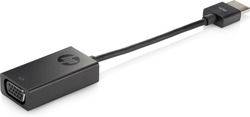
HP H4F02AA HDMI to VGA Adapter
| Lieske Part No. | 1674417 |
|---|---|
| Mfg Part No | H4F02AA |
| EAN-Code | 0887111282125 |
| Manufacturer | HP |
| Here only | 27,58 EUR
32,82 EUR incl. VAT
|
Further information for HP H4F02AA HDMI to VGA Adapter
| Features | |
| Cable length | 0.045 m |
| Connector 1 | HDMI |
| Connector 2 | VGA (D-Sub) |
| Connector 1 gender | Male |
| Connector 2 gender | Female |
| Product colour | Black |
| Country of origin | China, South Korea |
| Windows operating systems supported | Windows XP Professional, Windows XP Home, Windows XP, Windows Vista x64, Windows Vista, Windows 7 x64, Windows 7 |
| HP segment | Business |
| Logistics data | |
| UNSPSC-code | 26121630 |
| Harmonized System (HS) code | 84733080 |
| Other features | |
| Compatible products | HP Folio 13 HP Envy 4 HP SpectreXT HP ProBook 4230s, 4330s, 4340s, 4341s, 4430s, 4431s, 4435s, 4436s, 4440s, 4441s, 4446s, 4530s, 4540s, 4535s, 4545s, 4730s, and 4740s Notebook PCs HP 430, 431, 435, 436, 450, 455, 630, 631, 635, 636, 650, and 655 Notebook PCs HP ProBook 5330m Notebook PC |
| Technical details | |
| Box contents | HP HDMI to VGA Adapter; Warranty Card; Quick Installation Guide |
| Weight & dimensions | |
| Weight | 40 g |
| Width | 18 mm |
| Depth | 54 mm |
| Height | 160.2 mm |
Applications
The adapter is designed for use in office environments where connecting a second screen increases work productivity. It enables the connection of projectors, monitors, or other VGA-compatible display devices to HP notebooks equipped with an HDMI output. Its use is particularly intended for users of HP Business notebooks who require flexible display configurations without sacrificing integrated graphics functionality.
Functions and Features in Detail
The adapter converts digital HDMI signals into analog VGA signals, enabling video output on older or specific VGA displays. The signal conversion requires no additional power supply, as the adapter receives all necessary power and data transmission through the HDMI cable. The cable length of 0.045 m ensures a compact design, suitable for use in confined workspaces. The black finish matches typical notebook and office equipment aesthetics. The VGA socket (D-Sub) is standard for connecting to VGA displays, while the HDMI plug fits directly into the laptop’s HDMI port.
Technology Explained Simply
The adapter functions as a signal converter between two different connection standards: HDMI (digital) and VGA (analog). Since HDMI and VGA use different signal formats, conversion is required to correctly display video information on a VGA screen. The adapter performs this conversion internally, without requiring additional devices or external power sources. The cable length of 0.045 m is sufficient to attach the adapter directly to the laptop while enabling a connection to a nearby display. The weight of 40 g indicates that this is a lightweight, portable device, ideal for travel or mobile work environments.
Compatibility and Accessories
The adapter is specifically designed for a range of HP notebooks, including models from the HP Folio 13, HP Envy 4, HP SpectreXT series, as well as various HP ProBook models (e.g. 4230s, 4330s, 4430s, 4530s, 4730s) and HP 430/450/630 series. Compatibility is limited to these models, as the signal conversion is tailored to the specific output profiles of these devices.
Installation and Mounting
Installation involves simply plugging the HDMI plug into the notebook’s HDMI output and connecting the VGA socket to the corresponding input on the external display. No additional tools or software installation are required. The connection is automatically detected once the display is powered on. The cable length of 0.045 m requires close proximity between the laptop and display, so placement of both devices within the workspace must be considered.
Operational Advantages
Using the adapter allows for extension of display functions without additional hardware or software. The signal conversion occurs without external power supply, simplifying handling. The compact size and low weight (40 g) make the adapter a practical tool for mobile work environments. Compatibility with specific HP notebooks ensures reliable signal transmission and image quality sufficient for office applications. The black finish blends visually into typical office environments.
Note: Batteries or other accessories are not included in the delivery scope.

This is an offer of:
79279 Vörstetten
https://industry-electronics.com
Tel. 07666/88499-0
Fax. 07666/88499-111
Diesen Artikel finden Sie unter:
industry-electronics.com/artikel/1674417

Lieske Elektronik e.K.
Reutener Str. 1079279 Vörstetten
https://industry-electronics.com
Tel. 07666/88499-0
Fax. 07666/88499-111
Diesen Artikel finden Sie unter:
industry-electronics.com/artikel/1674417