
HP 2DW53AA Mounting Bracket Desk Stand
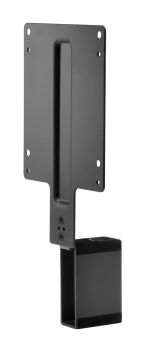
HP 2DW53AA Mounting Bracket Desk Stand
| Lieske Part No. | 834549 |
|---|---|
| Mfg Part No | 2DW53AA |
| EAN-Code | 0191628141197 |
| Manufacturer | HP |
| Here only | 34,96 EUR
41,60 EUR incl. VAT
|
Further information for HP 2DW53AA Mounting Bracket Desk Stand
| Packaging data | |
| Package width | 285 mm |
| Package depth | 135 mm |
| Package height | 85 mm |
| Package weight | 450 g |
| Screws included | |
| Technical details | |
| Product colour | Black |
| UNSPSC-code | 31162313 |
| Country of origin | China |
| Total carbon footprint (kg of CO2e) | 1.2 |
| General Product Safety Regulation (GPSR) URL | https://support.hp.com/us-en/document/ish_6126692-6126777-16?openCLC=true |
| Compatibility | Desktop PCs: Compatible with HP Desktop Mini Business PCs and HP Chromebox that have a 100 mm x 100 mm VESA mount.; Thin Clients: Compatible with most HP Thin Clients that have a 100 mm x 100 mm VESA mount.; Workstations: Compatible with HP Workstation Mini that have a 100mm x 100mm VESA mount (select displays only, not all displays can support weight of Z2 Mini) |
| Panel mounting interface | 100 x 100 mm |
| HP segment | Business |
| VESA mounting | |
| Weight & dimensions | |
| Weight | 318 g |
| Width | 246.3 mm |
| Depth | 115 mm |
| Height | 51.9 mm |
Applications
The mounting bracket is primarily designed for office environments where a compact and tidy workspace is required. It is recommended for use with HP displays equipped with a VESA mounting (100 x 100 mm), particularly HP EliteDisplays from 2017 and 2018, as well as HP Z Displays. When used with the HP Workstation Mini, note that not all monitors can support the weight of the Z2 Mini — compatibility is therefore limited to specific monitor models.
Features and Equipment in Detail
The bracket provides a stable mounting solution for small PC systems, allowing them to be mounted directly behind the monitor. This frees up more desk space. Installation is done via the VESA mounting, with the bracket itself secured using screws. The package includes the HP B300 PC mounting bracket, a DisplayPort cable with a length of 700 mm, a USB A-to-B cable also 700 mm in length, and screws in two sizes (4 x 6 mm and 4 x 10 mm). Additionally, a quick installation guide is included. The cables are kept short to minimize cable clutter and enable neat cabling.
Technology Explained Simply
The mounting bracket uses the VESA mounting (100 x 100 mm), a globally recognized standard for securing monitors and other devices. This standard enables compatibility with a wide range of devices supporting this interface. The bracket itself is made from robust material and measures 246.3 mm (width) x 115 mm (depth) x 51.9 mm (height), with a weight of 318 g. The design ensures that monitor functions such as tilt, height, swivel, and rotation are not impaired. Installation is at the rear of the display stand, preserving the original adjustment capabilities of the monitor.
Compatibility and Accessories
The bracket is compatible with HP Desktop Mini-Business PCs, HP Chromebox, most HP Thin Clients, and the HP Workstation Mini, provided they feature a VESA mounting (100 x 100 mm). Use is restricted to specific HP EliteDisplays (2017 and 2018) and HP Z Displays. When using the HP Workstation Mini, note that not all monitors can support the weight of the Z2 Mini. The bracket is not suitable for all monitors, only those supporting the VESA mounting (100 x 100 mm) and mechanically designed for the load. The included cables (DisplayPort and USB A-to-B) are intended for connecting the PC to the monitor and support the required interfaces.
Installation and Mounting
Installation involves securing the bracket to the rear of the display stand using the included screws. The PC platform is then mounted onto the bracket. The quick installation guide included in the package provides step-by-step instructions. Installation is straightforward and requires no special tools beyond a screwdriver. The bracket is designed to not interfere with the original adjustment features of the monitor.
Operational Advantages
Using the HP B300 PC mounting bracket results in a tidier workspace, as the PC is mounted directly behind the monitor. This reduces desk space requirements and minimizes cable clutter. The included cables are kept short, keeping cabling neat. The bracket also allows continued use of monitor functions such as tilt, height, swivel, and rotation. The warranty is one year, with additional support available 24/7 via phone and online forums. The bracket is designed for business environments and provides a reliable mounting solution for small PC systems.

This is an offer of:
79279 Vörstetten
https://industry-electronics.com
Tel. 07666/88499-0
Fax. 07666/88499-111
Diesen Artikel finden Sie unter:
industry-electronics.com/artikel/834549

Lieske Elektronik e.K.
Reutener Str. 1079279 Vörstetten
https://industry-electronics.com
Tel. 07666/88499-0
Fax. 07666/88499-111
Diesen Artikel finden Sie unter:
industry-electronics.com/artikel/834549