
GN Audio 14201-33 ACCS EHS Adapter
Telecommunication > Headsets
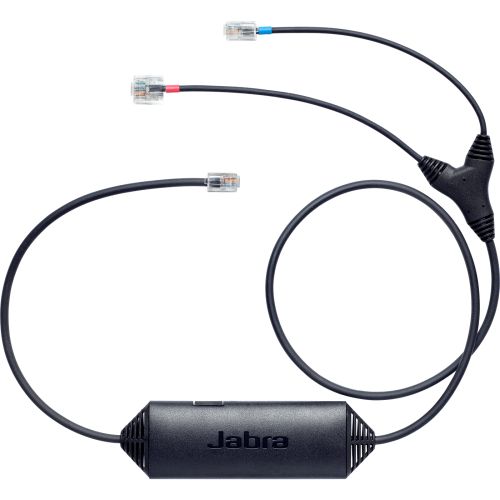
GN Audio 14201-33 ACCS EHS Adapter
| Lieske Part No. | 849287 |
|---|---|
| Mfg Part No | 14201-33 |
| EAN-Code | 5706991014297 |
| Manufacturer | GN Audio |
| Here only | 46,26 EUR
55,05 EUR incl. VAT
|
Further information for GN Audio 14201-33 ACCS EHS Adapter
| Features | |
| Product type | Accessory kit |
| Brand compatibility | Avaya |
| Compatibility | Avaya IP 1408 / 1416, IP 9404 / 9408, IP 9504 / 9508 Jabra GN 9120 DHSG, GN 93XX, PRO 94XX, PRO 920, GO 6470 |
| Product colour | Black |
| Electronic hook switch (EHS) | |
| Unified communications | |
| Logistics data | |
| Harmonized System (HS) code | 85189000 |
| Products per master (outer) case | 100 pc(s) |
| Country of origin | China |
| Packaging data | |
| Package width | 160 mm |
| Package depth | 15 mm |
| Package height | 210 mm |
| Package weight | 50 g |
| Ports & interfaces | |
| Bluetooth | |
| Technical details | |
| Certification | Avaya |
| Near Field Communication (NFC) | |
| Voice control | |
| Voice guidance | |
Applications
This accessory set is specifically designed for companies combining Avaya telephone systems with Jabra headsets. It is used in office environments where employees frequently work away from their desks, such as in call centers, customer service, or mobile workstations. The EHS function reduces the need to be physically at the telephone and increases communication efficiency. Compatibility includes Avaya models such as IP series 1408, 1416, 9404, 9408, 9504, 9508, as well as digital desktop telephones from series 9608, 9611, 9621G, 9641G, and the J-series (excluding J129). It is also compatible with Jabra headset models such as GN 9120 DHSG, GN 93XX, PRO 94XX, PRO 920, and GO 6470.
Functions and Equipment in Detail
The adapter supports electronic remote call answering (EHS), enabling the headset to act as a control interface for the telephone. Users can answer, terminate calls, adjust volume, and mute the microphone directly via the headset. These functions are transmitted through the Bluetooth connection between the headset and the adapter. The Bluetooth technology enables a wireless connection with a range of up to 150 meters, allowing use beyond the immediate workstation. Control is performed via buttons on the headset, enhancing user-friendliness.
Technology Explained Simply
The EHS adapter acts as a bridge between the analog or IP-based telephone and the wireless headset. It detects signals from the headset, such as pressing the call answer button, and translates them into corresponding commands for the telephone. This allows the telephone to lift the handset (hook off") or place it down ("hook on), enabling call control via the headset. The Bluetooth connection ensures signals are transmitted between headset and adapter without requiring a cable. The operation is based on EHS technology, which is standard in many modern telephone systems and headsets.
Compatibility and Accessories
The accessory set is compatible with a range of Avaya telephones, including IP models 1408, 1416, 9404, 9408, 9504, 9508, as well as digital desktop telephones from series 9608, 9611, 9621G, 9641G, and the J-series (excluding J129). It is also usable with Jabra headsets such as GN 9120 DHSG, GN 93XX, PRO 94XX, PRO 920, and GO 6470. Compatibility is limited to specific model series, and it is recommended to consult the manufacturer’s compatibility guide before installation to determine the correct EHS configuration and required protocol. Use with other telephone models is not guaranteed.
Installation and Mounting
Installation involves connecting the adapter to the Avaya telephone, with the exact connection method depending on the telephone model series. The adapter is typically connected to a free port on the telephone, with the exact procedure described in the telephone’s manual or the manufacturer’s compatibility guide. After the physical connection, the headset is paired with the adapter via Bluetooth. EHS function configuration is done through the telephone’s settings, where the correct EHS protocol must be selected to enable communication between the telephone and headset.
Operational Advantages
Using this accessory set increases employee mobility, as calls can be controlled via the headset without remaining at the desk. The Bluetooth connection supports a range of up to 150 meters, enabling use in larger offices or mobile work environments. The EHS function reduces the need to be physically at the telephone and improves communication efficiency. Integration with Jabra headsets and Avaya telephones provides a reliable and standardized solution in existing communication environments.

This is an offer of:
79279 Vörstetten
https://industry-electronics.com
Tel. 07666/88499-0
Fax. 07666/88499-111
Diesen Artikel finden Sie unter:
industry-electronics.com/artikel/849287

Lieske Elektronik e.K.
Reutener Str. 1079279 Vörstetten
https://industry-electronics.com
Tel. 07666/88499-0
Fax. 07666/88499-111
Diesen Artikel finden Sie unter:
industry-electronics.com/artikel/849287