
DELL DELL-WD25 Docking Station USB-C/HDMI/2xDP/1GbE
Computer Hardware > Notebook Accessories > Dockingstation
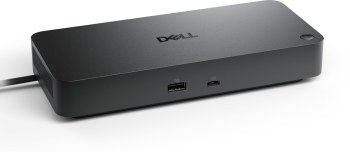
DELL DELL-WD25 Docking Station USB-C/HDMI/2xDP/1GbE
| Lieske Part No. | 1615391 |
|---|---|
| Mfg Part No | DELL-WD25 |
| EAN-Code | 5397184961735 |
| Manufacturer | DELL |
| Here only | 159,16 EUR
189,39 EUR incl. VAT
|
Further information for DELL DELL-WD25 Docking Station USB-C/HDMI/2xDP/1GbE
| Carbon footprint | |
| Total carbon footprint (kg of CO2e) | 90.7 |
| Carbon emissions, manufacturing (kg of CO2e) | 27.39 |
| Carbon emissions, logistics (kg of CO2e) | 2 |
| Carbon emissions, energy usage (kg of CO2e) | 60.5 |
| Carbon emissions, end-of-life (kg of CO2e) | 0.82 |
| PAIA version | GaBi version 1, 2025 |
| Network | |
| Ethernet LAN (RJ-45) ports | 1 |
| Ethernet LAN data rates | 10,100,1000,2500 Mbit/s |
| Ethernet LAN | |
| Wake-on-LAN ready | |
| Packaging content | |
| Cables included | Power |
| AC adapter included | |
| Quick start guide | |
| Performance | |
| Data transfer rate | 2500 Gbit/s |
| Maximum digital resolution | 6144 x 3456 pixels |
| Number of displays supported | 4 |
| Maximum refresh rate | 60 Hz |
| Cable lock slot type | Kensington |
| Product colour | Black |
| Card reader integrated | |
| Cable lock slot | |
| Charging function | |
| Ports & interfaces | |
| Connectivity technology | Wired |
| Host interface | USB 3.2 Gen 2 (3.1 Gen 2) Type-C |
| USB 3.2 Gen 2 (3.1 Gen 2) Type-A ports quantity | 4 |
| USB 3.2 Gen 2 (3.1 Gen 2) Type-C ports quantity | 2 |
| USB Power Delivery up to | 100 W |
| HDMI ports quantity | 1 |
| HDMI version | 2.1 |
| DisplayPorts quantity | 2 |
| DisplayPort version | 1.4 |
| USB Power Delivery (USB PD) | |
| Microphone in | |
| DC-in jack | |
| USB Type-C DisplayPort Alternate Mode | |
| Power | |
| Power source type | DC |
| Power connector | USB Type-C |
| Power supply | 130 W |
| Software | |
| Windows operating systems supported | Windows 10, Windows 11 |
| Other operating systems supported | ChromeOS |
| Mac operating systems supported | |
| Linux operating systems supported | |
| Weight & dimensions | |
| Width | 90 mm |
| Depth | 35.2 mm |
| Height | 205 mm |
| Weight | 550 g |
Applications
The WD25 is suitable for workstations where a notebook must be connected to multiple external devices. This includes, for example, office environments with multiple monitors, network connections, external storage devices, and peripheral devices such as keyboards or mice. The docking station supports up to four displays simultaneously, with a maximum resolution per screen of 6144 x 3456 pixels. The refresh rate is limited to 60 Hz. The integrated network function with 2500 Mbit/s enables fast connection in the local network, with Wake-on-LAN support to activate the computer even in standby mode via the network.
Functions and Equipment in Detail
The docking station features a USB 3.2 Gen 2 (3.1 Gen 2) Type-C port as the host interface, which simultaneously handles power supply and data transfer. The maximum power supply is 100 W, sufficient to charge many modern notebooks. The docking station offers a total of six USB ports: four Type A and two Type C, all supporting USB 3.2 Gen 2 (3.1 Gen 2). The USB Type-C ports support DisplayPort Alternate Mode, allowing them to be used for video output as well. Additionally, there is an HDMI port (Version 2.1) and two DisplayPort ports (Version 1.4) for connecting external monitors. A DC power input is also integrated to ensure power supply.
Technology Explained Simply
The data transfer rate of 2500 Gbit/s refers to the maximum bandwidth of the Ethernet LAN interface, which is equipped with an RJ-45 connector. This enables fast network connections with speeds up to 2500 Mbit/s. Power supply is provided via an external AC power adapter with a power rating of 130 W, connected to the docking station via a USB Type-C connector. The docking station itself features a Kensington lock slot to protect against theft. Power delivery via USB enables simultaneous charging and operation of the connected device.
Compatibility and Accessories
The WD25 is compatible with Windows 10, Windows 11, Mac operating systems, Linux, and ChromeOS. The docking station supports connection to up to four displays, with a maximum resolution per screen of 6144 x 3456 pixels. The ports are designed to be compatible with a wide range of peripheral devices, including USB 3.2 devices, monitors via HDMI and DisplayPort, and network units via RJ-45. The docking station is designed for use with notebooks that feature a USB Type-C port.
Installation and Mounting
Installation is done by connecting the notebook to the docking station via the USB Type-C port. The docking station is powered via the included AC power adapter. External devices are connected to the respective ports. Setup is performed according to the instructions included in the package. The docking station is compact in size, with a width of 90 mm, depth of 35.2 mm, and height of 205 mm. The weight is 550 g.
Advantages in Operation
The WD25 provides a central interface for connecting multiple devices, allowing the workstation to be organized and operated efficiently. The high data transfer rate and support for multiple monitors increase productivity. The integrated 100 W power supply enables charging of the notebook while it is connected. Support for various operating systems increases flexibility in use. The Kensington lock slot provides additional protection against theft.
Scope of Delivery
The scope of delivery includes the AC power adapter and a quick start guide. The docking station is delivered in black and is designed for use in office environments.

This is an offer of:
79279 Vörstetten
https://industry-electronics.com
Tel. 07666/88499-0
Fax. 07666/88499-111
Diesen Artikel finden Sie unter:
industry-electronics.com/artikel/1615391

Lieske Elektronik e.K.
Reutener Str. 1079279 Vörstetten
https://industry-electronics.com
Tel. 07666/88499-0
Fax. 07666/88499-111
Diesen Artikel finden Sie unter:
industry-electronics.com/artikel/1615391