
DELL WD22TB4 Docking Station 180 Watt
Computer Hardware > Notebook Accessories > Dockingstation
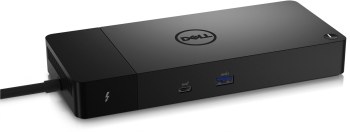
DELL WD22TB4 Docking Station 180 Watt
| Lieske Part No. | 1970498 |
|---|---|
| Mfg Part No | DELL-WD22TB4 |
| EAN-Code | 5397184635629 |
| Manufacturer | DELL |
| Here only | 237,76 EUR
282,93 EUR incl. VAT
|
Further information for DELL WD22TB4 Docking Station 180 Watt
| Logistics data | |
| Harmonized System (HS) code | 84733020 |
| Network | |
| Ethernet LAN (RJ-45) ports | 1 |
| Ethernet LAN data rates | 10,100,1000 Mbit/s |
| Ethernet LAN | |
| Packaging content | |
| Quick start guide | |
| Performance | |
| Maximum digital resolution | 5120 x 2880 pixels |
| Product colour | Black |
| Card reader integrated | |
| LED indicators | |
| Ports & interfaces | |
| Connectivity technology | Docking |
| Host interface | Thunderbolt |
| USB 3.2 Gen 1 (3.1 Gen 1) Type-A ports quantity | 1 |
| USB 3.2 Gen 2 (3.1 Gen 2) Type-C ports quantity | 1 |
| Number of USB ports with PowerShare support | 1 |
| HDMI ports quantity | 1 |
| HDMI version | 2.0 |
| DisplayPorts quantity | 2 |
| DisplayPort version | 1.4 |
| Thunderbolt 4 ports quantity | 2 |
| PowerShare | |
| Microphone in | |
| DC-in jack | |
| USB Type-C DisplayPort Alternate Mode | |
| Power | |
| Power source type | DC |
| AC input voltage | 120 - 230 V |
| AC input frequency | 50 - 60 Hz |
| Power supply | 180 W |
| Software | |
| Windows operating systems supported | Windows 10, Windows 11 |
| Linux operating systems supported | Ubuntu 20.04 LTS |
| Weight & dimensions | |
| Width | 205 mm |
| Depth | 90 mm |
| Height | 29 mm |
| Weight | 650 g |
Applications
The WD22TB4 is suitable for professional work environments where a notebook must be connected to multiple monitors, network connections, and peripheral devices. It enables connection of up to four 4K displays, with a maximum resolution per display of 5120 x 2880 pixels. The docking station is particularly suitable for users requiring a flexible workstation configuration, where the laptop is connected to the entire peripheral setup via a single connection.
Functions and Equipment in Detail
The docking station features two Thunderbolt 4 ports, enabling high data transfer rates and simultaneous power delivery. A USB 3.2 Gen 2 (3.1 Gen 2) Type-C port supports DisplayPort alternate mode, allowing direct connection of external monitors. Additionally, a USB 3.2 Gen 1 (3.1 Gen 1) Type-A port is included, equipped with PowerShare functionality to charge external devices such as smartphones or tablets. An HDMI port (version 2.0) and two DisplayPort ports (version 1.4) offer additional screen connection options. The integrated network function includes an RJ-45 Ethernet port with data rates of 10, 100, and 1000 Mbit/s.
Technology Explained Simply
Thunderbolt technology enables fast, bidirectional data transfer and power delivery over a single cable. The docking station uses the Thunderbolt 4 specification, which offers a maximum bandwidth of 40 Gbit/s. The PowerShare function allows external devices to be powered via the USB Type-C port, with power supplied through the docking station’s power adapter. The docking station itself is powered via DC, with the power adapter supporting an input voltage of 120 to 230 V and a frequency of 50 to 60 Hz. The maximum power consumption is 180 W.
Compatibility and Accessories
The WD22TB4 is compatible with Windows 10 and Windows 11, as well as the Linux operating system Ubuntu 20.04 LTS. The docking station is designed for notebooks equipped with a Thunderbolt interface. Connection is established via docking, with the link made through the Thunderbolt cable. The docking station supports connection of up to four 4K displays, with a maximum resolution per display of 5120 x 2880 pixels. The integrated LED indicator provides status information for the docking station.
Installation and Mounting
Installation is performed by docking the notebook to the docking station. The connection is established via the Thunderbolt cable, while the docking station is powered through a DC connection. Setup is carried out using the integrated software, which supports configuration of external monitors and network connections. The docking station is compact in size, with a width of 205 mm, depth of 90 mm, and height of 29 mm. The weight is 650 g.
Operational Advantages
The WD22TB4 provides a central interface for connecting multiple devices, simplifying workstation organization. Its modular design allows flexible expansion of connectivity options. Support for up to four 4K displays and high data transfer rates via Thunderbolt 4 ensure a high-performance working environment. The integrated network function and PowerShare function enhance the docking station’s functionality. The LED indicator enables quick status checks without requiring additional software.
The docking station is black in colour and features a robust construction suitable for professional use. Compliance with standards EN IEC 62368-1:2020 +A11:2020, EN 62479:2010, EN IEC 62311:2020, EN 55032:2015 +A11:2020, EN 55035:2017 +A11:2020, EN 61000-3-2:2014 (Class D), EN 61000-3-3:2013, EN IEC 63000:2018, and EN 50563:2011 ensures safe and reliable operation. The docking station meets the requirements of EU directives 2014/30/EU, 2011/65/EU, 2014/35/EU, and 2009/125/EC.
Quick Start Guide
The delivery includes a quick start guide to assist with setting up the docking station. The documentation is available in German and provides instructions for installation and configuration.
The docking station is designed for use in office environments and workstations with high demands on connectivity versatility and performance. Its modular design allows flexible expansion of connectivity options, enabling connection of up to four 4K displays and Thunderbolt peripherals via a single cable. The integrated network function and PowerShare function enhance the docking station’s functionality. The LED indicator enables quick status checks without requiring additional software. The docking station is black in colour and features a robust construction suitable for professional use. Compliance with standards EN IEC 62368-1:2020 +A11:2020, EN 62479:2010, EN IEC 62311:2020, EN 55032:2015 +A11:2020, EN 55035:2017 +A11:2020, EN 61000-3-2:2014 (Class D), EN 61000-3-3:2013, EN IEC 63000:2018, and EN 50563:2011 ensures safe and reliable operation. The docking station meets the requirements of EU directives 2014/30/EU, 2011/65/EU, 2014/35/EU, and 2009/125/EC. The quick start guide assists with setup and is available in German.
The docking station is designed for use in office environments and workstations with high demands on connectivity versatility and performance. Its modular design allows flexible expansion of connectivity options, enabling connection of up to four 4K displays and Thunderbolt peripherals via a single cable. The integrated network function and PowerShare function enhance the docking station’s functionality. The LED indicator enables quick status checks without requiring additional software. The docking station is black in colour and features a robust construction suitable for professional use. Compliance with standards EN IEC 62368-1:2020 +A11:2020, EN 62479:2010, EN IEC 62311:2020, EN 55032:2015 +A11:2020, EN 55035:2017 +A11:2020, EN 61000-3-2:2014 (Class D), EN 61000-3-3:2013, EN IEC 63000:2018, and EN 50563:2011 ensures safe and reliable operation. The docking station meets the requirements of EU directives 2014/30/EU, 2011/65/EU, 2014/35/EU, and 2009/125/EC. The quick start guide assists with setup and is available in German.

This is an offer of:
79279 Vörstetten
https://industry-electronics.com
Tel. 07666/88499-0
Fax. 07666/88499-111
Diesen Artikel finden Sie unter:
industry-electronics.com/artikel/1970498

Lieske Elektronik e.K.
Reutener Str. 1079279 Vörstetten
https://industry-electronics.com
Tel. 07666/88499-0
Fax. 07666/88499-111
Diesen Artikel finden Sie unter:
industry-electronics.com/artikel/1970498