
DELL WD19DCS docking station performance
Computer Hardware > Notebook Accessories > Dockingstation
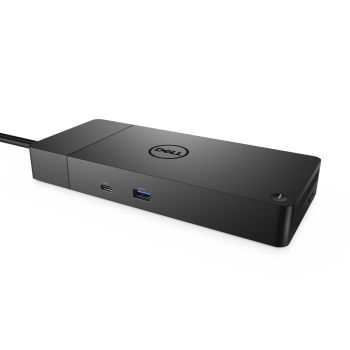
DELL WD19DCS docking station performance
| Lieske Part No. | 2033288 |
|---|---|
| Mfg Part No | Dell-WD19DCS |
| EAN-Code | 5397184514009 |
| Manufacturer | DELL |
| Here only | 282,11 EUR
335,71 EUR incl. VAT
|
Further information for DELL WD19DCS docking station performance
| Carbon footprint | |
| Total carbon footprint (kg of CO2e) | 40.95 |
| Carbon emissions, manufacturing (kg of CO2e) | 29.8 |
| Carbon emissions, logistics (kg of CO2e) | 7.75 |
| Carbon emissions, energy usage (kg of CO2e) | 5.95 |
| Carbon emissions, end-of-life (kg of CO2e) | -2.55 |
| PAIA version | PAIA/GaBi not used |
| Logistics data | |
| Harmonized System (HS) code | 84733020 |
| Network | |
| Ethernet LAN (RJ-45) ports | 1 |
| Ethernet LAN data rates | 10,100,1000 Mbit/s |
| Ethernet LAN | |
| Operational conditions | |
| Operating temperature (T-T) | 0 - 35 °C |
| Storage temperature (T-T) | -20 - 60 °C |
| Operating relative humidity (H-H) | 10 - 80% |
| Storage relative humidity (H-H) | 5 - 90% |
| Packaging data | |
| Quantity per pack | 1 pc(s) |
| Package width | 300 mm |
| Package depth | 315 mm |
| Package height | 62 mm |
| Performance | |
| Maximum digital resolution | 5120 x 2880 pixels |
| Product colour | Black |
| Card reader integrated | |
| VESA mounting | |
| On/off switch | |
| LED indicators | |
| Ports & interfaces | |
| Connectivity technology | Wired |
| Host interface | USB 3.2 Gen 2 (3.1 Gen 2) Type-C |
| USB 3.2 Gen 1 (3.1 Gen 1) Type-A ports quantity | 3 |
| HDMI ports quantity | 1 |
| HDMI version | 2.0 |
| DisplayPorts quantity | 2 |
| DisplayPort version | 1.4 |
| PowerShare | |
| Microphone in | |
| DC-in jack | |
| Power | |
| Power source type | DC |
| AC input voltage | 120 - 230 V |
| AC input frequency | 50 - 60 Hz |
| Power supply | 240 W |
| Power cable length | 0.8 m |
| Software | |
| Windows operating systems supported | Windows 10, Windows 10 Education, Windows 10 Education x64, Windows 10 Enterprise, Windows 10 Enterprise x64, Windows 10 Home, Windows 10 Home x64, Windows 10 IOT Core, Windows 10 IoT Enterprise, Windows 10 Pro, Windows 10 Pro x64, Windows 10 x64 |
| Linux operating systems supported | |
| Weight & dimensions | |
| Width | 205 mm |
| Depth | 90 mm |
| Height | 29 mm |
| Weight | 585 g |
Applications
The WD19DCS is suitable for workstations where a notebook needs to be connected to multiple monitors, network connections, external storage devices, and other peripherals. It is particularly suitable for users of Dell notebooks who require a stable and powerful expansion solution. The maximum resolution of 5120 x 2880 pixels enables the driving of high-resolution screens, which is beneficial for graphic design, data analysis, or software development. The integrated VESA mount allows mounting to a monitor, making the workspace more efficient.
Functions and Equipment in Detail
The docking station features three USB 3.2 Gen 1 (3.1 Gen 1) Type A ports, which can be used to connect storage devices, keyboards, mice, or other USB peripherals. An integrated Gigabit Ethernet port (RJ-45) provides a stable network connection with data rates of 10, 100, or 1000 Mbit/s. Additionally, there is an HDMI port (Version 2.0) and two DisplayPort ports (Version 1.4), enabling the connection of up to three external monitors.
Technology Explained Simply
The docking station is powered by an external power supply unit providing direct current, supporting an input voltage of 120 to 230 V and a frequency of 50 to 60 Hz. The power supply is rated at 240 W, sufficient to operate the connected notebook and multiple external devices simultaneously. The power cable has a length of 0.8 m. The USB 3.2 Gen 2 (3.1 Gen 2) Type-C interface ensures fast data transfer and simultaneous power delivery. The DisplayPort and HDMI ports enable driving external screens with high resolution and colour accuracy. The LED indicators signal the operational status of the docking station, with the docking status indicator showing the connection status.
Compatibility and Accessories
The WD19DCS is compatible with various Windows operating systems, including Windows 10 in different editions (Home, Pro, Enterprise, Education, IoT Core). Additionally, support for Linux operating systems is indicated. The docking station requires BIOS and driver software updates on the connected computer to ensure optimal compatibility and functionality. The use of Dell notebooks is recommended to fully utilise all features.
Installation and Mounting
The docking station connects to the notebook via the USB-C port. Power supply is provided by the included power adapter. Installation requires no additional tools. The VESA mount allows attachment to a monitor, optimising the workspace. The LED indicators assist in diagnosing connection issues.
Operational Advantages
The WD19DCS offers high connection density and performance in a compact design. The 240 W power supply enables the use of high-performance notebooks without additional power sources. Support for multiple high-resolution screens improves productivity. The integrated network connection ensures a stable LAN connection. The PowerShare function enhances usage flexibility, allowing external devices to be powered through the USB-C port. The operating temperature range of 0 to 35 °C and storage temperature range of -20 to 60 °C make the docking station suitable for various environments.
The docking station is black and has dimensions of 205 mm (width) × 90 mm (depth) × 29 mm (height), with a weight of 585 g. The operating environment requires a relative humidity of 10 to 80 %, while storage allows humidity between 5 and 90 %. Power supply is via direct current, with input parameters of 120–230 V and 50–60 Hz.
Power Supply and Operating Conditions
The docking station is powered by an external power supply unit providing direct current. Input parameters are 120–230 V and 50–60 Hz. The power supply is rated at 240 W, sufficient to operate the connected notebook and multiple external devices. The operating temperature is 0 to 35 °C, and the storage temperature is -20 to 60 °C. Relative humidity during operation is between 10 and 80 %, and during storage between 5 and 90 %.
Software Support
The docking station supports various Windows operating systems, including Windows 10 in different editions. Additionally, support for Linux operating systems is indicated. Use requires updating the BIOS and driver software of the connected computer to ensure full functionality.
Design and Integration
The docking station is compact and black. The VESA mount enables mounting to a monitor, making the workspace more efficient. The LED indicators signal the operational status, with the docking status indicator showing the connection status. Power supply is via an external power supply unit with a cable length of 0.8 m.

This is an offer of:
79279 Vörstetten
https://industry-electronics.com
Tel. 07666/88499-0
Fax. 07666/88499-111
Diesen Artikel finden Sie unter:
industry-electronics.com/artikel/2033288

Lieske Elektronik e.K.
Reutener Str. 1079279 Vörstetten
https://industry-electronics.com
Tel. 07666/88499-0
Fax. 07666/88499-111
Diesen Artikel finden Sie unter:
industry-electronics.com/artikel/2033288