
DELL DELL-P2425HE Monitor 24" IPS
Monitors > 23 Inch LCD
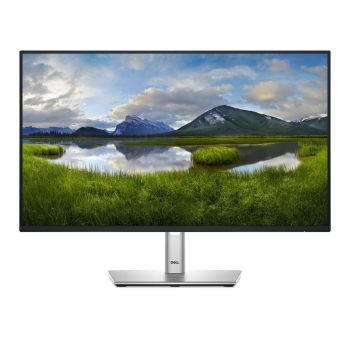
DELL DELL-P2425HE Monitor 24" IPS
| Lieske Part No. | 1351761 |
|---|---|
| Mfg Part No | DELL-P2425HE |
| EAN-Code | 5397184821725 |
| Manufacturer | DELL |
| Here only | 174,72 EUR
207,92 EUR incl. VAT
|
Further information for DELL DELL-P2425HE Monitor 24" IPS
| Brand-specific features | |
| Dell Display Manager (DDM) compatibility | |
| Carbon footprint | |
| Total carbon footprint (kg of CO2e) | 168 |
| Carbon emissions, manufacturing (kg of CO2e) | 85.34 |
| Carbon emissions, logistics (kg of CO2e) | 11.59 |
| Carbon emissions, energy usage (kg of CO2e) | 68.38 |
| Carbon emissions, end-of-life (kg of CO2e) | 2.69 |
| PAIA version | GaBi version 1, 2024 |
| Design | |
| Product colour | Black |
| Front bezel colour | Black |
| Feet colour | Grey |
| Display | |
| Display diagonal | 60.5 cm (23.8") |
| Display resolution | 1920 x 1080 pixels |
| HD type | Full HD |
| Native aspect ratio | 16:9 |
| Display technology | LCD |
| Panel type | IPS |
| Backlight type | Edge-Lit |
| Display brightness (typical) | 250 cd/m² |
| Response time | 8 ms |
| Screen shape | Flat |
| Supported graphics resolutions | 640 x 480 (VGA), 720 x 400, 800 x 600 (SVGA), 1024 x 768 (XGA), 1152 x 864 (XGA+), 1280 x 1024 (SXGA), 1280 x 720 (HD 720), 1600 x 900, 1920 x 1080 (HD 1080) |
| Supported video modes | 480p, 576p, 720p, 1080p |
| Contrast ratio (typical) | 1500:1 |
| Maximum refresh rate | 100 Hz |
| Viewing angle, horizontal | 178° |
| Viewing angle, vertical | 178° |
| Display number of colours | 16.7 million colours |
| Response time (fast) | 5 ms |
| Pixel pitch | 0.2745 x 0.2745 mm |
| Pixel density | 92.53 ppi |
| Horizontal scan range | 30 - 110 kHz |
| Vertical scan range | 48 - 100 Hz |
| Viewable size, horizontal | 52.7 cm |
| Viewable size, vertical | 29.6 cm |
| Viewable size diagonal | 60.5 cm |
| Surface hardness | 3H |
| sRGB coverage (typical) | 99% |
| LED backlight | |
| Touchscreen | |
| Anti-glare screen | |
| Dell ComfortView technology | |
| Ergonomics | |
| Panel mounting interface | 100 x 100 mm |
| Cable lock slot type | Kensington |
| Adjustable height (max) | 15 cm |
| Pivot angle | -90 - 90° |
| Swivel angle range | -45 - 45° |
| Tilt angle range | -5 - 21° |
| VESA mounting | |
| Cable management | |
| Cable lock slot | |
| Height adjustment | |
| Pivot | |
| Swivelling | |
| Tilt adjustment | |
| On Screen Display (OSD) | |
| Plug and Play | |
| LED indicators | |
| Multimedia | |
| Built-in speaker(s) | |
| Built-in camera | |
| Operational conditions | |
| Operating temperature (T-T) | 0 - 40 °C |
| Storage temperature (T-T) | -20 - 60 °C |
| Operating relative humidity (H-H) | 10 - 80% |
| Storage relative humidity (H-H) | 5 - 90% |
| Operating altitude | 0 - 5000 m |
| Non-operating altitude | 0 - 12192 m |
| Other features | |
| RJ-45 ports quantity | 1 |
| Compliance certificates | TÜV mark, RoHS |
| Packaging content | |
| Cables included | AC, DisplayPort, USB Type-C |
| DisplayPort cable length | 1.8 m |
| Stand included | |
| Quick start guide | |
| Packaging data | |
| Package weight | 7.24 kg |
| USB cable length | 1 m |
| Performance | |
| Windows operating systems supported | Windows 10, Yes |
| Mac operating systems supported | MacOS |
| NVIDIA G-SYNC | |
| AMD FreeSync | |
| Flicker-free technology | |
| Low Blue Light technology | |
| Ports & interfaces | |
| USB hub version | 3.2 Gen 1 (3.1 Gen 1) |
| Number of USB Type-C upstream ports quantity | 1 |
| USB Type-A downstream ports quantity | 3 |
| USB Type-C downstream ports quantity | 1 |
| USB Power Delivery up to | 90 W |
| HDMI ports quantity | 1 |
| HDMI version | 1.4 |
| DisplayPorts quantity | 2 |
| DisplayPort version | 1.4 |
| HDCP version | 1.4 |
| Built-in USB hub | |
| USB Type-C DisplayPort Alternate Mode | |
| USB Power Delivery (USB PD) | |
| HDMI | |
| Headphone out | |
| HDCP | |
| AC (power) in | |
| Power | |
| Energy efficiency class (SDR) | D |
| Energy efficiency class (HDR) | Not available |
| Energy consumption (SDR) per 1000 hours | 14 kWh |
| Power consumption (typical) | 13.9 W |
| Power consumption (standby) | 0.3 W |
| Power consumption (max) | 180 W |
| Power consumption (off) | 0.3 W |
| AC input voltage | 100 - 240 V |
| AC input frequency | 50/60 Hz |
| Input current | 2 A |
| Power supply type | Internal |
| Energy efficiency scale | A to G |
| Sustainability | |
| Sustainability certificates | TCO, ENERGY STAR |
| Doesn't contain | Arsenic, Mercury, PVC/BFR |
| Sustainability compliance | |
| Weight & dimensions | |
| Width (with stand) | 538.6 mm |
| Depth (with stand) | 181.8 mm |
| Height (with stand) | 364 mm |
| Weight (with stand) | 5.18 kg |
| Width (without stand) | 538.6 mm |
| Depth (without stand) | 50 mm |
| Height (without stand) | 314.2 mm |
| Weight (without stand) | 3.69 kg |
| Bezel width (side) | 5.8 mm |
| Bezel width (top) | 5.8 mm |
| Bezel width (bottom) | 1.2 cm |
Applications
The monitor is designed for indoor use and is particularly suitable for office and workstation applications where high image quality, ergonomic adjustment options, and comprehensive connectivity are required. It is compatible with Windows 10 and macOS. The energy efficiency class (SDR) is D, and the power consumption in standard operation is 13.9 W. In standby and off modes, the consumption is 0.3 W each.
Functions and Equipment in Detail
The monitor features an integrated USB hub of version 3.2 Gen 1 (3.1 Gen 1). This includes three downstream USB-A ports and one downstream USB-C port. Additionally, a USB-C port with DisplayPort alternate mode is integrated, supporting USB Power Delivery up to 90 W. This enables power supply for compatible devices such as laptops. The monitor offers two DisplayPort connections (version 1.4), one of which functions as an output with MST (Multi-Stream Transport). Furthermore, an HDMI connection (version 1.4) is available, supporting HDCP 1.4. An RJ45 Ethernet connection is also integrated, enabling direct network connection. Control is via buttons, and an On-Screen Display (OSD) is available to adjust settings directly on the device. The monitor is Plug & Play-capable.
Technology Explained Simply
The IPS technology ensures uniform colour reproduction and wide viewing angles, which is particularly beneficial when multiple users are involved or when working with multiple screens. The LED backlighting provides uniform brightness and lower energy consumption. The USB Power Delivery function allows external devices to be powered through the monitor, simplifying cable management. The brightness control is manual, as no automatic brightness control (ABC) is available. The Dell ComfortView technology reduces blue-light-emitting radiation, which can reduce eye strain. The flicker-free technology minimises screen flickering, making prolonged use more comfortable.
Compatibility and Accessories
The monitor is equipped with two DisplayPort connections (1.4), one HDMI connection (1.4), and one RJ45 Ethernet connection, enabling flexible connectivity to various devices. The USB-C connections support DisplayPort alternate mode and Power Delivery, allowing external devices such as laptops to be connected and powered. The USB-A ports enable connection of peripheral devices such as keyboards, mice, or flash drives. The support for Windows 10 and macOS ensures broad compatibility with common operating systems.
Mounting and Installation
The monitor features a VESA mounting (100 x 100 mm), enabling wall mounting or use with a third-party stand. The height adjustment is up to 15 cm, allowing optimal seating position. The monitor is pivotable (rotation from -90° to +90°), swivelable (-45° to +45°), and tiltable (-5° to +21°), enabling individual adaptation to the workspace. An integrated cable lock slot (Kensington) protects the device against theft. Cable management is supported by integrated guides to enable neat cabling.
Advantages in Operation
The monitor offers high image quality with Full HD resolution, wide viewing angles, and good colour reproduction. The integrated USB hub function with Power Delivery simplifies cable management and enables laptop power supply. The ergonomic adjustment options such as height adjustment, pivot, swivel, and tilt functions ensure an adaptable working position. The flicker-free technology and Dell ComfortView technology reduce eye strain during prolonged use. The combination of DisplayPort, HDMI, and Ethernet connections offers flexible connectivity options to various devices. The Plug & Play function enables easy setup without additional configuration.
Scope of Delivery
The scope of delivery includes the DELL P2425HE monitor, stand column and base, cable ties, quick start guide, safety and environmental information, and required documentation.

This is an offer of:
79279 Vörstetten
https://industry-electronics.com
Tel. 07666/88499-0
Fax. 07666/88499-111
Diesen Artikel finden Sie unter:
industry-electronics.com/artikel/1351761

Lieske Elektronik e.K.
Reutener Str. 1079279 Vörstetten
https://industry-electronics.com
Tel. 07666/88499-0
Fax. 07666/88499-111
Diesen Artikel finden Sie unter:
industry-electronics.com/artikel/1351761