
Canon 5452C004 Zoemini 2 Printer Pearl White
Printers/Scanners > Printers > Photo Printer
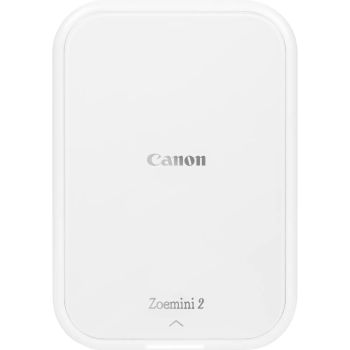
Canon 5452C004 Zoemini 2 Printer Pearl White
| Lieske Part No. | 2032840 |
|---|---|
| Mfg Part No | 5452C004 |
| EAN-Code | 4549292194197 |
| Manufacturer | Canon |
| Here only | 95,22 EUR
113,31 EUR incl. VAT
|
Further information for Canon 5452C004 Zoemini 2 Printer Pearl White
| Battery | |
| Battery technology | Lithium Polymer (LiPo) |
| Battery capacity | 500 mAh |
| Features | |
| Market positioning | Home & office |
| Product colour | White |
| Control type | Buttons |
| Built-in display | |
| Input & output capacity | |
| Total input capacity | 20 sheets |
| Network | |
| Wi-Fi | |
| Ethernet LAN | |
| Bluetooth | |
| Operational conditions | |
| Operating temperature (T-T) | 5 - 40 °C |
| Storage temperature (T-T) | 15 - 32 °C |
| Storage relative humidity (H-H) | 40 - 55% |
| Paper handling | |
| Maximum print size | 2" x 3" (5x7.6 cm) |
| Ports & interfaces | |
| USB connector | USB Type-C |
| Direct printing | |
| USB port | |
| Power | |
| Power source | Battery |
| Printing | |
| Print technology | ZINK (Zero ink) |
| Maximum resolution | 313 x 500 DPI |
| Time to first page (colour, normal) | 50 s |
| Borderless printing | |
| Duplex printing | |
| Weight & dimensions | |
| Width | 120 mm |
| Depth | 21.5 mm |
| Height | 84 mm |
| Weight | 177 g |
Applications
The printer is ideal for quick, mobile use, such as during travel, events, or in everyday life, where immediate photo prints are desired. The combination of compact dimensions (120 mm width, 84 mm height, 21.5 mm depth) and a weight of 177 g makes it a lightweight device that can easily fit in a pocket or backpack. The integrated lithium-polymer battery (500 mAh) allows operation without external power supply, with charging via a USB-C connection. Charging time is approximately 50 minutes, enabling quick reuse.
Functions and Equipment in Detail
The Zoemini 2 features simple operation via buttons, without an integrated display. Control is primarily done through the Canon Mini Print App, available for iOS and Android devices. Within the app, photos can be personalized before printing, for example by adding text, frames, filters, or creative layouts such as tiles or collages. The app also allows sharing images directly from the printer. The printing function is activated via Bluetooth (version 5.0), ensuring a stable, wireless connection to the mobile device. Direct printing is possible without requiring a computer or network.
Technology Explained Simply
The ZINK technology (Zero Ink) works without ink. Instead, special photo paper is used, which already contains the necessary pigments in its color layers. During the printing process, heat selectively activates the respective color layer, creating the image. This paper is water-resistant and tear-resistant, making it suitable for use as photo stickers or in scrapbooks. The prints are thus durable and last longer. The print size of 5 x 7.6 cm corresponds to a small photo or sticker format, ideal for gifts, memories, or decoration.
Compatibility and Accessories
The printer is compatible with Canon ZINK™ photo paper, supplied in packs of 10 sheets. The paper capacity is 20 sheets in total, with paper feeding via a visible paper tray area. Connection to the mobile device is via Bluetooth, making usage independent of WLAN or LAN. There is no support for Ethernet or WLAN. App control is a central part of usage, so installation of the Canon Mini Print App is required.
Installation and Setup
Setup is done via the app, which, after downloading to the mobile device, establishes a Bluetooth connection to the printer. The printer is charged via the USB-C connection, with charging status indicated by LED indicators (white for operation, red for charging, green for fully charged). Paper loading is done by opening the top cover and inserting the ZINK paper into the paper tray. Operation is via buttons, with the power button and reset button designated for basic functions.
Advantages in Operation
Operation is simple, fast, and clean. The ZINK technology avoids ink splatters and cartridge changes. Prints are dry immediately and can be used right away. The combination of mobile use, Bluetooth connection, and integrated battery makes the Zoemini 2 a flexible companion on the go. App control enables creative design options, allowing prints to serve not only as simple copies but also as personalized memories. The operating temperature range is 5 to 40 °C, with storage recommended at 15 to 32 °C and relative humidity of 40 to 55 %. Use in extreme environments may cause malfunctions, so adherence to operating conditions is advised.
Scope of Delivery
The scope of delivery includes the Mini Photo Printer Zoemini 2, a USB cable, a quick start guide, a safety information sheet, and 10 sheets of Canon ZINK™ photo paper.
Product Color
The device is available in the color Pearl White, offering a modern, clean appearance. The surface is smooth and easy to clean, with the recommendation to use only dry, soft cloths.
Maintenance and Care
For maintenance, it is recommended to clean the printer with a dry, soft cloth. Ventilation slots should be kept clear to ensure proper cooling. The top cover should be kept closed to exclude dust and particles. Firmware updates can be performed via the app, requiring internet access and a minimum charge of 50 %.
Operating Conditions
The printer is designed for operation at temperatures from 5 to 40 °C. Optimal storage is at 15 to 32 °C and relative humidity of 40 to 55 %. Function may be impaired at extreme temperatures or humidity. Use near liquids or in dusty environments is not recommended.

This is an offer of:
79279 Vörstetten
https://industry-electronics.com
Tel. 07666/88499-0
Fax. 07666/88499-111
Diesen Artikel finden Sie unter:
industry-electronics.com/artikel/2032840

Lieske Elektronik e.K.
Reutener Str. 1079279 Vörstetten
https://industry-electronics.com
Tel. 07666/88499-0
Fax. 07666/88499-111
Diesen Artikel finden Sie unter:
industry-electronics.com/artikel/2032840