
Brother LX4268001 document sub tray for DCP/MFC
Printers/Scanners > Parts
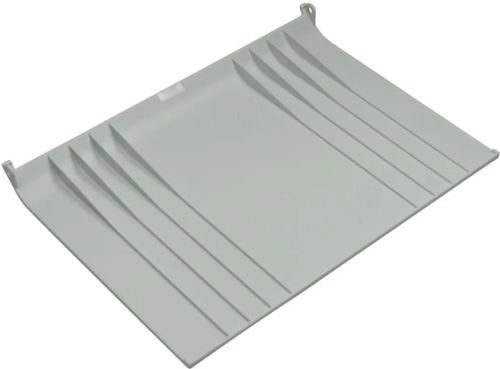
Brother LX4268001 document sub tray for DCP/MFC
| Lieske Part No. | 778150 |
|---|---|
| Mfg Part No | LX4268001 |
| EAN-Code | |
| Manufacturer | Brother |
| Here only | 9,18 EUR
10,92 EUR incl. VAT
|
Further information for Brother LX4268001 document sub tray for DCP/MFC
| Features | |
| Type | Tray |
| Device compatibility | Multifunctional |
| Brand compatibility | Brother |
| Compatibility | MFC-L8850CDW, DCP-9055CDN, MFC9970CDW |
| Packaging data | |
| Quantity per pack | 1 pc(s) |
Applications
This tray is intended for multifunction devices used in professional environments, for example in administrations, print shops, or medium-sized enterprises. It allows for the loading of additional sheets of paper, thereby reducing the need to reload paper frequently. Compatibility is limited to specific models, ensuring precise integration into existing systems.
Functions and Features in Detail
The tray is designed as a replacement part and serves to restore or extend the paper feeding function. It is designed for use with the models MFC-L8850CDW, DCP-9055CDN, and MFC9970CDW. These devices are multifunction devices combining printing, copying, and scanning functions. Installation is tool-free, as it is designed as a standard replacement part.
Technology Explained Simply
The tray is a mechanical component integrated into the device to support paper feeding. It is not electronically controlled, but operates mechanically by inserting paper into the designated area. The construction is designed to fit into the existing paper path of the device and stabilize paper delivery. Use is exclusively in conjunction with the specified Brother models, with exact installation instructions provided in the device itself or in the device’s user manual.
Compatibility and Accessories
The tray is compatible with the multifunction devices MFC-L8850CDW, DCP-9055CDN, and MFC9970CDW. These models are part of the Brother product line for office applications and support printing, copying, and scanning. Compatibility is limited to these models, and no other devices or accessories are mentioned. Use with other models is not intended and may cause malfunctions.
Installation and Mounting
Installation is performed by mechanical mounting onto the device. The tray is attached at the designated location on the device, requiring no additional tools or electrical connections. Installation is part of maintenance and spare part supply, typically carried out by the operator or an authorized service partner. The exact procedure is described in the user manual of the respective device.
Operational Advantages
Using this tray enables higher paper capacity, allowing office workflows to be made more efficient. Reducing reloading operations minimizes workflow interruptions and increases productivity. As an original replacement part, precise fit and reliability are guaranteed, enhancing the operational safety of the devices. Using original parts minimizes the risk of compatibility issues or damage to the device.
The packaging contains 1 piece of the tray. It is a single replacement part to be mounted directly onto the device.

This is an offer of:
79279 Vörstetten
https://industry-electronics.com
Tel. 07666/88499-0
Fax. 07666/88499-111
Diesen Artikel finden Sie unter:
industry-electronics.com/artikel/778150

Lieske Elektronik e.K.
Reutener Str. 1079279 Vörstetten
https://industry-electronics.com
Tel. 07666/88499-0
Fax. 07666/88499-111
Diesen Artikel finden Sie unter:
industry-electronics.com/artikel/778150