
BlackBox EHN9000U-0015 USB Cable 4.5 m
Accessories > Cable / Adapter > USB
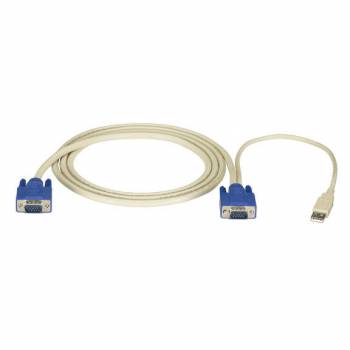
BlackBox EHN9000U-0015 USB Cable 4.5 m
| Lieske Part No. | 247429 |
|---|---|
| Mfg Part No | EHN9000U-0015 |
| EAN-Code | |
| Manufacturer | BlackBox |
| Here only | 20,81 EUR
24,76 EUR incl. VAT
|
Further information for BlackBox EHN9000U-0015 USB Cable 4.5 m
| General | |
| Application | Connection of USB servers with ServSwitch EC KVM switches |
| Connections | One end: (1) VGA; Other end: (1) VGA, (1) USB |
| Compatibility | ServSwitch™ EC KVM switches with HD15 socket CPU connections |
Applications
This cable is specifically designed for integrating USB-servers into existing KVM infrastructures with ServSwitch EC switches. It is used in data centers, server rooms, or IT management environments where centralized control of multiple systems via a KVM system is required. The use of HD15 sockets on the CPU connections of the switches is a prerequisite for compatibility.
Features and Equipment in Detail
At one end of the cable, there is a single VGA connector, which connects to the server. At the other end, two connectors are integrated: one VGA connector and one USB connector, which connect to the KVM switch. This configuration enables simultaneous transmission of video and keyboard/mouse data over a single cable, simplifying cabling and increasing reliability. The USB connection enables control of input devices, while the VGA connector transmits the video signal.
Technology Explained Simply
The cable transmits analog video signals via the VGA standard, which is used for displaying images on monitors. The USB connection enables bidirectional data transfer between server and KVM switch, allowing keyboard and mouse commands to be transmitted. Combining both technologies in a single cable reduces the number of required connections and minimizes the risk of connection errors. The HD15 sockets (also known as DB-15) are a standard for VGA connections and provide a mechanically stable and electrically reliable interface.
Compatibility and Accessories
The cable is exclusively compatible with ServSwitch™ EC KVM switches that feature HD15 socket CPU connections. It is not intended for other KVM systems or switch models without this specific connector type. Use with other devices is not guaranteed and may result in malfunctions.
Installation and Mounting
Installation is performed by directly connecting the cable between the server and the KVM switch. On the server side, the VGA connector is connected to the corresponding video output. On the KVM switch, the VGA and USB connectors are connected to the CPU connections of the switch. Cabling requires no additional tools or configurations; the connection is established via physical plug-in connection.
Operational Advantages
The cable offers a long service life thanks to the 25-year Double Diamond™ warranty, which stands for the reliability and quality of BlackBox products. The combination of VGA and USB in a single cable reduces the number of required cables and minimizes cabling clutter. The use of HD15 sockets ensures a stable mechanical connection suitable for professional use. The simple installation without additional configurations or tools facilitates deployment in existing IT infrastructures.

This is an offer of:
79279 Vörstetten
https://industry-electronics.com
Tel. 07666/88499-0
Fax. 07666/88499-111
Diesen Artikel finden Sie unter:
industry-electronics.com/artikel/247429

Lieske Elektronik e.K.
Reutener Str. 1079279 Vörstetten
https://industry-electronics.com
Tel. 07666/88499-0
Fax. 07666/88499-111
Diesen Artikel finden Sie unter:
industry-electronics.com/artikel/247429