
BlackBox EHN900025U-0006 cable DVI-D+USB A to DVI-D+USB B 1.8 m
Accessories > Cable / Adapter > USB
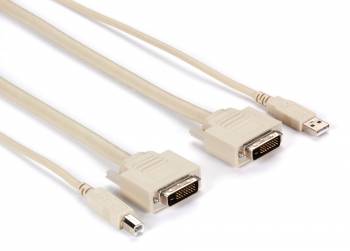
BlackBox EHN900025U-0006 cable DVI-D+USB A to DVI-D+USB B 1.8 m
| Lieske Part No. | 905578 |
|---|---|
| Mfg Part No | EHN900025U-0006 |
| EAN-Code | |
| Manufacturer | BlackBox |
| Here only | 18,11 EUR
21,55 EUR incl. VAT
|
Further information for BlackBox EHN900025U-0006 cable DVI-D+USB A to DVI-D+USB B 1.8 m
| General | |
| Application | CPU to desktop KVM switch |
| Computer connections | (1) USB Type A connector, (1) DVI-D connector for video |
| Switch ports | (1) USB Type B connector, (1) DVI-D connector for video |
| DVI pin assignment | Pins C1, C2, C3 and C4 not assigned |
| Compatibility | Black Box KVM switch, ServSwitch DT or EC, KVT400- and 500-series |
Applications
This cable is intended for use in IT infrastructures where multiple computers are centrally controlled via a KVM switch. It is particularly suitable for workstations where a DVI-I-compatible computer needs to be connected to a Black Box KVM switch. Typical usage occurs in office environments, server rooms, or by IT administrators who value a compact and reliable connection between CPU and switch.
Functions and Equipment in Detail
At one end of the cable, there is a USB Type A connector and a DVI-D connector, which are connected to the computer. At the other end, there is a USB Type B connector and a DVI-D connector, which are connected to the KVM switch. The DVI connection transmits the video signal, while the USB connection enables keyboard and mouse control. The pin assignment of the DVI section is designed such that pins C1, C2, C3, and C4 are unassigned, indicating a specific adaptation to the KVM switch models in use.
Technology Explained Simply
The cable combines two important interfaces in a single cable: DVI-D for digital video transmission and USB for peripheral device communication. The use of DVI-D ensures clear, digital video transmission without quality loss. The USB connection enables control of input devices (keyboard, mouse) via the KVM system. Combining both interfaces in one cable reduces the number of required connections and simplifies cabling.
Compatibility and Accessories
The cable is compatible with Black Box KVM switch models, particularly the ServSwitch DT or EC, as well as the KVT400 and 500 series. It is designed for connecting a DVI-I-compatible computer to the KVM switch. Compatibility is limited to these specific models, as the pin assignment and signal transmission are tailored to these systems.
Installation and Mounting
Installation is performed by connecting the USB Type A and DVI-D connectors to the computer and the USB Type B and DVI-D connectors to the KVM switch. The connection is mechanically stable and requires no additional tools. The cable length depends on the selected model, although sources do not specify a length for model EHN900025U-0006. Cabling is straightforward and requires no special settings.
Operational Advantages
The cable provides reliable and stable transmission of video signals and USB data. Combining both interfaces in a single cable reduces the number of required cables and simplifies connection management. The 25-year Double Diamond™ warranty highlights the product’s durability and reliability. Use in existing Black Box KVM systems ensures seamless integration without additional modifications.
Scope of Delivery
The product is delivered as a KVM CPU cable DVI-I and USB.

This is an offer of:
79279 Vörstetten
https://industry-electronics.com
Tel. 07666/88499-0
Fax. 07666/88499-111
Diesen Artikel finden Sie unter:
industry-electronics.com/artikel/905578

Lieske Elektronik e.K.
Reutener Str. 1079279 Vörstetten
https://industry-electronics.com
Tel. 07666/88499-0
Fax. 07666/88499-111
Diesen Artikel finden Sie unter:
industry-electronics.com/artikel/905578