
Aten KA7176-AX KVM switch adapter cable TPUSB+HDB+Audio
Accessories > KVM > KVM-Extender
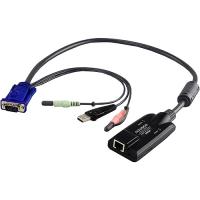
Aten KA7176-AX KVM switch adapter cable TPUSB+HDB+Audio
| Lieske Part No. | 544228 |
|---|---|
| Mfg Part No | KA7176-AX |
| EAN-Code | 4710423775855 |
| Manufacturer | Aten |
| Here only | 179,55 EUR
213,66 EUR incl. VAT
|
Further information for Aten KA7176-AX KVM switch adapter cable TPUSB+HDB+Audio
| Logistics data | |
| Master (outer) case net weight | 6 kg |
| Harmonized System (HS) code | 84733080 |
| Master (outer) case width | 270 mm |
| Master (outer) case length | 470 mm |
| Master (outer) case height | 296 mm |
| Master (outer) case gross weight | 8.93 kg |
| Products per master (outer) case | 40 pc(s) |
| Other features | |
| Dimensions (WxDxH) | 43 x 90 x 21.8 mm |
| Packaging data | |
| Weight | 150 g |
| Package width | 42 mm |
| Package depth | 124 mm |
| Package height | 129 mm |
| Package weight | 190 g |
| Performance | |
| Product colour | Multicolour |
| Keyboard port type | USB |
| Mouse port type | USB |
| Video port type | VGA |
| Console port | RJ-45 |
| Connector 1 | 1 x RJ-45 |
| Connector 2 | 1 x USB Type A, 1 x HDB-15, 2 x Mini Stereo |
| Connector 1 gender | Female |
| Connector 2 gender | Male |
| Material | Plastic |
| Technical data | |
| Fiber optic network | Without |
| Height packaging | 0.129m |
| Side A | RJ45 female x1 |
| TP Network | RJ45 x1 |
| Max. distance | 50m |
| Length packaging | 0.124m |
| Packaging volume | 0.0007m³ |
| Type 2 | KVM CPU module cable VGA |
| Design | Cable |
| Side B | VGA male x1, USB-A male x1, 3.5mm jack male x2 |
| Weight | 0.189kg |
| Width packaging | 0.042m |
| Type 1 | KVM CPU module cable |
| Max. resolution | 1920x1200 |
| Audio microphone | |
| Audio loudspeakers | |
Applications
The KVM adapter cable is designed for use in IT infrastructures where multiple computers are operated via a central KVM switch. It is typically used in server rooms or data centers, where physical connection of devices to a monitor, keyboard, and mouse is not possible or desirable. The combination of VGA video, USB keyboard and mouse connections, and audio transmission makes it suitable for systems requiring full control and communication with the target computer. The maximum transmission distance is 50 meters, with a resolution up to 1920x1200 pixels supported — provided that transmission distance and cable quality do not impair signal integrity.
Functions and Features in Detail
The cable features automatic signal compensation (ASC), ensuring consistent signal quality over various transmission distances without requiring DIP switches or manual adjustments. This simplifies installation and maintenance. The integrated keyboard and mouse emulation ensures the server continues to operate stably even if the KVM port is disconnected or switched to another port. Firmware can be updated throughout the device's lifetime, ensuring long-term compatibility with new systems. The device supports virtual media, enabling the use of external storage devices over the network without requiring physical connections on the server.
Technology Explained Simply
The cable uses an RJ-45 network cable (Cat5e/6) as the transmission medium, connected on the KVM switch side. On the computer side, the interfaces VGA (HDB-15), USB Type A, and two 3.5-mm mini stereo jacks for speakers and microphone are integrated. Signals are transmitted over the network cable, with the integrated ASIC chip ensuring higher reliability and compatibility. LED indicators (Online green, Link orange, Power orange) display the module’s operational status. The maximum resolution of 1920x1200 pixels is achieved under the condition that transmission distance and cable quality do not compromise signal integrity.
Compatibility and Accessories
The KVM adapter cable is designed for use with Aten KVM switches and compatible systems. It supports various operating systems, including Windows, Mac, and Sun, thanks to its flexible interface configuration. The connection is made via a standardized RJ-45 network cable, typically Cat5e or Cat6. Audio transmission occurs via the mini stereo jacks, enabling both speaker and microphone signals to be transmitted. The use of unshielded cables may cause signal interference at transmission distances exceeding 40 meters.
Installation and Mounting
The cable is connected directly to the KVM switch, using the RJ-45 socket on the switch side. On the computer side, the corresponding connections (VGA, USB, audio) are attached to the respective ports on the computer. Installation requires no additional configuration, as automatic signal compensation handles the settings. The compact design (43 x 90 x 21.8 mm) allows for easy placement in racks or tight mounting areas.
Operational Advantages
The KVM adapter cable provides a reliable and compact solution for remote computer control. Automatic signal compensation and keyboard/mouse emulation ensure stable system operation, even when connection configurations change. Support for virtual media and audio transmission extends functionality without requiring additional hardware. The low weight of 150 g and robust plastic casing make it a low-maintenance module for professional use. The LED indicators allow for quick visual verification of operational status.

This is an offer of:
79279 Vörstetten
https://industry-electronics.com
Tel. 07666/88499-0
Fax. 07666/88499-111
Diesen Artikel finden Sie unter:
industry-electronics.com/artikel/544228

Lieske Elektronik e.K.
Reutener Str. 1079279 Vörstetten
https://industry-electronics.com
Tel. 07666/88499-0
Fax. 07666/88499-111
Diesen Artikel finden Sie unter:
industry-electronics.com/artikel/544228