
Aten CS1953 KVM 3-Port USB-C DisplayPort
Accessories > KVM > Miscellaneous
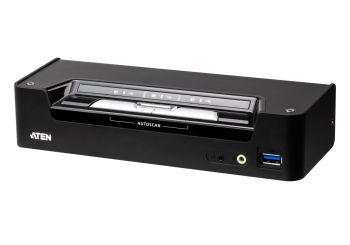
Aten CS1953 KVM 3-Port USB-C DisplayPort
| Lieske Part No. | 515555 |
|---|---|
| Mfg Part No | CS1953 |
| EAN-Code | 4719264647529 |
| Manufacturer | Aten |
| Here only | 215,48 EUR
256,42 EUR incl. VAT
|
Further information for Aten CS1953 KVM 3-Port USB-C DisplayPort
| Design | |
| Product colour | Black |
| Housing material | Metal, Plastic |
| LED indicators | |
| Push button | |
| Hot keys | |
| Display | |
| Built-in display | |
| Logistics data | |
| Master (outer) case net weight | 4.8 kg |
| Harmonized System (HS) code | 85176200 |
| Master (outer) case width | 232 mm |
| Master (outer) case length | 500 mm |
| Master (outer) case height | 283 mm |
| Master (outer) case gross weight | 7.19 kg |
| Products per master (outer) case | 5 pc(s) |
| Operational conditions | |
| Operating temperature (T-T) | 0 - 40 °C |
| Storage temperature (T-T) | -20 - 60 °C |
| Operating relative humidity (H-H) | 0 - 80% |
| Storage relative humidity (H-H) | 0 - 80% |
| Packaging content | |
| Quick installation guide | |
| Manual | |
| Packaging data | |
| Package width | 95 mm |
| Package depth | 265 mm |
| Package height | 220 mm |
| Package weight | 1.33 kg |
| Performance | |
| HD type | 4K Ultra HD |
| Maximum resolution | 4096 x 2160 pixels |
| Video bandwidth | 60 Hz |
| Scan interval | 1,5,99 s |
| Ports & interfaces | |
| Number of computers controlled | 3 |
| Keyboard port type | USB |
| Mouse port type | USB |
| Video port type | DisplayPort |
| DisplayPorts quantity | 2 |
| USB 3.2 Gen 1 (3.1 Gen 1) Type-B ports quantity | 3 |
| Console ports | 3.5mm headphone, 3.5mm mic, DisplayPort, USB A |
| Console USB ports quantity | 2 |
| USB 3.2 Gen 1 (3.1 Gen 1) Type-A hub ports quantity | 2 |
| USB connector type | USB Type-A, USB Type-B |
| Headphone outputs | 4 |
| Number of microphone inputs | 1 |
| USB hub | |
| Audio connections | |
| DC-in jack | |
| Power | |
| Power source | DC |
| Input voltage | 12 V |
| Power consumption (typical) | 5.78 W |
| System requirements | |
| Windows operating systems supported | |
| Technical data | |
| Number of CPU | 3 |
| Data rate | 5Gb/s |
| Weight | 1.340kg |
| Design | Desktop |
| USB specification | USB 3.2 Gen.1 |
| Width packaging | 0.095m |
| Length packaging | 0.265m |
| Height packaging | 0.220m |
| Video inputs per CPU | DisplayPort x1 (CPU 1 und 2) / USB-C (CPU 3) x1 |
| DisplayPort standard | 1.2 |
| Packaging volume | 0.0055m³ |
| Type 1 | KVM switch |
| Type 2 | 3-fold DisplayPort / USB-C KVM |
| Max. resolution | 4096x2160 / 60Hz |
| Incl. KVM cableset | |
| Front panel buttons | |
| USB peripherals | |
| Weight & dimensions | |
| Width | 206.3 mm |
| Depth | 75.4 mm |
| Height | 44 mm |
| Weight | 960 g |
Complying with DisplayPort 1.2 standard, the CS1953 supports superior video quality up to 4K DCI (4096 x 2160 @ 60Hz) for premium images. In addition, its USB-C channel supports DP Alt Mode, so it can deliver DisplayPort signals and work like a standard DisplayPort connection. For added flexible usage, the CS1953 can convert signals from DisplayPort to HDMI or DVI with its DisplayPort Dual-Mode technology (DP++).
Featuring these robust functionalities and an unbeatable combination of USB 3.1 Gen 1 data transfer speed convenience, bus-powered design, and user-friendly port switching methods including hotkeys, mouse and remote port selector etc., the CS1953 allows users to keep up with the latest innovations in desktop multimedia and work smarter than ever.One USB keyboard, mouse and one DisplayPort monitor control two DisplayPort computers, one USB-C device and share two USB peripherals
Supports superior video quality – up to 4K DCI (4096 x 2160 @ 60Hz)
Provides USB Power Delivery 3.0 for USB-C device charging up to 45W(1)
Computer selection via pushbuttons, hotkeys, mouse(2), and remote port selector
Built-in 2-port USB 3.1 Gen 1 hub with SuperSpeed 5 Gbps data transfer rates
Supports DisplayPort Alternate Mode (DP Alt Mode) which enables the USB connection to carry DisplayPort signals
Independent switching of KVM, USB peripheral, and audio focus(3)
DisplayPort 1.2 compliant; HDCP 1.4 compliant
Supports HD Audio(3)
Supports DisplayPort Dual-Mode technology (DP++)(4)
Firmware upgradeable
Bus-powered(5)
Note:
1. An additional power adapter is needed on the CS1953 for USB-C device charging to work.
2. Mouse port switching is only supported under mouse emulation mode with a USB 3-button mouse wheel.
3. HD audio through DisplayPort channel cannot be switched independently.
4. DisplayPort Dual-Mode technology (DP++) does not require an active adapter for most single display setups. Active DisplayPort adapters are recommended if you are unsure of the video source’s DP++ compatibility.
5. The unit can be bus-powered by the connected KVM sources via USB ports.
Package Contents:1x CS1953 3-Port USB-C DisplayPort Hybrid KVMP™ Switch
2x DisplayPort 1.2 Cables
2x USB 3.0 Type-A to Type-B Cables
1x USB-C Cable
3x Audio Cables
1x Remote Port Selector
1x User Instructions
Computer Connections3
Port SelectionHotkey, Pushbutton, Mouse, Remote Port Selector
Connectors
Console Ports2 x USB Type A Female
1 x DisplayPort Female (Black)
2 x 3.5mm Audio Jack Female (Green; 1 x front, 1 x rear)
KVM (Computer) PortsCPU1 and CPU2:
2 x USB3.1 Gen1 Type B Female (Blue)
2 x DisplayPort Female (Black)
2 x 3.5mm Audio Jack Female (Green)
CPU3:
1 x USB Type-C Female (Black)
1 x 3.5mm Audio Jack Female (Green)
Remote Port Selector1 x 2.5mm Audio Jack Female (Black)
Power1 x DC Jack
USB Hub2 x USB3.1 Gen1 Type A Female (Blue; 1 x front, 1 x rear)
Switches
Selected3 x Pushbutton
Mode Switch1 x Slide Switch
LEDs
Audio3 (Green)
KVM3 (Orange)
USB3 (Green)
Emulation
Keyboard / MouseUSB
Video4096 x 2160 @ 60Hz
Scan Interval1-99 Seconds (Default: 5 sec.)
Power ConsumptionDC12V:5.78W:269BTU
Environmental
Operating Temperature0-40°C
Storage Temperature-20-60°C
Humidity0-80% RH, Non-condensing
Physical Properties
HousingMetal, Plastic
Weight0.50 kg ( 1.1 lb )
Dimensions (L x W x H)20.63 x 7.54 x 4.40 cm
(8.12 x 2.97 x 1.73 in.)
NoteFor some of rack mount products, please note that the standard physical dimensions of WxDxH are expressed using a LxWxH format.

This is an offer of:
79279 Vörstetten
https://industry-electronics.com
Tel. 07666/88499-0
Fax. 07666/88499-111
Diesen Artikel finden Sie unter:
industry-electronics.com/artikel/515555

Lieske Elektronik e.K.
Reutener Str. 1079279 Vörstetten
https://industry-electronics.com
Tel. 07666/88499-0
Fax. 07666/88499-111
Diesen Artikel finden Sie unter:
industry-electronics.com/artikel/515555