
Aten CS1944DPA KVM 4-Port USB 3.0 8K DP
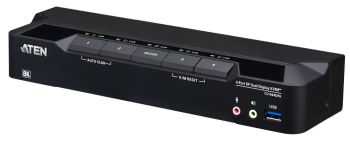
Aten CS1944DPA KVM 4-Port USB 3.0 8K DP
| Lieske Part No. | 861509 |
|---|---|
| Mfg Part No | CS1944DPA |
| EAN-Code | 4711581520554 |
| Manufacturer | Aten |
| Here only | 428,53 EUR
509,95 EUR incl. VAT
|
Further information for Aten CS1944DPA KVM 4-Port USB 3.0 8K DP
| Design | |
| Product colour | Black |
| Rack mounting | |
| LED indicators | |
| Push button | |
| Display | |
| Built-in display | |
| Logistics data | |
| Harmonized System (HS) code | 84718000 |
| Country of origin | Taiwan |
| Operational conditions | |
| Operating temperature (T-T) | 0 - 50 °C |
| Storage temperature (T-T) | -20 - 60 °C |
| Operating relative humidity (H-H) | 0 - 80% |
| Storage relative humidity (H-H) | 0 - 80% |
| Packaging content | |
| Quick installation guide | |
| Performance | |
| HD type | 8K Ultra HD |
| Maximum resolution | 7680 x 4320 pixels |
| Video bandwidth | 60 Hz |
| Scan interval | 1,99 s |
| Maximum refresh rate | 240 Hz |
| Ports & interfaces | |
| Number of computers controlled | 4 |
| Keyboard port type | USB |
| Mouse port type | USB |
| Video port type | DisplayPort |
| DisplayPorts quantity | 8 |
| USB 3.2 Gen 1 (3.1 Gen 1) Type-B ports quantity | 4 |
| Console ports | 3.5mm headphone, DisplayPort, USB A |
| Console USB ports quantity | 2 |
| Console DisplayPorts ports quantity | 1 |
| Console RJ-45 ports quantity | 1 |
| USB 3.2 Gen 1 (3.1 Gen 1) Type-A hub ports quantity | 4 |
| USB connector type | USB Type-A, USB Type-B |
| Headphone outputs | 6 |
| Number of microphone inputs | 6 |
| USB hub | |
| DC-in jack | |
| Power | |
| Power source | DC |
| Input voltage | 12 V |
| Power consumption (typical) | 3.18 W |
| Technical data | |
| Type 2 | 4-fold DisplayPort KVM |
| Height packaging | 0.271m |
| Width packaging | 0.118m |
| Type 1 | KVM switch |
| Number of CPU | 4 |
| Data rate | 5Gb/s |
| Design | Desktop |
| Length packaging | 0.394m |
| USB specification | USB 3.2 Gen.1 |
| Weight | 3.030kg |
| Max. resolution | 7680x4320 / 60Hz |
| Incl. KVM cableset | |
| Front panel buttons | |
| USB peripherals | |
| Weight & dimensions | |
| Width | 71.8 mm |
| Depth | 260 mm |
| Height | 43 mm |
| Weight | 620 g |
With a single keyboard and mouse, you can maintain a tidy workspace while simplifying control of four DisplayPort computers across two DisplayPort displays.
Whether you're a professional seeking a productivity booster for your daily office routines, a content creator, a hybrid worker, or someone looking for an immersive entertainment setup, the CS1944DPA is definitely your key to a workspace transformation.
Level up your multitasking productivity at this dual-display KVM console with:A pristine visual experience up to 4K@120and 8K@60
Ultra-wide 21:9 and 32:9 aspect ratios for an expansive viewing experience
A 2-port USB 3.0 hub for peripheral sharing, supporting up to 5 Gbps data transfer
Multi-system compatibility with Windows, macOS, and Linux
High-Performance Hardware and Display Capabilities
Supports Quad-Display by connecting two Dual-Display KVM switches
Superior video quality – up to 7680 × 4320 @ 60 Hz, 5120 × 2880 @ 60 Hz, and 4096 × 2160 @ 120 Hz
Two USB 3.1 Gen 1 ports with SuperSpeed 5 Gbps transfer rates
Supports DisplayPort Dual-Mode technology (DP++)1
Supports MST (Multi-Stream Transport) 2
DisplayPort 1.4 compliant
HDCP compliant
Supports HDR 10+
Supports HD Audio3
Supports hot-plugging
Comprehensive Management and Switching Controls
One USB keyboard and mouse control two or four DisplayPort computers and share two USB peripherals
Computer selection via pushbuttons, remote port selector, hotkeys, mouse4, and RS-232 commands
Independent switching of KVM, USB, and Audio
Console keyboard/mouse emulation/bypass support
Power-on detection automatically switches to the next active computer
Firmware upgradable
Multilingual keyboard mapping – supports English, Japanese, French, and German keyboards5
Streamlined, Ready-to-Use Experience
Plug & play
All DisplayPort/USB cables and power adapter included for hassle-free installation – no extra purchases needed
Multiplatform support – Windows, Mac, and Linux
Note:
1. DP++ (DP Dual Mode) requires a DP++ adapter (powered DP++ adapter recommended). The graphics source must be DP++ compliant.
2. MST (Multi-Stream Transport) requires monitors capable of DisplayPort 1.4 daisy-chaining or the use of a powered DisplayPort MST hub. The PC source must be DisplayPort 1.4 compliant. A DisplayPort 1.1a or 1.2 display can be the last display in a DisplayPort 1.4 chain.
3. HD audio through HDMI cannot be switched independently.
4. For 3-button USB wheel mouse only. Mouse-port switching is supported only under mouse emulation mode.
5. PC keyboard combinations emulate Mac keyboards. Mac keyboards only work with Mac computers.
Package Contents
1 x CS1944DPA 4-Port USB 3.0 8K DisplayPort Dual-Display KVMP™ Switch
8 x DisplayPort cables (1.5 m/5 ft)
4 x USB Type-A to Type-B cables (USB 3.0-A to USB 3.0-B; 1.8 m/6 ft)
4 x microphone cables (1.8 m/6 ft)
4 x speaker cables (1.8 m/6 ft)
1 x remote port selector
1 x power adapter
1 x user instructions
Computer Connections4
Port SelectionHotkey, Pushbutton, Mouse wheel, RS-232 Commands, Remote port selector
Connectors
Console Ports2 x USB Type A Female
2 x DisplayPort Female (Black)
2 x 3.5mm Audio Jack Female (Green; 1 x front, 1 x rear)
2 x 3.5mm Audio Jack Female (Pink; 1 x front, 1 x rear)
KVM (Computer) Ports4 x USB3.1 Gen1 Type B Female (Blue)
8 x DisplayPort Female (Black)
4 x 3.5mm Audio Jack Female (Green)
4 x 3.5mm Audio Jack Female (Pink)
Daisy Chain Ports1 x RJ-45 Female
Power1 x DC Jack
USB Hub2 x USB3.1 Gen1 Type A Female (Blue; 1 x front; 1 x rear)
LEDs
KVM5 (Orange)
Audio5 (Green)
USB Link5 (Green)
Switches
Selected5 x Pushbutton
Station Selection1 x Slide Switch
Emulation
Keyboard / MouseUSB
VideoUp to 7680 x 4320 @ 60 Hz, 5120 x 2880@60Hz, 4096 x 2160@120Hz
Scan Interval1-99 seconds (default: 5 seconds)
Power ConsumptionDC12V:4.88W:144BTU/h
Note:
The measurement in Watts indicates the typical power consumption of the device with no external loading.
The measurement in BTU/h indicates the power consumption of the device when it is fully loaded.
Environmental
Operating Temperature0–50°C
Storage Temperature-20–60°C
Humidity0-80% RH, Non-condensing
Physical Properties
HousingMetal
Weight0.62 kg ( 1.37 lb )
Dimensions (L x W x H)26.00 x 7.18 x 4.30 cm
(10.24 x 2.83 x 1.69 in.)

This is an offer of:
79279 Vörstetten
https://industry-electronics.com
Tel. 07666/88499-0
Fax. 07666/88499-111
Diesen Artikel finden Sie unter:
industry-electronics.com/artikel/861509

Lieske Elektronik e.K.
Reutener Str. 1079279 Vörstetten
https://industry-electronics.com
Tel. 07666/88499-0
Fax. 07666/88499-111
Diesen Artikel finden Sie unter:
industry-electronics.com/artikel/861509