
Aten CS1914 KVM switch 4-way DP/USB 3.0
Accessories > KVM > 4 compartment
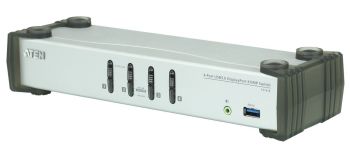
Aten CS1914 KVM switch 4-way DP/USB 3.0
| Lieske Part No. | 236934 |
|---|---|
| Mfg Part No | CS1914 |
| EAN-Code | 4719264645044 |
| Manufacturer | Aten |
| Here only | 237,12 EUR
282,17 EUR incl. VAT
|
Further information for Aten CS1914 KVM switch 4-way DP/USB 3.0
| Design | |
| Product colour | Black, Grey |
| Housing material | Metal, Plastic |
| LED indicators | Status, USB |
| Rack mounting | |
| Push button | |
| Hot keys | |
| Display | |
| Built-in display | |
| Logistics data | |
| Master (outer) case net weight | 9.85 kg |
| Harmonized System (HS) code | 85176200 |
| Master (outer) case width | 342 mm |
| Master (outer) case length | 512 mm |
| Master (outer) case height | 232 mm |
| Master (outer) case gross weight | 12.8 kg |
| Products per master (outer) case | 5 pc(s) |
| Operational conditions | |
| Operating temperature (T-T) | 0 - 50 °C |
| Storage temperature (T-T) | -20 - 60 °C |
| Operating relative humidity (H-H) | 0 - 80% |
| Packaging content | |
| Cables included | Audio (3.5mm), DisplayPort, USB |
| Manual | |
| AC adapter included | |
| Packaging data | |
| Package width | 98 mm |
| Package depth | 325 mm |
| Package height | 210 mm |
| Package weight | 2.46 kg |
| Performance | |
| Maximum resolution | 3840 x 2160 pixels |
| Scan interval | 1,99 s |
| Automatic switching | |
| HDCP | |
| Hot-Plug support | |
| Ports & interfaces | |
| Number of computers controlled | 4 |
| Keyboard port type | USB |
| Mouse port type | USB |
| Video port type | DisplayPort |
| DisplayPorts quantity | 5 |
| USB 3.2 Gen 1 (3.1 Gen 1) Type-B ports quantity | 4 |
| Console ports | USB A |
| Console USB ports quantity | 2 |
| USB connector type | USB Type-A, USB Type-B |
| Headphone outputs | 6 |
| USB hub | |
| Audio connections | |
| DC-in jack | |
| Power | |
| Output voltage | 5 V |
| Power consumption (typical) | 2.99 W |
| External power adapter | |
| Sustainability | |
| Compliance certificates | RoHS |
| System requirements | |
| Mac operating systems supported | |
| Weight & dimensions | |
| Width | 88 mm |
| Depth | 270 mm |
| Height | 55.5 mm |
| Weight | 1.97 kg |
As a KVM switch, the CS1914 gives users access to four DisplayPort computers from a single USB keyboard, USB mouse and monitor. To work with ease, the CS1914 provides three convenient switching methods – front panel pushbuttons, mouse and hotkeys for flexible and quick access to both computers.
ATEN’s unique independent switching feature allows the KVM control to focus on one computer while the USB peripheral focus is on another computer. This eliminates the need to purchase a separate USB hub or stand-alone peripheral sharer – such as a printer server, modem or splitter.
With its rich feature set, the CS1914 is designed to surpass all requirements for video post production, CAD design and applications that have a high demand for precise video clarity and large data transfer rates. The CS1914 allows you to share the audio from each computer and in HD quality when transmitted by the DisplayPort, to offer you an exciting sound experience.
Features:4-port DisplayPort KVMP Switch with USB 3.1 Gen 1 hub and 2.1 surround sound audio
One USB console controls 4 computers and 2 USB peripherals
Computer selection via front panel pushbuttons, hotkeys and mouse*
Independent switching of KVM, USB, and Audio focus
Superior video quality – up to 3840 x 2160 @ 30 Hz
2-port USB 3.1 Gen 1 hub with SuperSpeed 5 Gbps transfer rates
DisplayPort 1.1 compliant, HDCP compliant
Supports HD audio through DisplayPort**
Full bass response for high-quality 2.1 channel surround sound systems
Power On Detection – if a computer is powered off, the CS1914 automatically switches to the next powered-on computer
Dual-Mode DisplayPort technology (DP++) supports HDMI and DVI signals via an DisplayPort-to-HDMI/DVI DP++ adapter*
Hot pluggable – add or remove computers without powering down the switch
Keyboard emulation/bypass feature supports most gaming keyboards
Mouse emulation/bypass feature supports most mouse drivers and multifunction mice
Multi-platform support – Windows, Mac, and Linux
Multilingual keyboard mapping supports English, Japanese, French and German keyboards
Mac keyboard support and emulation**
Auto Scan Mode for monitoring all computers
Firmware upgradable
Note:* Mouse port switching is only supported under mouse emulation mode with a USB 3-button mouse wheel.
** HD audio through DisplayPort cannot be switched independently.
* Dual-Mode DisplayPort technology (DP++) does not require an active adapter for most single display setups. Active DisplayPort adapters are recommended if you are unsure of the video source's DP++ compatibility.
** PC keyboard combinations emulate Mac keyboards. Mac keyboards only work with their own operating system.
Specification:Computer Connections: 4
Port Selection: Hotkey, Pushbutton, Mouse
Connectors:Console Ports:2 x USB Type A Female (Black)
1 x DisplayPort Female (Black)
2 x Mini Stereo Jack Female (Green; 1 x front, 1 x rear)
KVM- (Computer) Ports:4 x USB 3.1 Gen1 Type B Female (Blue)
4 x DisplayPort Female (Black)
4 x Mini Stereo Jack Female (Green)
Power: 1 x DC Jack
USB-Hub: 2 x USB 3.1 Gen1 Type A Female (Blue; 1 x front panel; 1 x rear panel)
Switches:Selected: 4 x Pushbutton
LEDs:On Line /Selected: 4 (Orange)
USB-Link: 4 (Green)
Emulation:Keyboard / Mouse: USB
Video: 3840 x 2160 @ 30Hz
Power Consumption: DC 5.0V; 3.3W
Scan Interval: 1-99 Seconds (Default: 5 sec.)
Environmental:Operating Temperature: 0-50°C
Storage Temperature: -20-60°C
Humidity: 0-80% RH, Non-condensing
Physical Properties:Housing: Metal, Plastic
Weight: 0,91 kg
Dimensions (L x W x H): 27,00 x 8,80 x 5,55 cm
Package Contents:1 x 4-Port USB 3.0 DisplayPort KVMP Switch
4 x DisplayPort Cables
4 x USB 3.0 Cables
4 x Audio Cables
1 x Power Adapter
1 x User Instructions

This is an offer of:
79279 Vörstetten
https://industry-electronics.com
Tel. 07666/88499-0
Fax. 07666/88499-111
Diesen Artikel finden Sie unter:
industry-electronics.com/artikel/236934

Lieske Elektronik e.K.
Reutener Str. 1079279 Vörstetten
https://industry-electronics.com
Tel. 07666/88499-0
Fax. 07666/88499-111
Diesen Artikel finden Sie unter:
industry-electronics.com/artikel/236934