
53103.3
Cables > Data lines > Fiber Optic Patch Cables
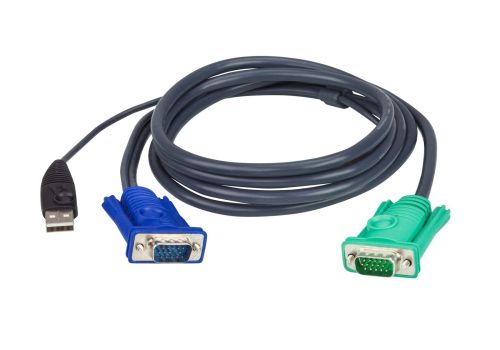
53103.3
| Lieske Part No. | 935831 |
|---|---|
| Mfg Part No | 53103.3 |
| EAN-Code | 4710423772922 |
| Manufacturer | |
| Here only | 1,04 EUR
1,24 EUR incl. VAT
|
Further information for 53103.3
| Logistics data | |
| Master (outer) case net weight | 10.8 kg |
| Harmonized System (HS) code | 84733080 |
| Master (outer) case width | 330 mm |
| Master (outer) case length | 450 mm |
| Master (outer) case height | 240 mm |
| Master (outer) case gross weight | 11.1 kg |
| Products per master (outer) case | 30 pc(s) |
| Packaging data | |
| Weight | 360 g |
| Package weight | 360 g |
| Performance | |
| Product colour | Black |
| Cable length | 5 m |
| Video port type | VGA |
| Connector 1 | HDB-15 + USB A |
| Connector 2 | SPHD-15 |
| Connector 1 gender | Male |
| Connector 2 gender | Male |
| Compatible products | CE700A CL5708M CL5716M CL5800N CL5808N CL5816N CN8000 CS1308 CS1316 CS1708A CS1708i CS1716A CS1716i CS1742 CS1744 CS231 CS82U CS84U IP8000 KL1100M KL3116M KL3116T |
Applications
The cable is intended for use with a range of KVM switch models, including CE700A, CL5708M, CL5716M, CL5800N, CL5808N, CL5816N, CN8000, CS1308, CS1316, CS1708A, CS1708i, CS1716A, CS1716i, CS1742, CS1744, CS231, CS82U, CS84U, IP8000, KL1100M, KL3116M, and KL3116T. These devices enable control of multiple computers via a single monitor, keyboard, and mouse, improving workstation organization efficiency. The cable serves as the connecting element between the PC and the KVM switch, transmitting video, keyboard, and mouse signals over a single cable.
Functions and Equipment in Detail
The cable combines three functions in one: it transmits VGA video signals via the HDB-15 connector, enables keyboard and mouse control via the USB-A connector, and connects to the KVM switch via the SPHD-15 plug. The 3-in-1 SPHD connection ensures all necessary signals are transmitted through a single port on the switch, reducing cable clutter. The use of HDB-15 and SPHD-15 plugs ensures a compatible and standardized connection commonly used in many KVM systems.
Technology Explained Simply
The VGA technology enables the transmission of analog video signals required for display on a monitor. The USB connection enables bidirectional communication between the keyboard, mouse, and the connected computer. Combining both technologies in a single cable reduces the number of required connections and simplifies installation. The cable length of 5 m is sufficient for typical office or server room environments, with stable signal transmission over the entire length. The black color ensures unobtrusive integration into professional work environments.
Compatibility and Accessories
The cable is specifically developed for the listed KVM switch models. Use with other devices may result in malfunctions or insufficient signal transmission.
Installation and Mounting
Installation is performed by simply plugging the connectors into the corresponding ports on the PC and the KVM switch. The plugs are designed to fit only in one orientation, preventing incorrect connections. The 5 m cable length allows flexible device placement, with stable signal transmission over the entire length. No additional tools or mounting aids are required.
A benefit in operation is the reduction in the number of required cables, as video, keyboard, and mouse signals are transmitted over a single cable. This simplifies cabling and reduces the risk of confusion or incorrect connections. The use of a standardized connector format (HDB-15, USB-A, SPHD-15) ensures high compatibility with the specified KVM switch models. The 5 m cable length provides sufficient flexibility for most applications in offices or server rooms.

This is an offer of:
79279 Vörstetten
https://industry-electronics.com
Tel. 07666/88499-0
Fax. 07666/88499-111
Diesen Artikel finden Sie unter:
industry-electronics.com/artikel/935831

Lieske Elektronik e.K.
Reutener Str. 1079279 Vörstetten
https://industry-electronics.com
Tel. 07666/88499-0
Fax. 07666/88499-111
Diesen Artikel finden Sie unter:
industry-electronics.com/artikel/935831